
FAQ
What happens if I get a new computer and need to reinstall Carlson?


No problem. Carlson’s registration process provides for that scenario.
When you reinstall on the new computer, follow the same steps to download and, during the installation process, use your same serial number. The key to NOT getting in trouble is how you register it the first time it launches on the new computer. The image below shows the Install Info tab of the registration dialog box.
You must specify the Reason for Installation from one of these 5 options:
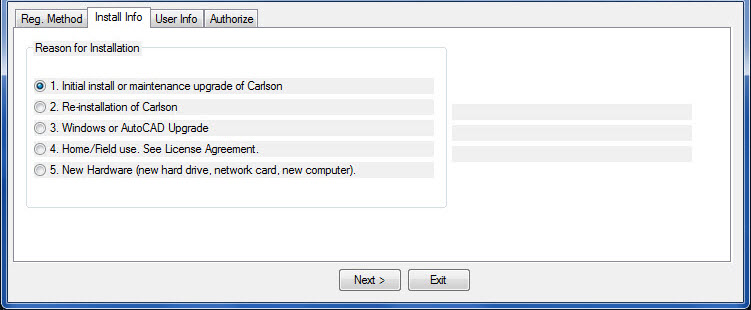
- Initial install or maintenance upgrade of Carlson
- Re-installation of Carlson
- Windows or AutoCAD Upgrade
- Home/Field use. See License Agreement.
- New Hardware (new hard drive, network card, new computer)
For your reinstall, you’d choose option #5. It’s a little dated but you can refer to this Knowledge Base article from Carlson’s website explaining these options: Carlson KB 893: Desktop Software Reasons for Registration. This FAQ explains where to find your Carlson Software License Agreement (EULA).

Some content on this website was prepared with AI assistance. Please verify important information with the manufacturer or original source before making purchasing or financial decisions.
If you find the material on this website helpful, please consider supporting That CAD Girl by purchasing our products or services.
If you are interested in purchasing products or services we do not offer, we would love to refer you to one of our Trusted Partners. Please click here to send us a message with your request.