
FAQ
Faq category: Topcon
SEARCH THAT CAD GIRL SITE
How do I download, install and activate Topcon MAGNET Office?
+Note: With the v2026.0 release, Topcon returned its office and field software to the MAGNET name. Topcon Office is now MAGNET Office, Topcon Field is now MAGNET Field and version numbers now follow the year (for example, MAGNET Office 2026.0).
Good news: once you’ve done it once, it’s pretty painless! Topcon MAGNET Office is downloaded from myTopcon NOW!, installed with a standard Windows installer and activated online with your Topcon ID and serial number.
This FAQ walks you through all of it, plus what to do when you get a new computer. Our screenshots were taken before the rebrand, so some screens may still say Topcon Office instead of MAGNET Office. The steps are the same.
Before you start, make sure your computer meets the MAGNET Office system requirements and has an internet connection for activation.
Jump to:
- Do I need a myTopcon account?
- How do I download MAGNET Office?
- How do I install MAGNET Office?
- How do I activate MAGNET Office?
- What happens the first time I open MAGNET Office?
- How do I reinstall MAGNET Office on a new computer?
- Can I install MAGNET Office on more than one computer?
- Where can I find more help from Topcon?
Do I need a myTopcon account?
Yes. You need a myTopcon account to download MAGNET Office and to watch Topcon’s activation videos. If you already have one, skip ahead to downloading MAGNET Office.
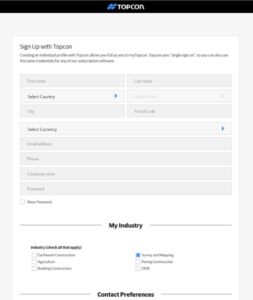
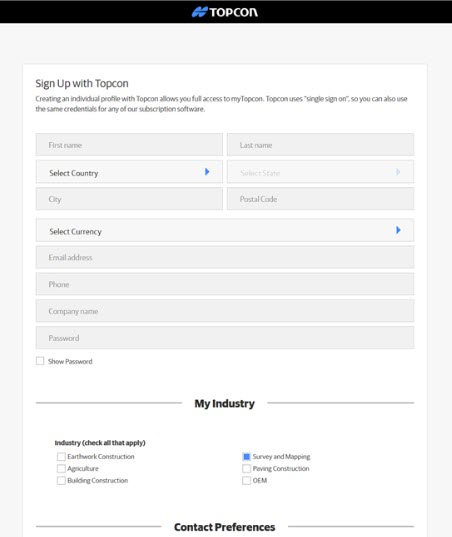
- Click here to create a myTopcon account.
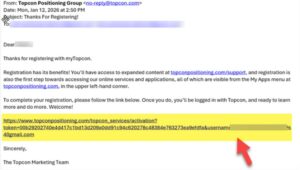
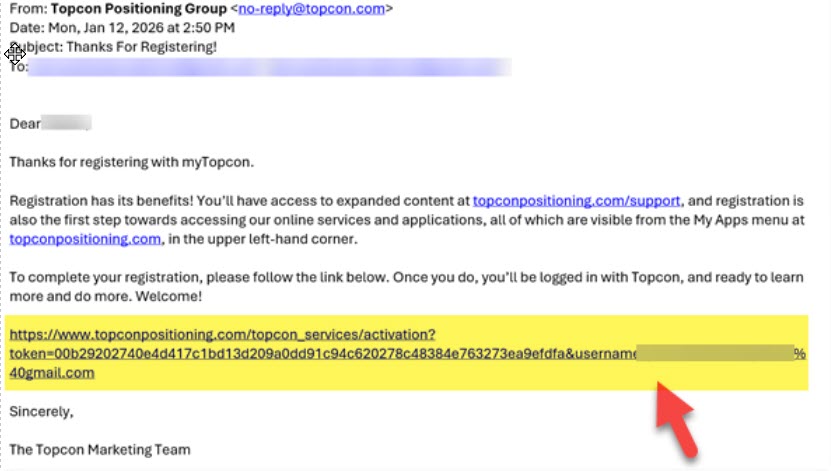
- Check the email address you registered with for a “Thanks For Registering” email from Topcon. Click the link near the bottom of that email to complete your registration.
- myTopcon opens in your browser and a video may play over the page. When it’s over, close the video. You’ll see a page with your name on it. Click myTopcon Now!

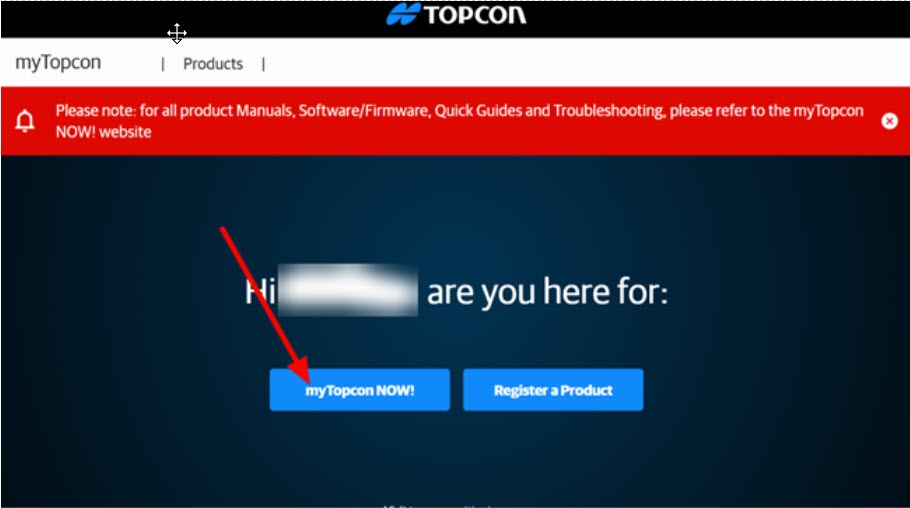
How do I download MAGNET Office?
- Log in to myTopcon NOW! with your myTopcon username and password.

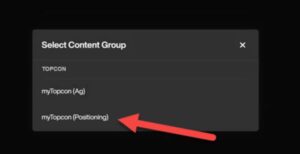
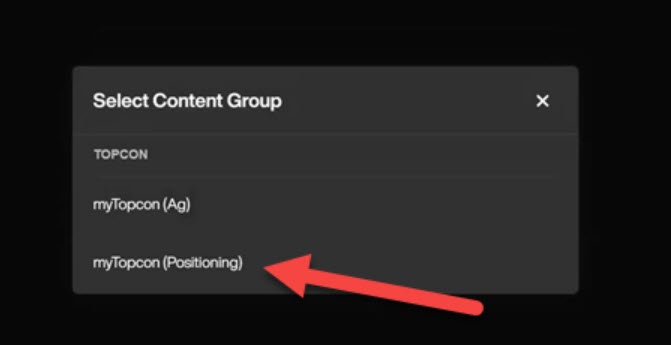
- When asked to select a content group, click myTopcon (Positioning).
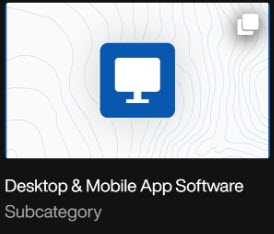
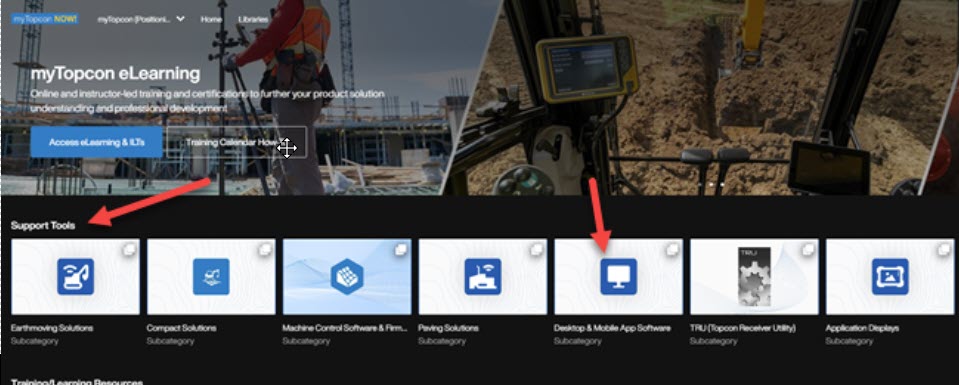
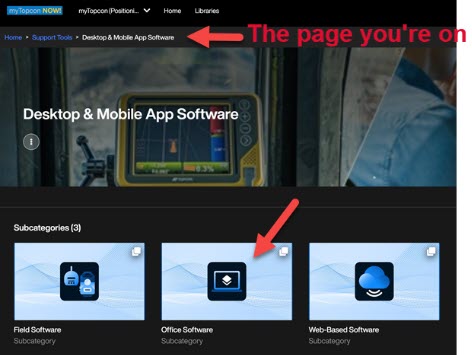
- The first row of options on the myTopcon NOW! home page is Support Tools. On that row, click the square labeled Desktop & Mobile App Software.

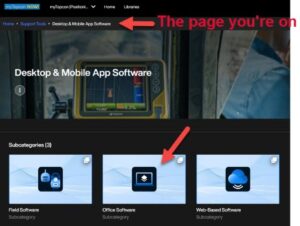
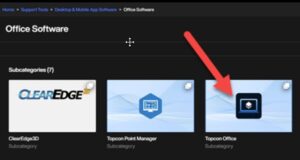
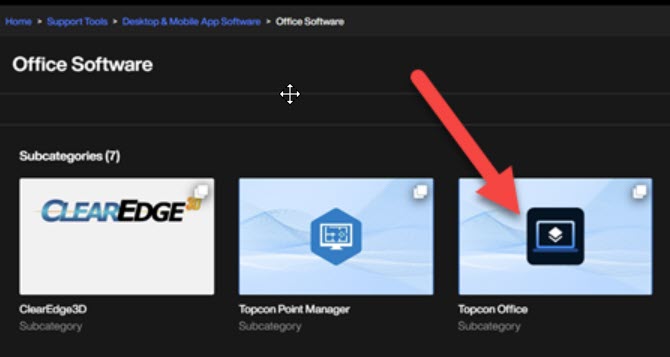
- Under the software subcategories, click Office Software.
- Click the product you want to download. In our screenshot it’s still listed as Topcon Office.
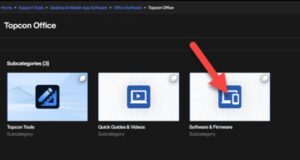
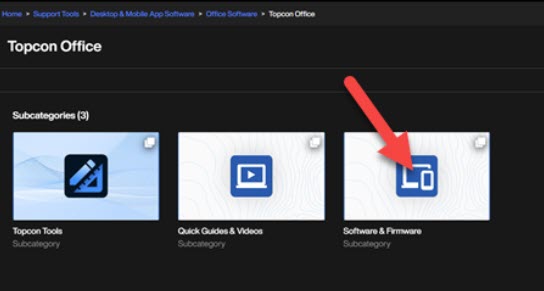
- Click Software and Firmware.
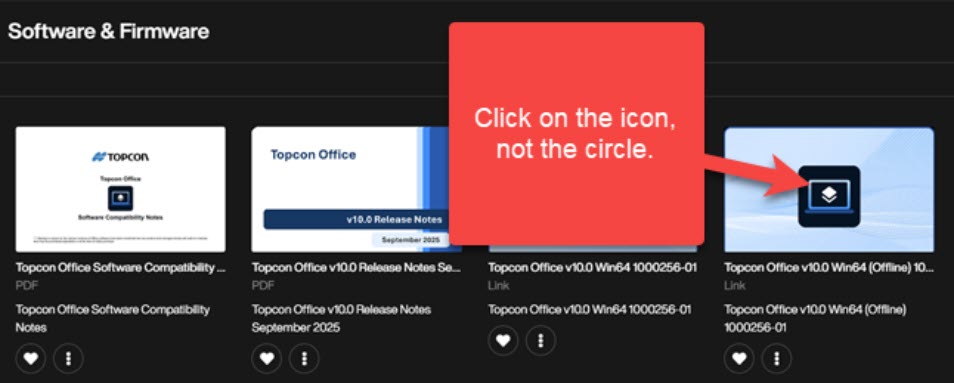
- Click the installer for the latest version. Be sure to click the icon, not the circle in the corner!

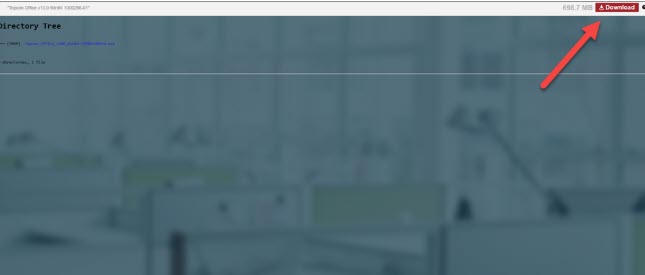
- Click the red Download button in the upper right corner of the screen. The download may take a few minutes depending on your internet connection.



How do I install MAGNET Office?
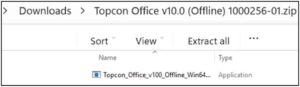
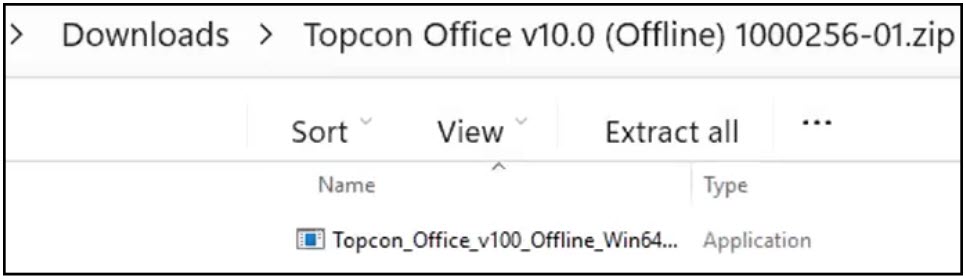
- When the download is finished, find the zip file in your Downloads folder. Right-click it and choose Extract All, then start the installer from the extracted files.
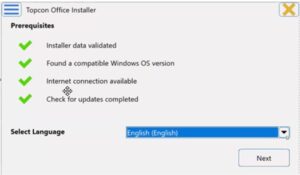
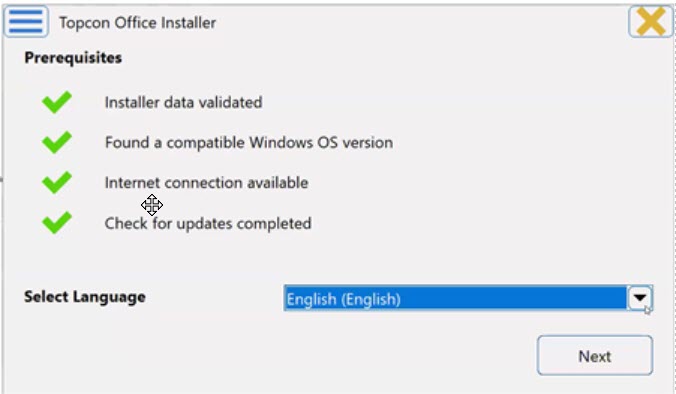
- Select your language and click Next.
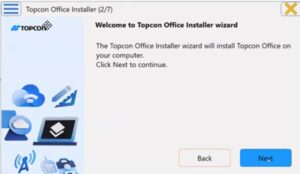
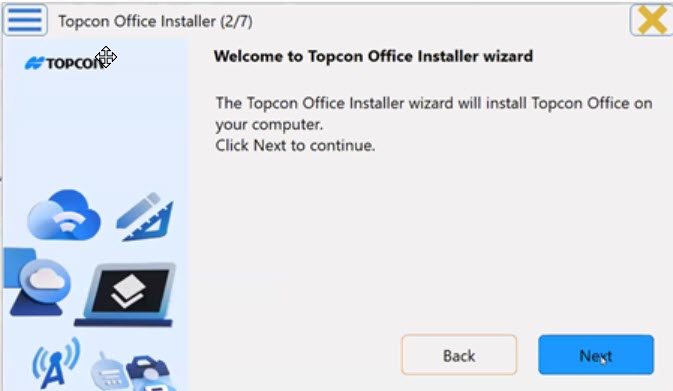
- When the Installer Wizard opens, click Next.
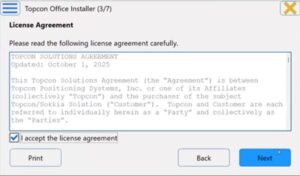
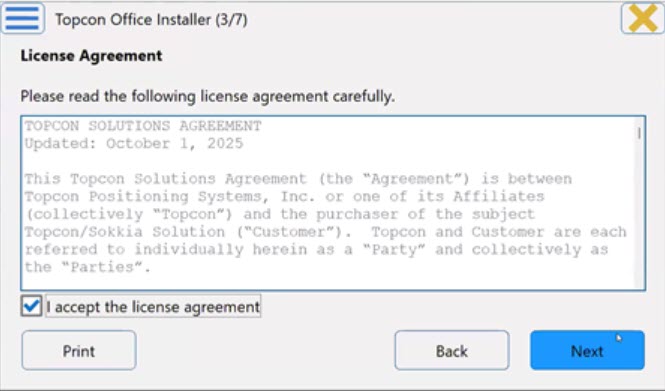
- Read the license agreement, check I accept the license agreement (click Print if you want a copy) and click Next.
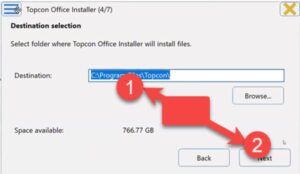
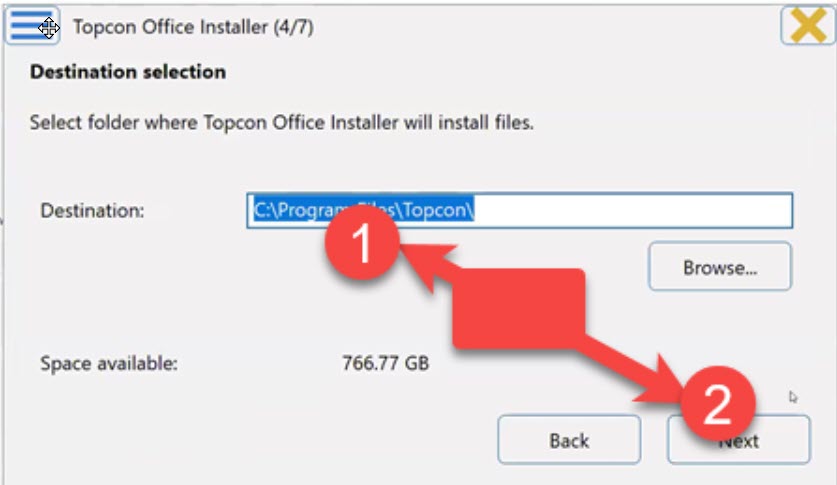
- Choose where you want the software installed and click Next.
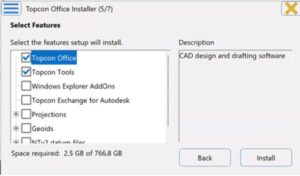
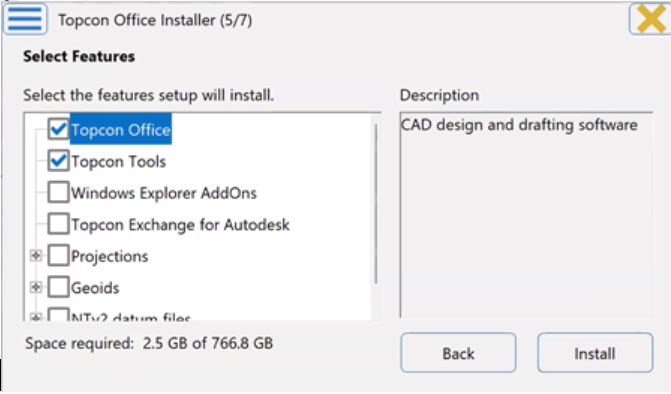
- Select the features you want to install and click Install.
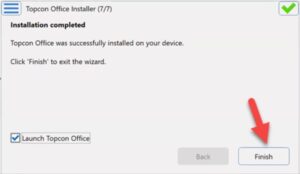
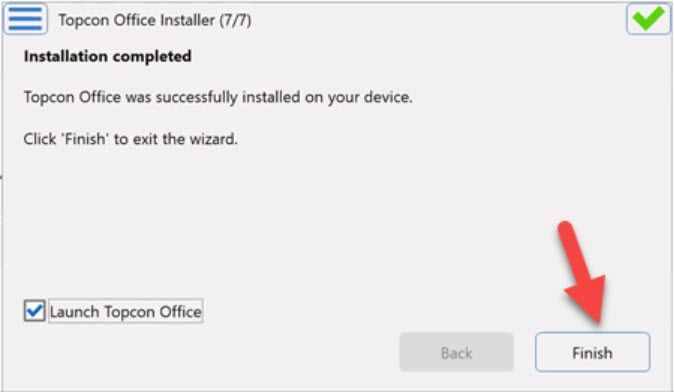
- When the installation is complete, make sure Launch is checked and click Finish.
How do I activate MAGNET Office?
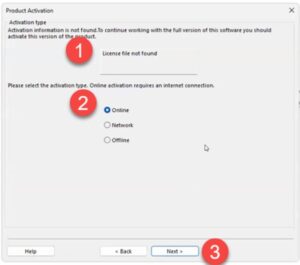
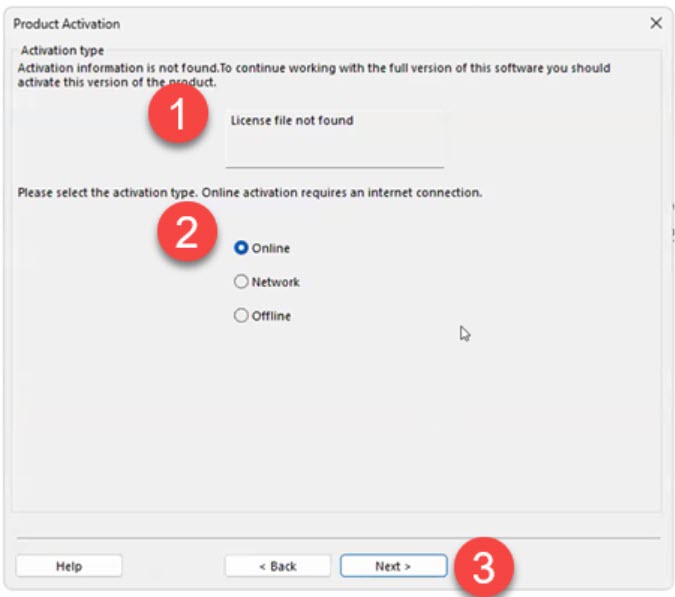
The first time you launch MAGNET Office, you’ll see a License file not found message. Don’t panic! That’s expected because your serial number hasn’t been activated yet.
Have your serial number and your Topcon ID (your myTopcon / MAGNET Enterprise login) handy, then:
- On the Product Activation screen, select Online and click Next.
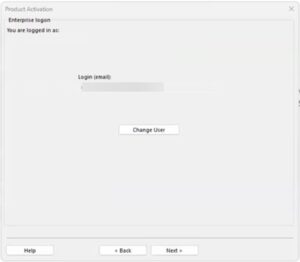
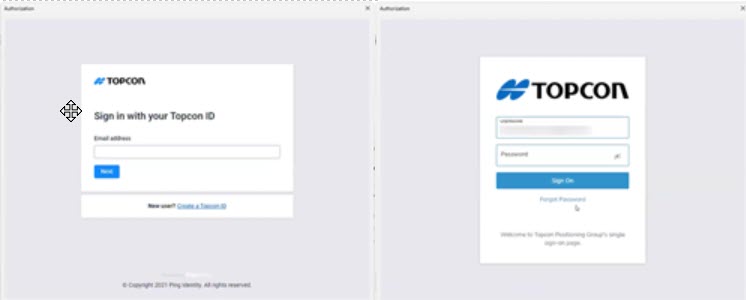
- Sign in with your Topcon ID.

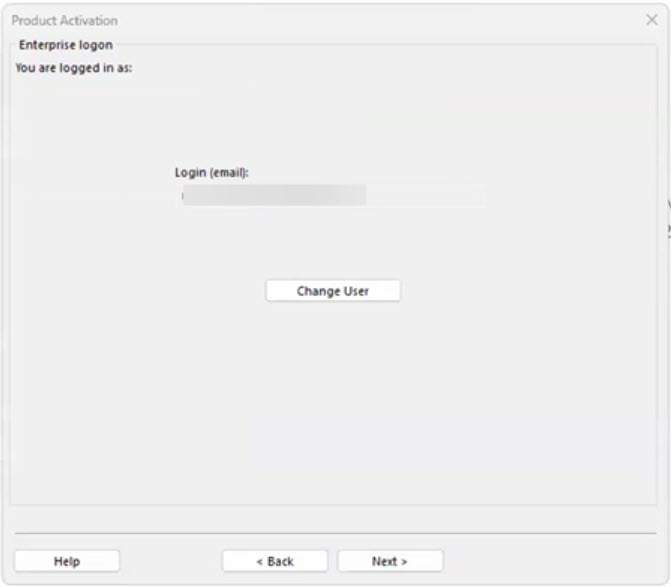
- You’re now logged in to Enterprise (the cloud side of your Topcon account). This step is required to activate your license. Check that your email address is correct in the Login field and click Next.
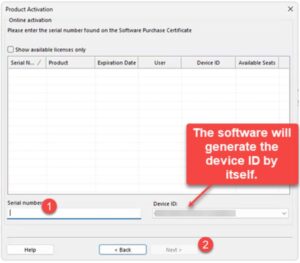
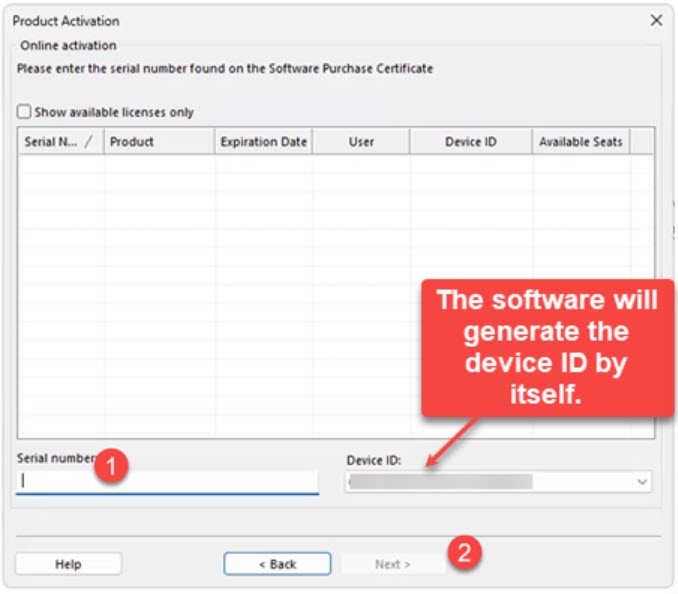
- Enter your serial number and click Next.
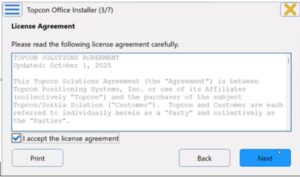
- Check I accept the terms of the license agreement and click Next.
- Review the Activation Result screen and click Finish.
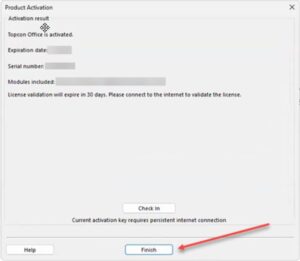
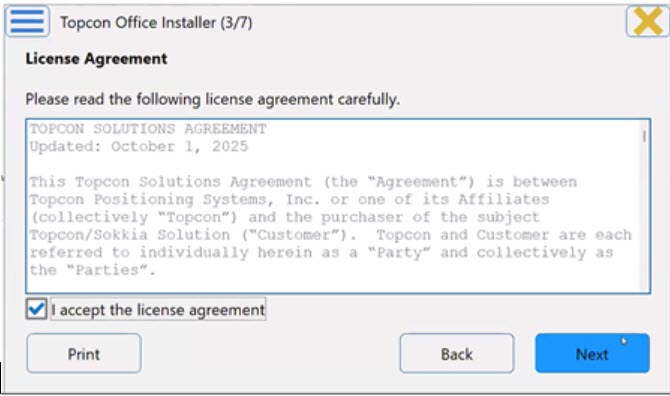
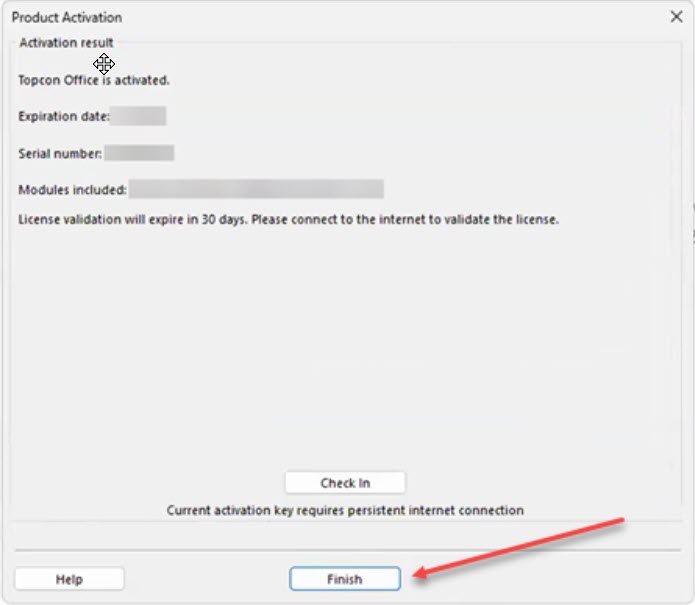
Topcon also has an offline activation method for computers that can’t get online. The catch: a license activated offline can’t use Topcon’s license Check In / Check Out feature, which is how you move a license to another computer. So I always recommend activating online if you can.
What happens the first time I open MAGNET Office?
You can launch MAGNET Office from the Windows Start menu or by typing its name in the Windows Search bar.
The first time it opens, the Program Setup Wizard walks you through some basic setup:
- Fill in the User Details, review the Folders and click Next.
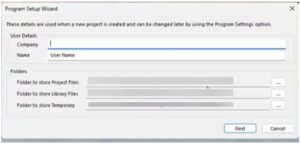
- Select your settings and click Finish.
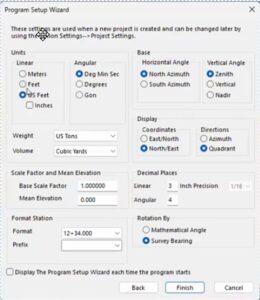
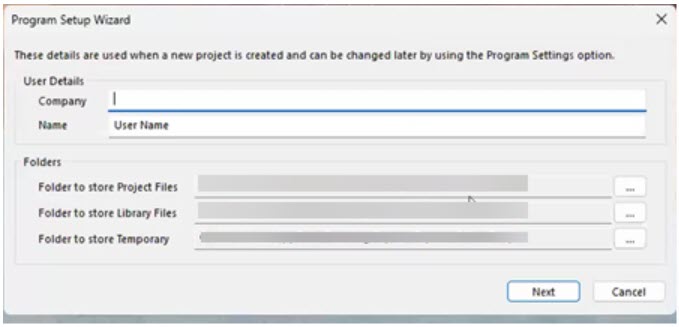
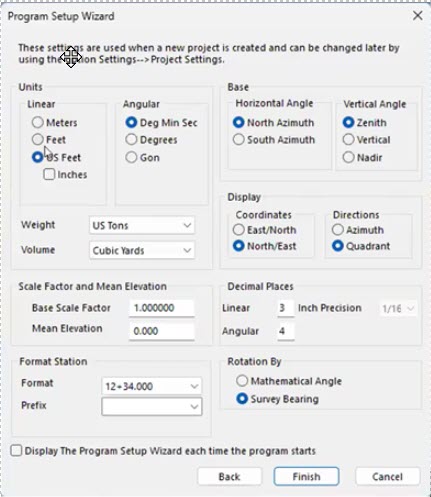
That’s it. MAGNET Office is installed, activated and ready for your configurations and projects!
How do I reinstall MAGNET Office on a new computer?
No problem. Your license is tied to the computer it’s activated on, so the trick is to release it from the old computer before you activate it on the new one. Topcon calls this Check In.
On the old computer (while it still works and is online):
- Open MAGNET Office and go to Help > License.
- Select Check In.
- Enter your Topcon ID (MAGNET Enterprise) credentials and click Next.
- Topcon warns you that the license will be checked in and the program will restart in Demo Mode. Select I understand and wish to continue and click Next.
On the new computer:
- Download and install MAGNET Office the same way you did the first time.
- Activate it online with the same serial number.
A few things to keep in mind:
- Check In only works for licenses that were activated online. If yours was activated offline, contact your dealer or Topcon support before you retire the old computer.
- If the old computer died before you could check the license in, contact your dealer or Topcon support to get the license released.
- MAGNET Office can also open in Demo Mode after you update to a new version or renew your Service Plan or Subscription. When that happens, just reactivate online with your serial number. Topcon’s Reactivating Topcon Office quick guide walks you through it.
Can I install MAGNET Office on more than one computer?
Installing isn’t really the limit. Activation is.
Each MAGNET Office serial number is activated on one computer at a time. Without an active license, MAGNET Office runs in Demo Mode. So if you want to work at the office one week and on your laptop the next, you can check the license in on one computer and activate it on the other, using the steps above.
If you need MAGNET Office running on two computers at the same time, you’ll need a license for each one. Talk to an authorized Topcon dealer about your options. See also What you should know about purchasing Topcon.
Where can I find more help from Topcon?
Topcon has quick guides and short videos for activation, Check In / Check Out and reactivation. The videos require a myTopcon NOW! login.
- Quick Guide PDF: MAGNET Office Online Activation
- Quick Guide PDF: MAGNET Office Offline Activation
- Quick Guide PDF: MAGNET Office License Check In and Check Out
- Quick Guide PDF: Reactivating Topcon Office
- Quick Guide Video: Topcon Office License Activation
- Quick Guide Video: Topcon Office License Check-in
Want to know what’s new in the latest release? See our running thread on recent improvements to MAGNET Office.

Some content on this website was prepared with AI assistance. Please verify important information with the manufacturer or original source before making purchasing or financial decisions.
If you find the material on this website helpful, please consider supporting That CAD Girl by purchasing our products or services.
If you are interested in purchasing products or services we do not offer, we would love to refer you to one of our Trusted Partners. Please click here to send us a message with your request.
Which Topcon / MAGNET software do I need in the field?
+Note: With the v2026.0 release, Topcon returned its office and field software to the MAGNET name. Topcon Office is now MAGNET Office, Topcon Field is now MAGNET Field and version numbers now follow the year (for example, MAGNET Office 2026.0).
Topcon provides four primary field software options designed around distinct job roles and construction phases:
- Topcon Field supports full survey and advanced layout workflows using GNSS and optical instruments.
- Topcon Field Mobile delivers core layout and verification tools in a simplified mobile friendly experience.
- Pocket 3D focuses on grade checking, earthwork verification and machine control support.
- Topcon Digital Layout is purpose built for vertical building layout by concrete, steel and MEP trades.
Side by side selection guide
This overview highlights how each field application aligns with different responsibilities on the jobsite. Many organizations deploy multiple tools across crews rather than relying on a single solution.
| Selection factor | Topcon Field | Topcon Field Mobile | Pocket 3D | Topcon Digital Layout |
|---|---|---|---|---|
| Primary focus | Survey grade data collection and advanced layout | Everyday construction layout and verification | Earthwork checks and production support | Interior and vertical building layout |
| Typical users | Survey crews and advanced layout teams | Foremen, supers and project engineers | Grade checkers, operators and site supervisors | Concrete, steel and MEP trade crews |
| Common jobsite use | Topo, control, stakeout and as built surveys | Points and lines layout plus progress checks | Cut and fill checks, volumes and model validation | Anchors, walls, sleeves and BIM driven layout |
| Device platforms | Windows based controllers and tablets | Android and iOS devices | Windows, Android and iOS devices | Windows, Android and iOS devices |
| Learning curve | Best for experienced technical users | Designed for fast adoption | Minimal training required | Built for non survey professionals |
| Licensing approach | Perpetual or subscription options | Subscription based | Perpetual with annual maintenance | Subscription only |
How to choose the right field software
- Select Topcon Field when survey grade accuracy and combined GNSS and optical workflows are required
- Select Topcon Field Mobile when crews need layout and verification without full survey functionality
- Select Pocket 3D when earthwork, grade checking and machine control drive the jobsite
- Select Topcon Digital Layout when vertical construction trades need accurate layout without survey training
Some content on this website was prepared with AI assistance. Please verify important information with the manufacturer or original source before making purchasing or financial decisions.
If you find the material on this website helpful, please consider supporting That CAD Girl by purchasing our products or services.
If you are interested in purchasing products or services we do not offer, we would love to refer you to one of our Trusted Partners. Please click here to send us a message with your request.
Which Topcon / MAGNET software do I need for the office?
+Note: With the v2026.0 release, Topcon returned its office and field software to the MAGNET name. Topcon Office is now MAGNET Office, Topcon Field is now MAGNET Field and version numbers now follow the year (for example, MAGNET Office 2026.0).
Topcon offers five primary office software options designed around distinct workflows in survey processing, CAD production, modeling and construction takeoff:
- Topcon Tools is a lightweight, standalone desktop tool for file conversions, GNSS and total station processing, QA/QC, adjustments, localization, visualization and reporting. It is often used as a preprocessing step before Topcon Office or other CAD workflows.
- Topcon Office Base is the core desktop environment for import/export, data prep, basic QA/QC, reporting, and light drafting. It is the foundation product for adding Survey and or Site Prep modules.
- Topcon Office Base + Survey adds survey-grade computation, adjustments, GNSS processing, richer COGO, drafting, and professional survey delivery workflows. Topcon Survey includes all the functionality of Topcon Tools.
- Topcon Office Base + Site Prep adds modeling and construction takeoff capabilities for surfaces and corridors, volumes, and file prep tools for GPS-guided machine control systems.
- Topcon Office Base + Survey + Site Prep is the complete office suite that unifies survey computation and adjustment, drafting, surface and corridor modeling, quantities and volumes, and machine-control data prep. Topcon Survey includes all the functionality of Topcon Tools.
Side by side selection guide
This overview highlights how each office product aligns with different responsibilities. Many organizations start with Office Base then add Survey and or Site Prep as their needs expand. :contentReference[oaicite:0]{index=0}
| Selection factor | Topcon Tools | Topcon Office Base | Office Base + Survey | Office Base + Site Prep | Office Base + Survey + Site Prep |
|---|---|---|---|---|---|
| Primary focus | Survey data processing, QA/QC, localization, visualization, and reporting. A Swiss Army knife for converting file formats from one to another. | Core import/export, coordinate management, basic QA/QC, reports, light drafting | Survey-grade computation: GNSS processing, adjustments, robust COGO and survey deliverables | Modeling and takeoff: surfaces, corridors, volumes, machine control file prep | Full suite: survey computation + modeling, takeoff, design, and machine control prep |
| Typical users | Survey techs/processors, survey managers or PLS doing QA/QC and adjustments | CAD/BIM techs, party chiefs/field techs prepping stakeout lists, owner-operators | Survey manager/PLS, party chief or office survey lead handling control and deliverables | Estimators, takeoff specialists, surface modelers, CAD techs supporting grading and machine control | Survey leads, CAD/civil designers, site modelers, project engineers/PMs managing end-to-end workflows |
| Common office use | Import and QA GNSS/TS data, run closures and least-squares, apply localization/datum transforms, export reports, import and export files of different formats for outside project partners | Import field data, validate, set coordinate systems, cleanup linework/points, basic volumes/areas, export to field/clients | Control, traverse and least-squares adjustment, GNSS baseline checks, robust COGO, stakeout prep, record mapping and reporting | 3D surface/corridor modeling, quantity takeoffs from PDF or CAD, volumes, machine-control data prep, as-built comparisons | Corridor and site design, road rehab workflows, utilities/trenches, pads and grading models, takeoffs and QC across survey + construction |
| Common project types | Control and boundary surveys, GNSS/TS network processing, survey QA/QC prior to CAD/civil handoff | Small site development, utilities, topo mapping/updates, as-built checks, change orders | Boundary and ALTA, subdivision and land development, utility and ROW survey and mapping | Site development, roads/corridors, subdivisions, industrial pads, mass grading | Highways and overlays, airports and logistics pavements, commercial/industrial site development, design-build heavy civil |
| Licensing approach | 1- or 3-year subscription. Includes Enterprise check-in/check-out convenience | 1- or 3-year subscription. Includes Enterprise check-in/check-out convenience | Subscription (1 or 3 year) or perpetual. Includes Enterprise. Subscription supports check-in/check-out convenience | Subscription (1 or 3 year) or perpetual. Includes Enterprise. Subscription supports check-in/check-out convenience | Subscription (1 or 3 year) or perpetual. Includes Enterprise. Subscription supports check-in/check-out convenience |
How to choose the right office software
- Select Topcon Tools when you need a standalone “Swiss Army knife” for help converting to/from an expansive variety of filetypes, survey processing, QA/QC, least-squares adjustment, localization, and reporting without CAD production, modeling, or takeoff.
- Select Topcon Office Base when you need a core office hub for import/export, coordinate setup, cleanup, reports, and light drafting
- Select Office Base + Survey when your office delivers survey-grade computation including control, traverse, GNSS processing, adjustments, and robust COGO deliverables
- Select Office Base + Site Prep when your focus is surfaces, corridors, volumes, takeoffs, and machine control data prep
- Select Office Base + Survey + Site Prep when your team needs the complete suite for survey delivery plus modeling, takeoff, design, and machine control workflows
Some content on this website was prepared with AI assistance. Please verify important information with the manufacturer or original source before making purchasing or financial decisions.
If you find the material on this website helpful, please consider supporting That CAD Girl by purchasing our products or services.
If you are interested in purchasing products or services we do not offer, we would love to refer you to one of our Trusted Partners. Please click here to send us a message with your request.
What training is available for Topcon / MAGNET Office?
+Note: With the v2026.0 release, Topcon returned its office and field software to the MAGNET name. Topcon Office is now MAGNET Office, Topcon Field is now MAGNET Field and version numbers now follow the year (for example, MAGNET Office 2026.0).
In addition to 2- and 4-hour blocks of custom training from Topcon Professional Services, Topcon offers several self-paced eLearning courses through myTopcon. The available eLearning training ranges from short introductory courses to more detailed drafting instruction.
Is there free Topcon Office training available before I buy?
Yes. Topcon offers several FREE introductory eLearning courses that can help you become familiar with Topcon Office before purchasing.
- Topcon Office Introduction • 7 minutes
- Topcon Office • 32 minutes
- Topcon Office Survey • 35 minutes
- Topcon Office + Site Prep • 54 minutes
These courses provide an overview of the available Topcon Office configurations and introduce workflows involving drafting, surveying, surfaces, design, data preparation and Site Prep tools.
Where can I access the free Topcon eLearning courses?
Topcon eLearning courses are available through MyTopconNow!.
After creating and logging into your account, go to myTopcon eLearning, select Catalog (All Courses), then filter the catalog by:
- Course type: Online courses
- Tags: Topcon Office
The four introductory Topcon Office courses are free and provide a good starting point for anyone considering Topcon Office or preparing to begin using it.
Is additional training available after I purchase Topcon Office?
Yes. After purchasing and activating a Topcon Office product, you are eligible to enroll in the Introduction to Drafting eLearning course.
This approximately four-hour course provides more detailed instruction in Topcon Office drafting workflows including:
- Creating and setting up projects
- Understanding the user interface, layers and snap modes
- Creating points, lines, arcs, circles, polylines, polygon areas and strings
- Modifying CAD entities
- Creating and editing surfaces
- Completing and exporting a final design
After purchasing and activating Topcon Office, you will receive an enrollment key that allows you to register for this course for FREE.
Additionally, Intro to Drafting can be purchased through an authorized Topcon dealer for a modest fee.
What if I need specific training on my project?
Custom training with Topcon Professional Services can be scheduled in 2- or 4-hour blocks and you can use your project data files to get the help you need. Custom training is available for any combination of the programs listed below:
- Topcon Enterprise
- Topcon Tools
- Topcon Office Base
- Topcon Survey
- Topcon Site Prep
- Topcon Field
Please be aware that there is a high-demand for the custom training services. The earliest available appointment may be 4-6 weeks out so please reach out to an authorized Topcon dealer to schedule your session.
How can That CAD Girl help me with my Topcon custom training?
For a limited time, when purchasing a 2- or 4-hour block of custom training with Topcon Professional Services through one of our Trusted Partners, That CAD Girl will attend, moderate and assist during the training.
Pre-training – That CAD Girl will work with you to develop a clear scope of topics to ensure you receive the training that will help you achieve your training goals.
Post-training – we will provide a training certificate and time-stamped written summary of the material covered.
Some content on this website was prepared with AI assistance. Please verify important information with the manufacturer or original source before making purchasing or financial decisions.
If you find the material on this website helpful, please consider supporting That CAD Girl by purchasing our products or services.
If you are interested in purchasing products or services we do not offer, we would love to refer you to one of our Trusted Partners. Please click here to send us a message with your request.
What are the recent improvements to Topcon’s MAGNET Office software? (a running thread)
+
Note: With the v2026.0 release, Topcon returned its office and field software to the MAGNET name. Topcon Office is now MAGNET Office, Topcon Field is now MAGNET Field and version numbers now follow the year (for example, MAGNET Office 2026.0).
Topcon release notes provide information about each release including System Requirements, New Features and Improvements and bug fixes. Pick a release below to jump to our quick take and the hot features, then follow the link to the full notes. Newest releases are listed first.
Jump to a release:
- MAGNET Office v2026.0 (July 2026)
- Topcon Office v10.1 (December 2025)
- Topcon Tools v10.0 (September 2025)
- Topcon Office v9.1.1 (April 2025)
- Topcon Office v9.1 (January 2025)
MAGNET Office v2026.0
Effective July 2026: click here for the MAGNET Office v2026.0 Release Notes (PDF from Topcon, opens at New Features and Improvements)
MAGNET Office 2026.0 is a big one and not just because of the return to the MAGNET name. We love having an AI chatbot right inside the program for quick answers. The long list of import and point cloud upgrades will save real time in the office.
- AI Chatbot – Get quick, context-aware answers and troubleshooting help without leaving the program.
- Twist Screen – Rotate the view so North is not at the top, for display only, without touching your coordinates.
- Right-Click Search – Find and run a command by typing any part of its name.
- Spell Check – Catch typos in project text as you type or check the whole job at once.
- Lane Marking Extraction – Pull road lane lines from point clouds as elevated strings ready for resurfacing work.
We’re excited to announce that our Topcon/Sokkia suite of products is returning back to the “MAGNET” name to unify our solutions and continue with the widely accepted products.
As part of this change, version numbers will now follow a year-based format (eg: MAGNET Office 2026.0), making it easier to identify the latest release.
Topcon Office v10.1
Effective December 2025: click here for the Topcon Office v10.1 Release Notes (PDF from Topcon, opens at Improvements and Resolutions)
Topcon Office v10.1 is a light maintenance release that is mostly fixes plus one nice addition for international teams. If you work with GeoTIFFs, PDF backgrounds or merged DTMs, it is worth the update.
- Chinese Language Option – Switch the program to Chinese under Help > Languages.
- Merge DTM Fix – Merging three or more DTMs works correctly again.
- GeoTIFF Orientation Fix – GeoTIFF images no longer display flipped.
- Transparent PNG Backgrounds – Background images now honor PNG transparency.
- PDF Vector Import Fix – Vectors now import from PDFs that have no layers and a dot in the file name.
Topcon Tools v10.0
Effective September 2025: Topcon has not posted public release notes for this version. Registered users can find them by signing in to myTopcon with a Topcon ID or ask an authorized Topcon dealer for a copy.
Topcon Tools v10.0 focused on processing and reporting, which is where Tools users spend most of their time. The new least squares adjustment and direct Excel and Word reports are the standouts for us.
- New Least Squares Adjustment – Adjust survey data with a new least squares routine and a matching report item.
- Excel and Word Reports – Send reports straight to Microsoft Excel or Word with cleaner formatting.
- Ionospheric Delay Maps – Use IONEX files during GNSS post-processing for ionospheric corrections.
- Tectonic Plate Motion Models – Calculate velocities and import or export coordinates with velocities in the coordinate calculator.
- Civil 3D 2025 and Revit 2025 Support – Keep exchanging data with current Autodesk releases.
Topcon Office v9.1.1
Effective April 2025: Topcon has not posted public release notes for this version. Registered users can find them by signing in to myTopcon with a Topcon ID or ask an authorized Topcon dealer for a copy.
Topcon Office v9.1.1 is a small patch release with critical fixes only, so there is nothing new to learn. If you were on v9.1 and ran into any of the issues below, this update is worth installing.
- Opening Jobs With Title Block Images – Jobs with an image in a drawing title block open again.
- DWG Export With Custom Linestyles – Exports no longer fail when ByLayer linework uses a custom linestyle.
- LS Transformation Results – Fixed incorrect 2D results when using only two point pairs in world coordinates.
- Takeoff Manager Tolerance – Overlapping subgrades get a higher tolerance in the Site Prep module.
- PDF Import Stability – Fixed a crash when importing certain PDF files.
Topcon Office v9.1
Effective January 2025: Topcon has not posted public release notes for this version. Registered users can find them by signing in to myTopcon with a Topcon ID or ask an authorized Topcon dealer for a copy.
Topcon Office v9.1 was a strong release for anyone who works from PDF plans. Layered PDF backgrounds with vector snapping make tracing cleaner and the rewritten LS Transformation cuts down on manual height adjustments.
- PDF Layers in Background Images – Keep and toggle individual PDF pages and layers in a panel that stays open while you work.
- Vector Snap for PDFs – Snap to endpoints, midpoints and intersections in vector PDFs.
- Rewritten LS Transformation – Choose 2D, 2D+1D or 3D methods with automatic height adjustment and a new report.
- Over-Excavate Takeoff Surfaces – Combine a design or subgrade surface with over-excavation areas into one surface (Site Prep).
- Road Templates as Corridor Templates – Import TP3, RD3 and MJF road templates straight into the corridor template library.
Some content on this website was prepared with AI assistance. Please verify important information with the manufacturer or original source before making purchasing or financial decisions.
If you find the material on this website helpful, please consider supporting That CAD Girl by purchasing our products or services.
If you are interested in purchasing products or services we do not offer, we would love to refer you to one of our Trusted Partners. Please click here to send us a message with your request.
What you should know about purchasing Topcon
+
- About Topcon Positioning Systems
- About MAGNET Office, MAGNET Field and MAGNET Enterprise
- Operating System
- System Requirements
- CAD Platform
- How and Where to Purchase
- Upgrades to New Versions and Crossgrades to Different License Types or Modules
- License Options
- License Terms
- License Levels (Modules)
- Software Trials
- Support and Training Options
About Topcon Positioning Systems
Topcon Positioning Systems, headquartered in Livermore, California, develops precision positioning technology, software and workflow solutions for the construction, geomatics and agriculture markets. Its European headquarters are in Zoetermeer, Netherlands. Its parent company, Topcon Corporation, was founded in 1932 and is headquartered in Tokyo, Japan.
Click here to learn more about Topcon Positioning Systems
About MAGNET Office, MAGNET Field and MAGNET Enterprise
With the v2026.0 release, Topcon returned its office and field software to the MAGNET name. Topcon Office is now MAGNET Office, Topcon Field is now MAGNET Field and version numbers now follow the year (for example, MAGNET Office 2026.0). The products work together to move survey and construction data between the office, the field and machine control.
MAGNET Office (formerly Topcon Office) is CAD and design software for contractors and surveyors. It combines plans and survey data to build 3D digital terrain models for site survey, layout and machine control. Optional Site Prep and Survey modules add road and site design and finished survey CAD deliverables. Click here to learn more about MAGNET Office
MAGNET Field (formerly Topcon Field) is data collection software that turns a rugged tablet or compatible Android device into a field controller for Topcon GNSS receivers, robotic total stations, scanning robotic total stations and digital levels. It is used for land surveying, stakeout, construction layout, roadwork and utility mapping. Click here to learn more about MAGNET Field
MAGNET Enterprise (also called Topcon Enterprise) is a cloud service for sharing project data between office teams, field crews and machine operators. Files can be shared and converted for use in MAGNET Office, Sitelink3D and Autodesk or Bentley software. Click here for Topcon’s software eBook (PDF), which covers MAGNET Enterprise
Sitelink3D is a web-based service for managing, monitoring and supporting job sites. It syncs design data between the office, machines and field crews and offers remote view and control of connected machines. Click here to learn more about Sitelink3D
Not sure which products you need? See Which Topcon / MAGNET software do I need for the office? and Which Topcon / MAGNET software do I need in the field?
Operating System
As of October 8, 2026, these are the supported operating systems for the current releases:
- MAGNET Office 2026.0: Windows 10 and 11 (64-bit)
- MAGNET Field 2026.0: Windows tablets and compatible Android devices
- MAGNET Enterprise and Sitelink3D: Web-based services used through a web browser
System Requirements
System requirements change with each release. See our Topcon MAGNET Office system requirements FAQ for the current requirements.
CAD Platform
MAGNET Office is a standalone Windows program with its own drafting, design and surface modeling tools. It does not run on top of another CAD program. It imports and exports AutoCAD DWG and DXF files, and MAGNET Office 2026.0 added import of Revit (RVT) models.
If you also work in AutoCAD or Revit, Topcon Exchange for Autodesk adds a ribbon to those programs for creating Topcon machine control and survey files and sending them to the field through MAGNET Enterprise.
How and Where to Purchase
When purchasing Topcon software, you buy through Topcon’s network of authorized dealers and distribution partners. Pricing is subject to change without notice and varies by product, license term and selected modules.
To purchase Topcon software, please contact an authorized Topcon dealer.
Upgrades to New Versions and Crossgrades to Different License Types or Modules
New versions are included while your subscription or your Topcon Software Service Plan is current. Software downloads, activation and support resources are available through your myTopcon account.
Perpetual licenses include the first year of the Service Plan. After that, you renew the Service Plan each year to keep receiving new versions and support.
You can add the Site Prep or Survey module to MAGNET Office as your needs grow. To add modules or move between subscription and perpetual licensing, contact your Topcon dealer about your options.
To see what has changed in recent releases, see What are the recent improvements to Topcon’s MAGNET Field and Office software?
License Options
- Online Activation: MAGNET Office licenses are activated online, so you need an internet connection to activate the software.
- Check In / Check Out: Licenses managed through MAGNET Enterprise can be checked in and checked out so they can be moved between computers and shared across your team. Ask an authorized Topcon dealer how many seats you need and how offline use works for your licenses.
License Terms
- Perpetual License (Permanent License): A one-time purchase that includes the first year of the Topcon Software Service Plan for maintenance, updates and support, plus one year of MAGNET Enterprise. After the first year, the Service Plan is renewed annually for a fee.
- Subscription License: Includes the Service Plan, access to the latest features in each release and MAGNET Enterprise for the length of the subscription. Subscriptions are typically sold in 1- or 3-year terms, so check with an authorized Topcon dealer for current options.
- Sitelink3D (Service Points): Sitelink3D uses Topcon’s Service Point model. You add credit to your myTopcon account and points are used only when the service is in use.
License Levels (Modules)
MAGNET Office is sold as base software with optional modules:
- MAGNET Office: The base software for Sitelink3D and Enterprise connectivity, machine control and layout data prep and building 3D digital terrain models
- Site Prep Module: Adds road, site, corridor and resurfacing design, 2D PDF to 3D job files and takeoff and material quantities
- Survey Module: Adds finished survey CAD deliverables for property plots, subdivisions and land development and includes MAGNET Tools for processing and adjusting total station, GNSS and digital level data
Click here to learn more about MAGNET Office license levels (modules)
For help choosing a combination, see Which Topcon / MAGNET software do I need for the office?
Software Trials
To try the complete MAGNET Office or MAGNET Field software without limitation, Topcon dealers can provide a 30-day trial license.
If you would like help requesting a trial of this software, please contact an authorized Topcon dealer.
Support and Training Options
Topcon provides software downloads, documentation and support resources through myTopcon.
Click here for myTopcon support
MAGNET Office also has built-in help. Click the ? icon at the top right of a dialog or panel for context help, or use the AI chatbot added in MAGNET Office 2026.0 under Help > Chatbot.
For free and paid MAGNET Office training, see What training is available for Topcon / MAGNET Office?
Some content on this website was prepared with AI assistance. Please verify important information with the manufacturer or original source before making purchasing or financial decisions.
If you find the material on this website helpful, please consider supporting That CAD Girl by purchasing our products or services.
If you are interested in purchasing products or services we do not offer, we would love to refer you to one of our Trusted Partners. Please click here to send us a message with your request.
What are the system requirements to run Topcon MAGNET Office?
+
Note: With the v2026.0 release, Topcon returned its office and field software to the MAGNET name. Topcon Office is now MAGNET Office, Topcon Field is now MAGNET Field and version numbers now follow the year (for example, MAGNET Office 2026.0).
This is a running list of the minimum system requirements for the current release of Topcon MAGNET Office. We update it as Topcon releases new versions. Last updated October 2026.
Good news: MAGNET Office runs on modest hardware by today’s standards. The one item to check closely is the processor. Topcon calls for a 64-bit quad-core processor with AVX support. Most recent Intel Core and AMD Ryzen processors support AVX, but some older or budget processors do not.
Per Topcon’s system requirements, MAGNET Office needs an internet connection for online activation and for some features.
As of October 9, 2026, these are the requirements for MAGNET Office 2026.0 (formerly Topcon Office, release notes dated July 2026).
- Windows 11 64-bit or Windows 10 64-bit
- Internet connection for online activation and some features
Minimum hardware:
- 64-bit quad-core processor with AVX support
- 2 GB RAM or more recommended
- 2 GB or more of local hard drive space recommended
- 1280 x 1024 display resolution
Notes: Topcon lists one set of requirements for MAGNET Office, including the Site Prep and Survey modules. Topcon lists 2 GB of RAM, but large surfaces, point clouds and background images will likely run better with more memory.
Topcon resources:
Want to know what’s changed in recent releases? See our running thread on recent improvements to MAGNET Office.
Some content on this website was prepared with AI assistance. Please verify important information with the manufacturer or original source before making purchasing or financial decisions.
If you find the material on this website helpful, please consider supporting That CAD Girl by purchasing our products or services.
If you are interested in purchasing products or services we do not offer, we would love to refer you to one of our Trusted Partners. Please click here to send us a message with your request.