
FAQ
Faq category: IntelliCAD
SEARCH THAT CAD GIRL SITE
xxWhat you should know about purchasing Carlson Software
+

About Carlson Software, the Company
About Carlson, the Software
Carlson programs work natively and produce DWG format files. There is NO need to convert, import or export – only Open and Save.
The programs are primarily delivered as “vertical” modules that can be installed and run on top of a generic-CAD platform.
Carlson’s desktop modules for land surveying, engineering and construction are built to run on top of the ITC’s IntelliCAD and Autodesk’s AutoCAD platforms. The modules include: Survey, Civil, Hydrology, GIS, Geology, Underground Mining, Surface Mining, Natural Regrade, Field, CADnet, GeoTech, Trench, Construction and Point Clouds.
Additionally, Survey and Takeoff are developed and run on top of an embedded AutoCAD (OEM).
You Have Options!
Purchase Carlson with the Platform that's Best for You
Carlson’s desktop programs can be installed as a standalone program on top of IntelliCAD or on top of your separately-purchased, full-AutoCAD-based program.
Each purchase includes a license of the latest version of IntelliCAD – it doesn’t have to be purchased separately.
Your separately-purchased, full-AutoCAD-based program can be AutoCAD, AutoCAD Map, Land Desktop, Civil 3D or other vertical – but does NOT include AutoCAD LT.
The following modules are available with IntelliCAD/for YOUR AutoCAD: Survey, Civil, Hydrology, GIS, Geology, Underground Mining, Surface Mining, Natural Regrade, Field, CADnet, GeoTech, Trench, Construction and Point Clouds
Carlson Survey and Takeoff can be purchased and installed standalone with embedded AutoCAD (also known as the OEM version).
Each purchase includes a license of the latest version of embedded AutoCAD (OEM) – it doesn’t have to be purchased separately.
Note that embedded AutoCAD (OEM) is more similar to AutoCAD LT than AutoCAD – so, experienced AutoCAD users may end up missing much of the functionality they are accustomed to.
The embedded AutoCAD (OEM) programs do not include IntelliCAD and do not require a separate purchase of AutoCAD.
Importantly, although both programs can be installed on the same computer, programs installed with the OEM platform will be completely separate from those installed with IntelliCAD/your AutoCAD. This means that you will not be able to work in a DWG file and simply switch between menus – you’ll have to close the drawing in one program in order to open it in the other.
Carlson's Versions vs AutoCAD's Versions
Carlson Software will run on earlier versions of AutoCAD; however, you cannot run a version of Carlson that is older than the AutoCAD. For instance, Carlson 2024 will run on AutoCAD 2018-2024 but Carlson 2022 will only run on AutoCAD 2018-2022.
Which Program or Modules Do I Need?
FAQ: I’m a land surveyor. What software do I need?
FAQ: I’m a civil engineer. What software do I need?
Programs with embedded AutoCAD (OEM)
FAQ: What features & menus are in Carlson Survey with embedded AutoCAD (OEM)? (a running thread)
FAQ: What features & menus are in Carlson Takeoff with embedded AutoCAD (OEM)? (a running thread)
Desktop Programs with IntelliCAD/for YOUR AutoCAD
FAQ: What features & menus are in the non-OEM Carlson Survey program? (a running thread)
FAQ: What features & menus are in Carlson Civil? (a running thread)
FAQ: What features & menus are in Carlson GIS? (a running thread)
FAQ: What features & menus are in Carlson Hydrology? (a running thread)
FAQ: What features & menus are in Carlson Point Cloud? (a running thread)
FAQ: What features & menus are in Carlson Construction? (a running thread)
FAQ: What features & menus are in Carlson CADNet? (a running thread)
FAQ: What features & menus are in Carlson GeoTech? (a running thread)
FAQ: What features & menus are in Carlson Trench? (a running thread)
Carlson iCAD
Retail Pricing for Carlson Software
| Program | Retail Price of Standalone (effective 7/10/2024) | Retail Price of Network |
|---|---|---|
| Select Suite - Pick 6 (from Survey, Civil, Hydrology, GIS, Point Cloud Basic, CadNet) | $ 4,950 | $ 5,445 |
| Select Suite - Pick 5 (from Survey, Civil, Hydrology, GIS, Point Cloud Basic, CadNet) | $ 4,650 | $ 5,115 |
| Civil Suite or Select Suite Pick 4 (from Survey, Civil, Hydrology, GIS, Point Cloud Basic, CadNet) | $ 4,250 | $ 4,675 |
| Select Suite - Pick 3 (from Survey, Civil, Hydrology, GIS, Point Cloud Basic, CadNet) | $ 3,850 | $ 4,235 |
| Select Suite - Pick 2 (from Survey, Civil, Hydrology, GIS, Point Cloud Basic, CadNet) | $ 3,350 | $ 3,685 |
| Survey | $ 2,150 | $ 2,365 |
| Civil | $ 1,950 | $ 2,145 |
| Hydrology | $ 1,550 | $ 1,705 |
| GIS | $ 1,250 | $ 1,375 |
| Point Cloud Basic | $ 2,000 | $ 2,200 |
| Point Cloud Advanced | $ 6,000 | $ 6,600 |
| Takeoff Suite (Construction, CADNet, Trench, GeoTech) | $ 7,500 | $ 8,250 |
| Construction | $ 3,950 | $ 4,345 |
| CADNet | $ 1,750 | $ 1,925 |
| Trench | $ 1,595 | $ 1,755.50 |
| GeoTech | $ 1,595 | $ 1,755.50 |
| Takeoff with embedded AutoCAD (OEM) | $ 9,000 | $ 9,900 |
| Survey with embedded AutoCAD (OEM) | $ 3,250 | $ 3,575 |
Upgrading Carlson Software
Upgrades are managed through the Annual Maintenance Plan which, essentially. allows users to pre-pay for future upgrades. As long as your Maintenance is active at the time a new version is released, you are eligible for an automatic upgrade to the new version.
See additional information about Maintenance below…
Survey and Takeoff with embedded AutoCAD (OEM)
Maintenance is NOT available for these products so upgrades are only available after a new version has been released.
The cost to upgrade Carlson’s OEM products is subject to change each year and varies depending on the program and how many versions behind you are.
However, Carlson never charges more than 50% of the current retail price to upgrade any license to the latest and greatest version of the software.
Carlson Software Annual Maintenance
Every new license of Carlson with IntelliCAD/for CAD includes 90 days of free Maintenance. This is Carlson’s way of ensuring that anyone who purchases a new license inside of that 90-day window can be assured of getting the free upgrade.
Renewing Maintenance Before it Expires
Renewing Maintenance is optional for users.
However, if you prefer to keep your software up-to-date when new versions are released, keeping the Maintenance plan active is the best way to do that.
If it is renewed prior to expiration, maintenance costs 10% of the retail price of the software.
Renewing Expired Maintenance
If your Maintenance has expired, you can pay the regular 10% Maintenance fee plus the expiration fee to activate your Maintenance for one-year. While Maintenance is active, you’ll be eligible for an immediate upgrade to the current version AND for automatic upgrades to any new versions released during the Maintenance year.
How Old is Too Old (to Renew)?
For licenses of Carlson with IntelliCAD/for CAD that are more than 4 years old, users can pay 50% of the retail price to activate Maintenance for 1-year.
While Maintenance is active, you’ll be eligible for an immediate upgrade to the current version AND for automatic upgrades to any new versions released during the Maintenance year.
See the tables below for sample pricing for Carlson Maintenance.
Carlson Software Maintenance Fees – per Product
Carlson’s policy on Software Maintenance can be viewed by clicking here
| Program | Retail Price of Standalone (effective 7/10/2024) | Annual Maintenance for Standalone | Retail Price of Network | Annual Maintenance for Network |
|---|---|---|---|---|
| Select Suite Pick 6 | $ 4,950 | $ 495 | $ 5,445 | $ 544.50 |
| Select Suite Pick 5 | $ 4,650 | $ 465 | $ 5,115 | $ 511.50 |
| Select Suite Pick 4 | $ 4,250 | $ 425 | $ 4,675 | $ 467.50 |
| Select Suite Pick 3 | $ 3,850 | $ 385 | $ 4,235 | $ 423.50 |
| Select Suite Pick 2 | $ 3,350 | $ 335 | $ 3,685 | $ 368.50 |
| Civil Suite | $ 4,250 | $ 425 | $ 4,675 | $ 467.50 |
| Survey | $ 2,150 | $ 215 | $ 2,365 | $ 236.50 |
| Civil | $ 1,950 | $ 195 | $ 2,145 | $ 214.50 |
| Hydrology | $ 1,550 | $ 155 | $ 1,705 | $ 170.50 |
| Point Cloud Basic | $ 2,000 | $ 200 | $ 2,200 | $ 220.00 |
| Point Cloud Advanced | $ 6,000 | $ 600 | $ 6,600 | $ 660.00 |
| GIS | $ 1,250 | $ 125 | $ 1,375 | $ 137.50 |
| Takeoff Suite | $ 7,500 | $ 750 | $ 8,250 | $ 825.00 |
| Construction | $ 3,950 | $ 395 | $ 4,345 | $ 434.50 |
| CADNet | $ 1,750 | $ 175 | $ 1,925 | $ 192.50 |
| Trench | $ 1,595 | $ 159.50 | $ 1,755 | $ 175.50 |
| GeoTech | $ 1,595 | $ 159.50 | $ 1,755 | $ 175.50 |
Carlson Software Maintenance & Expiration Fees
Carlson’s policy on Software Maintenance can be viewed by clicking here
| Maintenance Status | Annual Maintenance (Percentage of Retail) | Expiration Fee (Percentage of Retail) | Total Fee to Renew (Percentage of Retail) |
|---|---|---|---|
| Active | 10% | 0 | 10% |
| Expired, up to 1 year | 10% | 10% | 20% |
| Expired, up to 2 years | 10% | 20% | 30% |
| Expired, up to 3 years | 10% | 30% | 40% |
| Expired, more than 3 years | 10% | 40% | 50% |
Sample Pricing for Active and Expired Maintenance Renewal Fees
Carlson’s policy on Software Maintenance can be viewed by clicking here
| Program | # of Years Expired | Retail Price | Total Fee (Percentage of Retail) | Total Fee to Upgrade and/or Renew Maintenance for 1 Year |
|---|---|---|---|---|
| Survey | Not expired, maintenance is current | $ 2,150 | 10% | $ 215.00 |
| Survey | Expired for less than 1 year | $ 2,150 | 20% | $ 430.00 |
| Networked Survey | Expired for less than 1 year | $ 2,365 | 20% | $ 473.00 |
| Civil Suite or Select Suite Pick 4 | Not expired, maintenance is current | $ 4,250 | 10% | $ 425.00 |
| Civil Suite or Select Suite Pick 4 | Expired for less than 1 year | $ 4,250 | 20% | $ 850.00 |
| Networked Civil Suite or Select Suite Pick 4 | Expired for less than 1 year | $ 4,675 | 20% | $935.00 |
Carlson Licensing
A purchase of Carlson Software grants a perpetual license to the owner. This means that, once purchased, you “own it” and never need to pay additional fees to use it.
Carlson allows users to “network” their licenses for an additional fee. The fee is 10% of the retail price of the software being networked.
When installing their desktop software, Carlson recognizes 5 different “Reasons for Installation”:
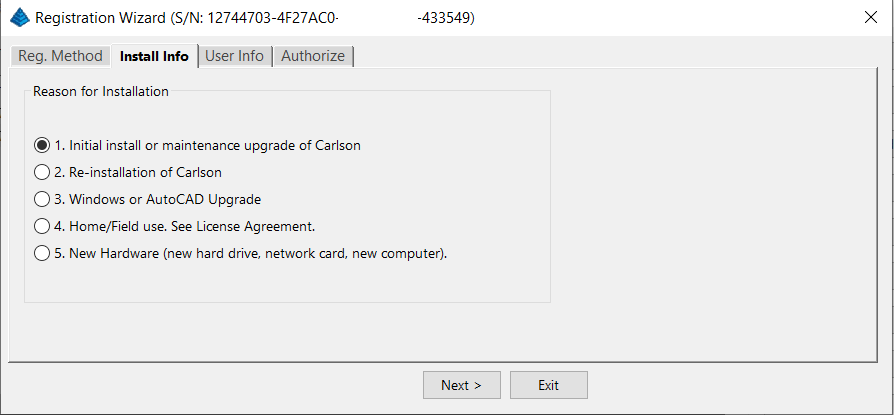
After installation and registration, Carlson provides a Registration Report that includes a “Change Key” and it’s a good idea to save the report and the change key.
And here’s a Pro-Tip for you! The Serial Number screen on your That CAD Girl Customer Portal has a “Customer Notes” section – that’s a great place to save your Change Key and other important information about each license!
FAQ: Does Carlson retire their products?
FAQ: What happens if I get a new computer and need to reinstall Carlson?
FAQ: Can I install my Carlson desktop software on two computers?
FAQ: Is it better to network Carlson than use standalone licenses?
FAQ: Does Carlson Software Still Offer Perpetual Licenses?
FAQ: How do I register my Carlson Software? And what are change keys?
System Requirements for Desktop Software
Technical Support & Training
You can see all the opportunities for training with That CAD Girl here and you can follow these links to see our FAQs about the training and technical support available from Carlson and That CAD Girl.
30-Day Trials
Once you decide to purchase, you won’t even need to uninstall. You can activate your software by simply updating your registration with your purchased serial number.
Frequently Asked Questions: What to Know Before Purchasing Carlson Software
1. What is Carlson Software and who should use it?
Carlson Software is a leading solution for land surveying, civil engineering, grading, and utility contractors. It offers powerful tools for site design, construction layout, data collection, and project management, making it ideal for professionals in land development and infrastructure projects.
2. What are the main features of Carlson Software for land development?
- Advanced survey data collection and processing
- 3D site modeling and earthwork calculations
- Road and subdivision design tools
- Utility and drainage design modules
- Seamless integration with GPS and total station hardware
- CAD drafting and mapping capabilities
- Automated grading and volume calculations
- Compatibility with DWG and DXF file formats
3. What types of licenses and versions are available?
Carlson Software offers perpetual, subscription, and network licenses. Choose from modules like Survey, Civil, Hydrology, GIS, and Takeoff. Bundle packages are available for comprehensive land development needs.
4. What are the system requirements and compatibility details?
Carlson Software runs on Windows-based PCs and is compatible with most CAD platforms, including AutoCAD and IntelliCAD. Check the latest system requirements on the Carlson website to ensure optimal performance.
5. How do I purchase Carlson Software?
You can buy Carlson Software directly from authorized dealers or the official Carlson website. Discounts may be available for multi-seat, educational, or government purchases.
6. Is technical support and training available?
Yes. Carlson provides extensive customer support, including phone, email, and online resources. Training options include webinars, tutorials, and in-person classes tailored for land surveyors and civil engineers.
7. Can I try Carlson Software before buying?
A free trial version is available for download. The trial allows you to explore core features relevant to surveying, civil engineering, grading, and utility design.
8. How are updates and upgrades handled?
Annual maintenance plans include software updates and technical support. Upgrades to new versions are available for users with active maintenance agreements.
9. What should I consider before purchasing?
- Ensure compatibility with your existing hardware and CAD platforms
- Identify which modules best fit your land development projects
- Review training and support options for your team
- Consider long-term maintenance and upgrade costs
10. Where can I find more information?
Visit the Carlson’s website or contact a local dealer for personalized advice on solutions for land surveying, civil engineering, grading, and utility contracting.
MicroSurvey Software: Your Questions Answered
About MicroSurvey
Who is MicroSurvey?
MicroSurvey is a Canadian software developer that has been creating software for land surveyors, engineers, and mapping professionals since 1985.
Software Platform Options
What makes MicroSurvey software unique?
MicroSurvey’s desktop programs run on 64-bit Windows computers and work natively with DWG files, eliminating the need for file conversion. Their software is built to run on various CAD platforms, including IntelliCAD, AutoCAD, and BricsCAD.
What are the different ways I can purchase and use MicroSurvey software?
- With IntelliCAD: MicroSurvey CAD can be installed as a standalone program with an embedded version of IntelliCAD included.
- With embedded AutoCAD (OEM): MicroSurvey embeddedCAD includes an embedded version of AutoCAD and is a standalone product. Note that its functionality is more similar to AutoCAD LT.
- With AutoCAD: MicroSurvey inCAD can be installed on top of your separately purchased, full version of AutoCAD-based programs (excluding AutoCAD LT).
- With BricsCAD: SurveyTools for BricsCAD can be installed on top of your BricsCAD, or you can bundle BricsCAD Pro with your purchase.
Licensing and Upgrades
What licensing options does MicroSurvey offer?
MicroSurvey provides both perpetual and subscription licensing. Licenses can be for a single user or floating (network) licenses that can be shared among users on the same network. Licensing is cloud-based, so no dongle is required.
How do software upgrades work?
Upgrades can be purchased for the current version from the previous version. Upgrades are also available to customers with an active Customer Care Package. Crossgrades to different editions or platforms may also be available.
Maintenance and Support
What is the MicroSurvey Customer Care Package (CCP)?
The CCP is a 12-month service plan that provides software updates and technical support. New software license purchases include one year of CCP.
Other MicroSurvey Products
What is MicroSurvey STAR*NET?
STAR*NET is software that adjusts and analyzes 2D/3D survey networks to improve accuracy. It runs on 64-bit versions of Windows 10 and 11.
What is MicroSurvey FieldGenius?
FieldGenius is data collection software for land surveyors that runs on Android and 64-bit versions of Windows 10 and 11. A legacy version for Windows devices is also available but is no longer updated.
Getting Started
How can I determine which MicroSurvey program is right for me?
It is recommended that you request a 30-day trial to test the software.
Carlson Software: Your Questions Answered
About Carlson Software
Who is Carlson Software?
Carlson Software, based in Maysville, Kentucky, has been a developer of software for land development professionals since 1983. They offer specialized modules for land surveying, civil engineering, construction, and mining industries.
Software Platform Options
What are my options for running Carlson Software?
Carlson’s desktop programs can be installed on top of IntelliCAD or a separately purchased full-AutoCAD-based program. A license for the latest version of IntelliCAD is included with each purchase. Compatible AutoCAD-based programs include AutoCAD, AutoCAD Map, Land Desktop, and Civil 3D, but not AutoCAD LT.
Does Carlson offer a standalone version with an embedded CAD engine?
Yes, Carlson Survey and Takeoff can be purchased with an embedded AutoCAD (OEM) version. This is a standalone product and does not require a separate purchase of AutoCAD. However, the functionality is more akin to AutoCAD LT.
Compatibility
What versions of AutoCAD are compatible with Carlson Software?
You can run Carlson Software on earlier versions of AutoCAD, but you cannot run a version of Carlson that is older than your AutoCAD version. For example, Carlson 2024 is compatible with AutoCAD 2018-2024, while Carlson 2022 works with AutoCAD 2018-2022.
Licensing and Upgrades
What type of license does Carlson offer?
Carlson Software offers perpetual licenses, meaning you own the software after purchase. They also provide network licensing for an additional fee.
How do software upgrades work?
Upgrades are managed through the Annual Maintenance Plan. If your maintenance is active when a new version is released, you receive an automatic upgrade. New licenses include 90 days of maintenance. The cost to upgrade OEM products varies.
Getting Started
Can I try the software before buying?
Yes, it is highly recommended to request a 30-day trial to test the software for your specific needs.
progeCAD Software: Your Questions Answered
About progeCAD
What is the story behind progeCAD?
Founded in 1985, progeCAD co-founded the IntelliCAD Technology Consortium (“ITC”) in 1999 to create a comprehensive and fairly priced alternative to AutoCAD. They offer a native DWG 2D/3D CAD software with a familiar interface and powerful features at a low cost.
progeCAD Software Features
What are the key features of progeCAD?
progeCAD works natively with AutoCAD DWG files without any conversion, ensuring complete compatibility. It features an “AutoCAD Like” interface and supports AutoCAD file types, fonts, and plotting styles. progeCAD Professional includes 3D ACIS Solid Modeling and realistic rendering. It also offers more functions than AutoCAD LT at a fraction of the price of other major CAD software.
Licensing Options
What licensing solutions does progeCAD offer?
- Single+ (SL): Allows installation and use on two computers by the same person, but not simultaneously.
- USB Portable (USB): Install on multiple computers and use the software on one computer at a time by plugging in a USB dongle.
- Network (NLM): Install on unlimited PCs on a network and use concurrently based on the number of licenses purchased. Licenses can be temporarily moved for offline use.
- Corporate One Site: Unlimited users at a single company location.
- Corporate Country: Unlimited users within the same country under one company name.
Maintenance and Support
What is iCARE?
iCARE is a one-year subscription-based maintenance and support program that provides all progeCAD updates, new versions, and free technical assistance.
Getting Started
Can I try progeCAD before I buy it?
Yes, it is highly recommended that you request a 30-day trial to test the software for yourself.
Why Buy from That CAD Girl?
Once you decide to purchase, you won’t even need to uninstall. You can activate your software by simply updating your registration with your purchased serial number.

Some content on this website was prepared with AI assistance. Please verify important information with the manufacturer or original source before making purchasing or financial decisions.
If you find the material on this website helpful, please consider supporting That CAD Girl by purchasing our products or services.
If you are interested in purchasing products or services we do not offer, we would love to refer you to one of our Trusted Partners. Please click here to send us a message with your request.
What you should know about purchasing progeCAD by progeSOFT
+
Updated October 2026 for progeCAD 2027.
Jump to:
- About the companies
- About the software
- Operating system and system requirements
- How and where to purchase
- Upgrades, competitive upgrades and crossgrades
- License types and license terms
- Software trials
- Support and training options
About the Companies
About progeSOFT
progeSOFT, founded in 1985 and based in Chiasso Switzerland, is a privately owned company known for delivering low cost 2D and 3D CAD software for Windows and macOS. The company develops both progeCAD for Windows and iCADMac, a native DWG CAD solution for macOS, giving users on either platform powerful tools for drafting and design at a competitive price.
As a founding member of the IntelliCAD Technology Consortium, progeSOFT has helped shape the direction of DWG-based CAD development. Today, it serves a global user base across industries like construction, engineering and manufacturing, with major clients including Boeing, Samsung and ABB Group.
Click here to learn more about progeSOFT
About progeCAD USA
progeCAD USA is the North American distributor for progeSOFT’s CAD products.
Headquartered in Clackamas Oregon, the company provides support and resources for users of DWG-based CAD software in the United States and surrounding regions.
progeCAD USA also develops progeEARTH, a civil and survey add-on suite designed for land development professionals working in coordinate geometry, terrain modeling and road design.
The company has been involved in CAD software development since 1985 and was one of the founding members of the IntelliCAD Technology Consortium (ITC) in 1999.
Click here to learn more about progeCAD USA
About the Software
About progeCAD
progeCAD is a DWG-native 2D and 3D CAD application developed by progeSOFT. Built on the IntelliCAD engine, it works natively in DWG format and includes a wide set of design tools and libraries.
Available through a try and buy model, progeCAD is used by over 250,000 professionals worldwide across industries such as construction, automotive and technology. It delivers high performance CAD at a competitive price.
The current version is progeCAD 2027, released in June 2026 on the IntelliCAD 14.1 engine. It opens and saves DWG files from AutoCAD 2.5 through AutoCAD 2027. For what changed in each release, see What are the recent improvements to progeCAD and progeEARTH?
Click here to learn more about progeCAD
Click here for a feature comparison between progeCAD, AutoCAD and AutoCAD LT
About iCADMac
iCADMac is the first DWG-native 2D/3D CAD solution designed specifically for macOS, compatible with AutoCAD files up to the 2025 version.
It offers a familiar AutoCAD-like interface and provides tools such as PDF import/export, gradient hatches, tables, ACIS® solid modelling, constraints, custom blocks, extensive hatch patterns and powerful rendering capabilities.
Click here to learn more about iCADMac
Click here for a list of features in iCADMac
About progeEARTH
progeEARTH is a civil and survey add-on suite for progeCAD Professional. It includes tools for coordinate geometry (COGO), digital terrain modeling (DTM) and simple road corridor design.
The suite is organized into modules—Survey/Cogo, DTM and Roads—each tailored to support topographic mapping, site planning and field-to-finish workflows. Each module is sold separately and progeEARTH requires progeCAD Professional to run.
Click here to learn more about progeEARTH
Operating System
progeCAD 2027
Windows 10 and 11 (64-bit only)
iCADMac
macOS v13 (Ventura), v14 (Sonoma), v15 (Sequoia)
System Requirements
progeCAD
- Processor: 2.2 GHz or faster (2.5 GHz recommended)
- RAM: Minimum 4 GB (8 GB recommended)
- Disk: At least 4 GB free disk space
- Graphics: Dedicated NVIDIA GeForce or compatible; Artisan Render does not support AMD graphics cards
iCADMac
- Intel® Core™ i5 or superior
- ARM: Apple M1 ARM or superior
- 8 GB RAM (16 GB recommended)
- 8 GB free disk space for download and installation
- mac OS X-compliant printer
Click here to learn more about progeCAD System Requirements
Click here to learn more about iCADMac System Requirements
CAD Platform
All application software developed by progeSOFT and progeCAD USA are built on the IntelliCAD CAD platform.
How and Where to Purchase
progeCAD and progeEARTH can be purchased directly from progeCAD USA or through an authorized progeCAD dealer.
Pricing is subject to change without notice and varies depending on software edition and add-ons.
If you would like a referral from That CAD Girl to one of our trusted partners, please click here to Send Us a Message with your request
Upgrades to New Versions, Competitive Upgrades and Crossgrades to Different License Types
progeCAD and iCADMac can be upgraded to the most current version at a reasonable, reduced rate versus the cost of a new license. An active subscription to iCARE includes updates and upgrades to newly released versions. Note that iCARE requires the latest version of progeCAD, so if you’re on an older version you’ll need to buy the upgrade first.
Upgrading to progeCAD 2027 is easier than past upgrades. The new UI Migrate Tool brings your toolbars, aliases, profiles and settings over from progeCAD 2026.
Users of other CAD programs, such as AutoCAD, are eligible for discounted competitive upgrades to Single or Network licenses of progeCAD Professional.
Click here to learn more about progeCAD upgrades and crossgrades
Click here to learn more about iCADMac upgrades
Click here to learn more about iCARE
License Types and License Terms
License Terms
Both progeCAD and iCADMac sell with perpetual licenses which do not expire and no annual fee required. The licensed software version will run for as long as your hardware and operating system support it.
License Types
iCADMac
Offers only a SL – Single license deployment.
progeCAD
progeCAD 2027 is sold as a Single+, Flex or Network license. Corporate site and country licenses are also available on request.
- Single+ (SL) – Single license
Assigned to one person and can’t be shared. The Single+ license can be installed on two computers, such as a desktop and a laptop, used by the same person but never at the same time. To move it to a new computer, uninstall it from the old one and release the license. - FL – Flex License (new in progeCAD 2027)
Install progeCAD on every computer you use: office, home, laptop, client site. Each Flex license runs on one computer at a time. When you close progeCAD you can release the license and pick it up on another computer in seconds. An internet connection is only needed to activate or release the license, so you can work offline once it’s on your computer. If you buy several Flex licenses, the number you own is the number of people who can run progeCAD at the same time, so it works as a floating license too. Flex costs a little more than Single+, but if you’re buying progeCAD 2027 and work on more than one computer, this is the license I’d choose. - NLM – Network Licenses
Network licenses aren’t assigned to individual users and can be shared over your local network from a license server. Network licenses do not require an internet connection to activate or use. progeCAD NLM can be installed on as many computers as you want, but you can only run it at the same time on the number of seats you purchased. License Take-Away lets you temporarily move a network seat to a laptop or remote PC to use offline. - Corporate One Site and Corporate Country
Unlimited installations and users under one company name at one location (One Site) or across the whole country (Country).
For how to install, activate and move each license type, see our FAQ: Downloading, Installing and Licensing progeCAD.
Click here to learn more about progeCAD licensing
Click here to learn more about iCADMac licensing
Software Trials
progeCAD, progeEARTH and iCADMac can run in trial mode for 30 days. After this period, you need to activate a valid commercial license.
If you would like our help requesting a trial of this software from an authorized dealer, please click here to Send Us a Message with your request
Support & Training Options
iCARE is an optional yearly maintenance plan that includes priority technical support through the help desk (ticket, email and remote support) plus every progeCAD update and new version released during the plan year. Buying iCARE with your license (within 30 days of registering) saves money compared to adding it later.
Free video recordings and tutorials for progeCAD and iCADMac are available from progeSOFT’s website here: https://www.progesoft.com/video-tutorial/progeCAD-professional-media-video
Some content on this website was prepared with AI assistance. Please verify important information with the manufacturer or original source before making purchasing or financial decisions.
If you find the material on this website helpful, please consider supporting That CAD Girl by purchasing our products or services.
If you are interested in purchasing products or services we do not offer, we would love to refer you to one of our Trusted Partners. Please click here to send us a message with your request.
What you should know about purchasing CMS IntelliCAD
+
Jump to:
- About CAD-Manufacturing Solutions (CMS)
- About CMS IntelliCAD
- Operating System
- System Requirements for CMS IntelliCAD 15.0
- CAD Platform
- How and Where to Purchase
- Upgrades to New Versions, Competitive Upgrades and Crossgrades
- License Types
- License Terms
- Editions
- Software Trials
- Support & Training Options
About CAD-Manufacturing Solutions (CMS)
CAD-Manufacturing Solutions Inc (CMS), based in Azle Texas, has over 30 years of experience in the CAD industry. Originally known for its proprietary ProCADD software, CMS now develops and markets CMS IntelliCAD, which is built on the powerful and customizable IntelliCAD Technology Consortium (ITC) platform.
The team behind CMS has been deeply involved in CAD software development for decades and continues to rely on CMS IntelliCAD internally, including at a partner corporation focused on advanced crane innovation and design.
Click here to learn more about CAD-Manufacturing Solutions (CMS)
About CMS IntelliCAD
CMS IntelliCAD is a DWG-native CAD application offering 2D drafting, 3D modeling and BIM capabilities. It includes AutoCAD-like menus, a ribbon interface, advanced rendering and custom development via LISP, VBA, .NET, IRX and SDS.
The software is designed to support users transitioning from AutoCAD or other IntelliCAD-based platforms and includes customizable workspaces, menus, toolbars and Command: line access.
All editions support CAD standards, external references (Xrefs), DGN underlays and interoperability with other CAD and GIS formats.
What’s new in 15.0? The current version, CMS IntelliCAD 15.0, adds Drawing Compare (preview), AI photorealistic rendering (you plug in your own Google Gemini API key), the “Lookout” PAN method, live FILLET and CHAMFER previews and the ability to compile protected LISP (.FAS and .VLX). Click here for What’s new in CMS IntelliCAD 15.0
Click here to learn more about CMS IntelliCAD
Click here for a comparison between CMS IntelliCAD and AutoCAD
Operating System
CMS IntelliCAD 15.0 runs on 64-bit Microsoft Windows. Windows 10 is the minimum supported version. There is no 32-bit version anymore.
There’s no macOS version. CMS says running it in a virtual 64-bit Windows machine on a Mac requires a USB dongle license.
System Requirements for CMS IntelliCAD 15.0
- Operating System: 64-bit Microsoft Windows 10 or newer, kept updated and supported by Microsoft
- Processor: Intel Core i5 or comparable (faster recommended). Multi-core processors are supported.
- System Memory: 3 GB free RAM minimum for a full installation; 8 GB recommended
- Hard Disk Space: 6.5 GB free disk space for a full installation
- Display and Graphics: 1024 x 768 resolution or higher; graphics driver must support OpenGL ES (or switch CMS IntelliCAD to OpenGL). A dedicated graphics card with its own memory is recommended.
- Input Devices: Keyboard and mouse or other pointing device
Click here to learn more about System Requirements for CMS IntelliCAD
CAD Platform
All CMS IntelliCAD editions (PE, PE Plus and Easy Run) are built on the IntelliCAD platform. Version 15.0 is based on the IntelliCAD 15.0 engine and opens and saves DWG files up through the current 2018 format (used by AutoCAD 2018 through 2026).
How and Where to Purchase
CMS IntelliCAD can be purchased directly from CMS or through an authorized CMS IntelliCAD dealer.
Pricing is subject to change without notice and varies depending on edition, license type and add-ons.
If you would like a referral from That CAD Girl to one of our trusted partners, please click here to Send Us a Message with your request.
Upgrades to New Versions, Competitive Upgrades and Crossgrades
CMS IntelliCAD offers upgrades from previous versions, crossgrades between editions and competitive upgrades for users of other CAD programs. A valid serial number is required for any upgrade or crossgrade.
Maintenance builds within the same version (for example, a new 15.0 build) are free for licensed users. CMS strongly recommends that users of older versions upgrade, since newer Windows 11 security rules can block older builds from launching.
License Types
- Standalone: one user on ONE computer, even if you’d never use two computers at the same time. Move it with Help > License Manager > Deactivate on the old computer, then activate on the new one. Transfers are unlimited when you deactivate first. The two-activations-per-year limit applies only when you activate without a prior deactivation; a paid Support Subscription covers those extras.
- USB dongle: the dongle is the license. Install on any 64-bit Windows computer and run it wherever the dongle is plugged in, with no activation or deactivation. CMS offers a free USB Dongle Maker for 15.0 PE Plus (it needs a PE Plus Activation Key that hasn’t been activated yet). Replacements for lost or damaged dongles are a paid item.
- It isn’t listed in the online store right now, so ask CMS or an authorized CMS IntelliCAD dealer if you need it.
- Network: PE Plus concurrent (floating) seats, sold in packs such as 3, 5 and 10 users. Users can borrow a seat for up to 30 days.
- Easy Run: PE only, streamed to your Windows computer using Turbo.net technology. One user, no License Manager activation and it updates itself.
For step-by-step activation and moving to a new computer, see our FAQ: How do I download, install and activate CMS IntelliCAD?
License Terms
- Perpetual license: One-time payment (Standalone, USB dongle and Network)
- 365-day license lease
- Subscription: Easy Run is sold as an annual subscription that’s always kept up to date
Editions
- Premium Edition (PE): 2D/3D drafting, DWG compatibility, BIM attach (RVT and RFA), rendering and LISP/VBA/.NET customization
- Premium Edition Plus (PE Plus): Adds 3D ACIS solids, BIM import (IFC and RVT), STEP and IGES import/export and AEC entities like walls, doors, windows and stairs
Software Trials
CMS IntelliCAD can run as a free trial for 15 days. Download it from the CMS website and click Register Later when the registration window appears. After the trial, a valid commercial license is required for continued use.
If you would like our help requesting a trial of this software from an authorized CMS IntelliCAD dealer, please click here to Send Us a Message with your request.
Support & Training Options
- Free community forum: forums.intellicadms.com
- Optional annual CMS IntelliCAD Support Subscription: email technical support and license management, including extra activations
- Sales phone: +1 (817) 221-8855 (sales only)
- Online training courses (4 levels, 56 videos): free for customers running updated CMS IntelliCAD licenses
Click here for more information about CMS IntelliCAD training and support
Some content on this website was prepared with AI assistance. Please verify important information with the manufacturer or original source before making purchasing or financial decisions.
If you find the material on this website helpful, please consider supporting That CAD Girl by purchasing our products or services.
If you are interested in purchasing products or services we do not offer, we would love to refer you to one of our Trusted Partners. Please click here to send us a message with your request.
What should I buy if I need a basic CAD program (like AutoCAD LT)?
+In September, Carlson Software introduced a new program in their lineup: Carlson iCAD. This program is comparable to AutoCAD LT with basic drafting and inquiry tools but is built on IntelliCAD 8.3.
FAQ: What features are in Carlson iCAD? (a running thread)
View Carlson iCAD in our online store
If you truly, truy only need generic-CAD functionality, I recommend purchasing Carlson GMS with IntelliCAD. It’s the cheapest of all the desktop products and you can load this basic IntelliCAD menu:


Some content on this website was prepared with AI assistance. Please verify important information with the manufacturer or original source before making purchasing or financial decisions.
If you find the material on this website helpful, please consider supporting That CAD Girl by purchasing our products or services.
If you are interested in purchasing products or services we do not offer, we would love to refer you to one of our Trusted Partners. Please click here to send us a message with your request.
How do AutoCAD, IntelliCAD and BricsCAD compare for raster-to-vector capabilities? (a running thread)
+
This is a running thread. I’ll update it when AutoCAD, IntelliCAD or BricsCAD change what they can do natively with rasters and scans.
First, a quick definition so we’re talking about the same thing. Raster-to-vector conversion means taking a scanned picture of a drawing (pixels) and automatically turning the lines, arcs and text on that scan into real, editable CAD entities (polylines, arcs, text and so on). Attaching an image and tracing over it by hand is not conversion. Importing a vector PDF’s geometry is also not the same thing as converting a scan.
I get asked this a lot when someone has a scanned survey plat, an old topographic sheet or a blurry engineering drawing and wants that linework turned into CAD. So I lined up the three platforms people ask me about most: AutoCAD, IntelliCAD and BricsCAD.
As of October 9, 2026, this comparison is based on AutoCAD 2027, IntelliCAD 15.0 and BricsCAD V26. It covers only the native CAD platforms. It does not include third-party raster-to-vector apps or specialized toolsets. Those tools do exist and they are where the real conversion work happens.
Jump to:
- The comparison table
- What the rows actually mean
- So what do you do with a scanned drawing?
- What about third-party apps?
The comparison table
Here’s the side-by-side. “Yes” means the feature is built into the core platform. “No” means it isn’t.
| Feature | IntelliCAD 15 | BricsCAD V26 | AutoCAD 2027 |
|---|---|---|---|
| Attach raster images (JPG, PNG, TIFF) | Yes | Yes | Yes |
| Scale, rotate and position raster images | Yes | Yes | Yes |
| Manually trace raster drawings | Yes | Yes | Yes |
| Attach scanned PDFs as underlays | Yes | Yes | Yes |
| Import vector PDF geometry as CAD entities | Implementation-dependent | Yes | Yes |
| Automatically convert scanned lines to CAD entities | No | No | No |
| Convert scanned contour lines to polylines | No | No | No |
| OCR recognition of scanned text | No | No | No |
What the rows actually mean
All three platforms let you attach a JPG, PNG or TIFF, then scale, rotate and position it so you can draw over it. That’s the old-fashioned way and it still works just fine.
All three also let you attach a scanned PDF as an underlay. Same idea: the scan sits under your drawing and you trace what you need.
What none of them do natively is look at a scanned picture of lines and turn those pixels into editable polylines, arcs and text for you. No automatic line conversion. No contour-to-polyline magic. No OCR that reads the text off the scan. If you want that, you’re looking at a specialized raster-to-vector tool or a toolset that sits on top of the CAD program.
So what do you do with a scanned drawing?
For scanned survey plats, topographic maps and legacy engineering drawings, all three platforms land in the same place:
- Attach the image or PDF underlay.
- Scale and position it so it matches your coordinate system or known distances.
- Trace the linework you actually need… or run the scan through a dedicated raster-to-vector program first, then bring the resulting CAD entities in.
In other words, don’t pick AutoCAD, IntelliCAD or BricsCAD expecting a built-in “turn this scan into CAD” button. Pick them for the CAD work. Handle the conversion with a specialized tool when the volume of tracing would make you crazy.
What about third-party apps?
Yes, there are third-party apps (and a few specialized toolsets) that actually do raster-to-vector conversion. They are built for that job: reading scanned linework, cleaning it up and turning it into editable CAD geometry, sometimes with OCR for the text.
If conversion is a big part of your workflow, look at those tools separately. The comparison table above is about what the three CAD platforms themselves can and cannot do without that help.
Some content on this website was prepared with AI assistance. Please verify important information with the manufacturer or original source before making purchasing or financial decisions.
If you find the material on this website helpful, please consider supporting That CAD Girl by purchasing our products or services.
If you are interested in purchasing products or services we do not offer, we would love to refer you to one of our Trusted Partners. Please click here to send us a message with your request.
How do I insert Bing, Azure or Esri maps and georeferenced images in IntelliCAD 15?
+IntelliCAD can put a live online map from Microsoft Bing, Microsoft Azure or Esri right behind your linework. Then you can capture a piece of that map as an image to keep in the drawing. It takes three steps and you don’t need any add-ons.
As of October 8, 2026, the current release is IntelliCAD 15.0 (released August 4, 2026). Everything below comes from the official IntelliCAD release notes for 15.0 and earlier versions.
One quick heads-up: IntelliCAD is the engine that many companies build their own CAD programs on. So the features, menus and ribbon tabs you actually see depend on your IntelliCAD-based product and edition. If something below doesn’t show up in yours, check with the IntelliCAD-based product’s vendor.
Jump to:
- Step 1: Give your drawing a geographic location
- Step 2: Turn on the online map
- Step 3: Capture an image for offline work
- Attaching your own georeferenced images
- Other mapping tools worth knowing about
Step 1: Give your drawing a geographic location
The map has to know where your drawing sits on the planet. You can set the location from:
- A .kml or .kmz file
- Latitude and longitude – a dialog box then shows the coordinate systems that make sense for that location (IntelliCAD 11.0 and newer).
- Your current location
- An address lookup (IntelliCAD 13.0 and newer)
You can also specify the base point and north rotation when you set the location. Once your drawing has a location, the status bar can display geographic coordinates.
Step 2: Turn on the online map
Bing Maps was the original map service, with road, aerial or hybrid map types. IntelliCAD has added more choices since then:
- Esri imagery – added in IntelliCAD 14.0.
- Microsoft Azure Maps – added in IntelliCAD 14.1, with several map types.
- GEOMICROSOFTSERVICE – type this at the command line to switch between the Bing and Azure services (IntelliCAD 14.1 and newer).
- Mark Position – adds position markers to the map.
IntelliCAD 11.1 sped up the display of large geographic images and 14.1 gave map rendering a noticeable boost, so big maps are much easier to live with.
Step 3: Capture an image for offline work
A live map is great, but it needs the Internet. So when you’re happy with the view:
- Capture Area – captures an area of the online map as an image you can keep working with offline.
- Reload Image – reloads the map image.
- Map Service – turns geographic map services on or off. When it’s off, IntelliCAD can’t reach the Internet to display the online map and the Mark Position, Capture Area and Reload Image commands aren’t available.
That Map Service switch is handy if your IT folks get nervous about CAD programs talking to the Internet!
Attaching your own georeferenced images
Have an aerial or a scanned map from somewhere else? You can attach it the old-fashioned way:
- IMAGEATTACH – attaches raster images and can use an image positioning file, such as a .tfw world file, to place and scale the image.
- MrSID images – IntelliCAD attaches .sid and MrSID MG4 compressed images and reads the world file data embedded in MrSID files.
- IMAGECLIP – clips an image, and you can select an existing polyline as the clipping boundary.
Other mapping tools worth knowing about
- Map Import – imports map data as CAD entities from Esri shapefiles (.shp), .sdf files and .sqlite files, or by connecting to PostgreSQL, MySQL and WFS servers. Polygons can come in as closed polylines and you can pick the coordinate system as you import.
- Geospatial PDFs – IntelliCAD 14.1 and newer can export and print geospatial PDFs. Turn on the Include geospatial information option and anyone with a supported PDF viewer can see live coordinates and take measurements as they pan and zoom.
Not sure which IntelliCAD version your product runs on? Ask the IntelliCAD-based product’s vendor. Since Esri arrived in 14.0 and Azure in 14.1, the version tells you which map services you’ll see.
Some content on this website was prepared with AI assistance. Please verify important information with the manufacturer or original source before making purchasing or financial decisions.
If you find the material on this website helpful, please consider supporting That CAD Girl by purchasing our products or services.
If you are interested in purchasing products or services we do not offer, we would love to refer you to one of our Trusted Partners. Please click here to send us a message with your request.
What can I do with point clouds in IntelliCAD 15?
+Many of the surveyors and engineers I talk to have no idea that IntelliCAD can work with point clouds right out of the box. You don’t need a separate program just to look at a scan, slice through it or snap your linework to it.
As of October 8, 2026, the current release is IntelliCAD 15.0 (released August 4, 2026). Everything below comes from the official IntelliCAD release notes for 15.0 and earlier versions.
One quick heads-up: IntelliCAD is the engine that many companies build their own CAD programs on. So the features, menus and ribbon tabs you actually see depend on your IntelliCAD-based product and edition. If something below doesn’t show up in yours, check with the IntelliCAD-based product’s vendor.
Jump to:
- Which point cloud files can I attach?
- How do I view and slice through a point cloud?
- Can I snap to a point cloud?
- What should I NOT expect?
Which point cloud files can I attach?
IntelliCAD attaches point clouds to your drawing as underlays, the same idea as attaching an image or a PDF. It supports:
- .pcg files
- .rcp and .rcs files (added in IntelliCAD 9.0)
You have two ways to bring one in:
- Point Cloud Underlay – pick the file and set your options for attaching it.
- Drag and drop – drag a point cloud file straight into the drawing window (IntelliCAD 10.1 and newer).
The typed command name and where it lives on the menu or ribbon can vary a bit from one IntelliCAD-based product to the next, so look for Point Cloud Underlay in yours or search your Help for “point cloud.”
How do I view and slice through a point cloud?
Once the cloud is in, the 3D viewing tools that came along in IntelliCAD 11 do the heavy lifting:
- Section planes – dynamically visualize cross-sections of 2D and 3D entities and point clouds. This one requires the OpenGL ES graphics device.
- View cube – check which way you’re looking and jump between preset views and custom viewing directions.
- View and visual style controls – the controls in the upper left corner of the viewport let you quickly change the view and visual style.
- 3D Walk and Fly – move through the model as though you’re walking or flying through it.
In the standard IntelliCAD interface these tools are grouped on the Visualize ribbon tab. Your product’s ribbon may be organized differently.
Two system variables control how point clouds display: POINTCLOUDPOINTMAX and POINTCLOUDPOINTSIZE. Starting with IntelliCAD 13.0, POINTCLOUDPOINTMAX defaults to 10,000,000.
Can I snap to a point cloud?
Yes! Entity snaps work with point clouds, so you can pick points right off the scan while you draw. IntelliCAD 9.2 improved snapping performance with point clouds, and IntelliCAD 15.0 refactored entity snapping and entity snap tracking for better stability and performance across the board.
The LIST command also works with point cloud entities if you need to check what’s attached.
What should I NOT expect?
In other words, IntelliCAD itself gives you the basics: attach, look, slice and snap.
You won’t find anything in the IntelliCAD release notes (15.0 or earlier) about classifying points, building surfaces from a cloud or extracting features like curbs, poles or trees. Some IntelliCAD-based products add their own point cloud tools on top of IntelliCAD and some don’t. If you need that kind of processing, ask the IntelliCAD-based product’s vendor what’s included in your product and edition before you buy.
Some content on this website was prepared with AI assistance. Please verify important information with the manufacturer or original source before making purchasing or financial decisions.
If you find the material on this website helpful, please consider supporting That CAD Girl by purchasing our products or services.
If you are interested in purchasing products or services we do not offer, we would love to refer you to one of our Trusted Partners. Please click here to send us a message with your request.
What you should know about purchasing MicroSurvey
+
About MicroSurvey Software
MicroSurvey Software, based in West Kelowna, British Columbia, has been developing survey and mapping software since 1985. MicroSurvey is part of Hexagon and serves surveyors, public safety and mapping professionals, with customers in over 100 countries. Its software is used for land surveying, mapping, law enforcement, forensics and accident reconstruction.
Click here to learn more about MicroSurvey Software
About the MicroSurvey Line of Products
MicroSurvey develops specialized software for land surveyors, civil engineers and construction professionals. Its products cover the workflow from field data collection through drafting, network adjustments and final deliverables, using industry-standard file formats such as DWG, DXF and LandXML.
MicroSurvey’s survey CAD software provides field to finish drafting, COGO, traverse adjustments, surface modeling, volume calculations and alignment design tools. It runs on your choice of CAD platform:
- MicroSurvey CAD runs standalone on an included IntelliCAD engine. Click here to learn more about MicroSurvey CAD
- MicroSurvey embeddedCAD runs standalone on an included AutoCAD OEM engine from Autodesk. Click here to learn more about MicroSurvey embeddedCAD
- MicroSurvey inCAD is a subscription-based plugin that adds MicroSurvey’s survey tools to your current Autodesk AutoCAD, Civil 3D or Map 3D subscription. Click here to learn more about MicroSurvey inCAD
- SurveyTools for BricsCAD is a subscription-based plugin that installs on top of a separately purchased license of BricsCAD. Click here to learn more about SurveyTools for BricsCAD
STAR*NET is least squares adjustment software that adjusts and analyzes 1D, 2D and 3D survey networks. It combines total station, level, GNSS and gyroscope data and supports GPS vectors, geoid modeling and detailed statistical reporting. Click here to learn more about STAR*NET
FieldGenius is field data collection software for total stations and GNSS receivers, with a map-based view, COGO, staking lists and cutsheet reporting. It runs on Windows and Android. Click here to learn more about FieldGenius
FieldGenius Legacy runs on Windows-based data collectors, tablets and desktop PCs. Click here to learn more about FieldGenius Legacy
Operating System
As of October 8, 2026, these are the supported operating systems for the current releases:
- MicroSurvey CAD 2027: Windows 11 (64-bit)
- MicroSurvey embeddedCAD 2027: Windows 11 (64-bit)
- MicroSurvey inCAD 2027: Windows 11 (64-bit)
- SurveyTools for BricsCAD V26: Windows 11 (64-bit)
- STAR*NET 14: Windows 10 and 11 (64-bit)
- FieldGenius: Windows 10 and 11 or Android
- FieldGenius Legacy: Windows 10, Windows Mobile and Windows CE
System Requirements
System requirements change with each release. See our MicroSurvey system requirements FAQ for the current requirements of each MicroSurvey desktop program.
CAD Platform
- MicroSurvey CAD: Standalone with an included IntelliCAD engine
- MicroSurvey embeddedCAD: Standalone with an included AutoCAD OEM engine
- MicroSurvey inCAD: Add-on for a current Autodesk AutoCAD, Civil 3D or Map 3D
- SurveyTools for BricsCAD: Add-on for BricsCAD (SurveyTools for BricsCAD V26 requires the latest BricsCAD V26)
How and Where to Purchase
When purchasing MicroSurvey software, you can buy directly from MicroSurvey or through its authorized dealer network. Pricing is subject to change without notice and varies by product, edition and license option.
To purchase MicroSurvey software, please contact MicroSurvey or an authorized MicroSurvey dealer.
Upgrades to New Versions and Crossgrades to Different License Types or Editions
New versions are included while your Customer Care Package (CCP) is current. With an active CCP you can update from inside the software by going to Help > Check for Updates. If you let your CCP lapse and renew more than 3 months after it expires, MicroSurvey prices the renewal as an upgrade.
MicroSurvey also offers an upgrade path for switching from USB key or network licenses to a floating license. To move between editions or products, contact MicroSurvey or an authorized MicroSurvey dealer about your options.
Click here to learn more about MicroSurvey maintenance and upgrades
License Options (License Types)
- USB License Key: The license is stored on a USB key plugged into the computer running the software. The key is activated after purchase and updated with MicroSurvey’s USB License Manager when new versions are released.
- Network License: The USB license key plugs into a license server computer on your network that runs MicroSurvey’s Network License Server software.
- Floating License: An internet-activated license that an administrator deploys, monitors and updates from an online MicroSurvey account. A floating license can be checked out for offline use, but nobody else can use that seat until it is checked back in or the checkout period ends.
Click here to learn more about MicroSurvey license options (license types)
License Terms
- Perpetual License: New perpetual licenses include a 12-month Customer Care Package (CCP). If your CCP expires, you can keep running the last version released before your CCP end date, but you lose access to new versions and MicroSurvey technical support until you renew. FieldGenius is available as a perpetual or subscription license.
- Subscription License: MicroSurvey inCAD and SurveyTools for BricsCAD are sold by subscription only and are activated with a License ID and Password. Without a current subscription, you can’t run new versions.
Refer to MicroSurvey’s End-User License Agreement (EULA) for the full license terms.
License Levels
Some MicroSurvey products are offered in more than one edition, each with different functionality. MicroSurvey’s pricing pages currently list:
- MicroSurvey CAD: Standard, Premium and Ultimate. The MicroSurvey CAD 2027 release notes also mention a Studio edition. Click here for the MicroSurvey CAD feature table
- MicroSurvey embeddedCAD: Premium. Click here for the MicroSurvey embeddedCAD feature table
- MicroSurvey inCAD: One level, sold by subscription. Click here for the MicroSurvey inCAD feature table
- SurveyTools for BricsCAD: One level, sold by subscription. Click here for the SurveyTools for BricsCAD feature table
- STAR*NET: Plus, Pro and Ultimate. Click here for the STAR*NET feature table
- FieldGenius: One level, sold as a subscription or perpetual license. Click here for the FieldGenius feature table
- FieldGenius Legacy: Premium. Click here for the FieldGenius Legacy feature table
Software Trials
MicroSurvey offers free 30-day demos of MicroSurvey CAD and FieldGenius. Its demo request page lists every MicroSurvey product. The MicroSurvey CAD demo is a complete, unrestricted version of the software. SurveyTools for BricsCAD also needs BricsCAD V26 installed, which you can try free for 30 days.
Click here to request a MicroSurvey demo
If you would like help requesting a trial of this software, please contact MicroSurvey or an authorized MicroSurvey dealer.
Support and Training Options
New MicroSurvey licenses include a 12-month Customer Care Package (CCP), formerly called the Annual Maintenance Subscription (AMS), which includes:
- Software updates and new versions
- Technical support from MicroSurvey’s experts
- Discounts on MicroSurvey live training and its on-demand online school
- Compatibility updates for the latest operating systems, IntelliCAD and AutoCAD versions
Click here to learn more about MicroSurvey’s Customer Care Package
MicroSurvey also offers self-paced online training courses, some of which are free.
Some content on this website was prepared with AI assistance. Please verify important information with the manufacturer or original source before making purchasing or financial decisions.
If you find the material on this website helpful, please consider supporting That CAD Girl by purchasing our products or services.
If you are interested in purchasing products or services we do not offer, we would love to refer you to one of our Trusted Partners. Please click here to send us a message with your request.
Is embedded AutoCAD (OEM) more like AutoCAD or AutoCAD LT?
+
Some content on this website was prepared with AI assistance. Please verify important information with the manufacturer or original source before making purchasing or financial decisions.
If you find the material on this website helpful, please consider supporting That CAD Girl by purchasing our products or services.
If you are interested in purchasing products or services we do not offer, we would love to refer you to one of our Trusted Partners. Please click here to send us a message with your request.
What versions of AutoCAD & IntelliCAD & Windows does Carlson run on top of? Does it run on AutoCAD LT? (a running thread)
+
Carlson Desktop Software with IntelliCAD or for Your AutoCAD
Carlson can be installed on top of any full-AutoCAD-based program such as AutoCAD, AutoCAD Map, Land Desktop or Civil 3d.
Carlson cannot be installed on top of any version AutoCAD LT.
| Carlson Version | AutoCAD & IntelliCAD Platforms | Windows Platforms |
|---|---|---|
| 2024 | AutoCAD 2018-2024, IntelliCAD 10.1a and 11.1 | 64 bit Windows |
| 2023 | AutoCAD 2018-2023, IntelliCAD 10.1a and 11.0 | 64 bit Windows |
| 2022 | AutoCAD 2017-2022, IntelliCAD 10.0a and 10.1a | 64 bit Windows 10 |
| 2021 | AutoCAD 2017-2021, Intellicad 10.0a | 64 bit Windows 10 |
| 2020 | AutoCAD 2015-2020, IntelliCAD 9.2 | 64 bit Windows 10 |
| 2019 | AutoCAD 2010-2019, IntelliCAD 9 | 32 or 64 bit Windows Vista, 7, 8, 8.1, and 10 |
| 2018 | AutoCAD 2010-2018, IntelliCAD 8.2 | 32 or 64 bit Windows Vista, 7, 8, 8.1, and 10 |
| 2017 | AutoCAD 2010-2017, IntelliCAD 8.2 | 32 or 64 bit Windows Vista, 7, 8, 8.1, and 10 |
| 2016 | AutoCAD 2007-2016, IntelliCAD 8.1 | 32 or 64 bit Windows Vista, 7, 8, 8.1, and 10 |
| 2015 | AutoCAD 2007-2015, IntelliCAD 8.0 | XP, 32 or 64 bit Windows Vista, 7, 8 and 8.1 |
| 2014 | AutoCAD 2004-2014, IntelliCAD 7.2 | XP, 32 or 64 bit Windows Vista, 7, 8 and 8.1 |
Carlson Desktop Software with Embedded AutoCAD (OEM)
| Carlson Version | Embedded AutoCAD Engine | Windows Platforms |
|---|---|---|
| Survey 2024 | 20222 | 64 bit Windows |
| Survey 2023 | 2022 | 64 bit Windows |
| Survey 2022/Takeoff R12 | 2022 | 64 bit Windows |
| Survey 2021 | 2018 | 64 bit Windows |
| Survey 2020 | 2018 | 64 bit Windows |
| Survey 2019/Takeoff R11 | 2018 | 64 bit Windows |
| Survey 2018/Takeoff R10 | 2018 | Windows 7, 8, 8.1, and 10 |
| Survey 2017/Takeoff R9 | 2013 | Windows XP, 7, 8, 8.1, and 10 |
| Survey 2016 | 2013 | Windows XP, 7, 8, 8.1, and 10 |
| Survey 2015/Takeoff R8 | 2013 | Windows XP, 7, 8, 8.1, and 10 |
| Survey 2014/Takeoff R7 | 2013 | Windows XP, 7, 8, 8.1, and 10 |
Some content on this website was prepared with AI assistance. Please verify important information with the manufacturer or original source before making purchasing or financial decisions.
If you find the material on this website helpful, please consider supporting That CAD Girl by purchasing our products or services.
If you are interested in purchasing products or services we do not offer, we would love to refer you to one of our Trusted Partners. Please click here to send us a message with your request.
If I buy Carlson, should I go with the embedded AutoCAD (OEM)? Or with IntelliCAD? or just buy AutoCAD?
+
Some content on this website was prepared with AI assistance. Please verify important information with the manufacturer or original source before making purchasing or financial decisions.
If you find the material on this website helpful, please consider supporting That CAD Girl by purchasing our products or services.
If you are interested in purchasing products or services we do not offer, we would love to refer you to one of our Trusted Partners. Please click here to send us a message with your request.
Is IntelliCAD more like AutoCAD or AutoCAD LT?
+Now, you also shouldn’t expect IntelliCAD to be the equivalent of today’s AutoCAD. IntelliCAD is a generic version of AutoCAD and will have the feel of an older “model” of AutoCAD and be missing some of the bells and whistles included in newer releases of AutoCAD.
But, it’s more customizable, supports LISP routines and 3D drafting.
Follow these links to see my FAQs that explain the differences between AutoCAD, Carlson’s IntelliCAD and the embedded AutoCAD (OEM) platforms.
You may also want to read this Software Review: AutoCAD and IntelliCAD that I wrote for Professional Surveyor Magazine several years ago.
Some content on this website was prepared with AI assistance. Please verify important information with the manufacturer or original source before making purchasing or financial decisions.
If you find the material on this website helpful, please consider supporting That CAD Girl by purchasing our products or services.
If you are interested in purchasing products or services we do not offer, we would love to refer you to one of our Trusted Partners. Please click here to send us a message with your request.
What’s the difference between Carlson with IntelliCAD and with the embedded AutoCAD (OEM) platform?
+Whether you’re using Carlson Survey or Takeoff on the IntelliCAD or embedded AutoCAD (OEM) platform, the Survey and Takeoff functionality will be identical. Any differences are going to be strictly limited to the underlying engine – IntelliCAD or embedded AutoCAD.
- From a feature and functionality standpoint, IntelliCAD will be closer to a full AutoCAD and embedded AutoCAD (OEM) will be closer to an AutoCAD LT.
- IntelliCAD is generic version of AutoCAD and tracks closer to a 4-5 year old version of AutoCAD. See this FAQ comparing IntelliCAD and AutoCAD
- Embedded AutoCAD (OEM) will look more like today’s AutoCAD and may have more of the current bells and whistles – but it’ll also be missing some key functionality such as the ability to create aliases (command shortcuts) and load LISP routines. See this FAQ comparing embedded AutoCAD (OEM) and AutoCAD
It’s a work in progress but you can check out this FAQ where I’m starting a list of the differences between the two programs.
Some content on this website was prepared with AI assistance. Please verify important information with the manufacturer or original source before making purchasing or financial decisions.
If you find the material on this website helpful, please consider supporting That CAD Girl by purchasing our products or services.
If you are interested in purchasing products or services we do not offer, we would love to refer you to one of our Trusted Partners. Please click here to send us a message with your request.
About IntelliCAD
+IntelliCAD – An IntroductionThe development of IntelliCAD is overseen by the IntelliCAD Technology Consortium, “an organization of CAD software developers, who develop applications for IntelliCAD, a Computer-aided design engine. The IntelliCAD engine, which is based on the DWGdirect library from the Open Design Alliance reads and writes the ‘.dwg’ data format – a widely used file format for storing both graphic and textual information of CAD-related software applications.”
The primary goals of the IntelliCAD Technology Consortium are to “research and develop CAD technology, the IntelliCAD platform, and to deliver CAD solutions to customers worldwide.” In other words, to provide the personal and commercial CAD markets with a cost-effective solution that is capable of reading and writing the common drawing (DWG) file.
The ITC is a non-profit, independent organization of commercial software developers (members). The ITC has an elected, volunteer, member based Board of Directors which guide its strategic vision. An independent (non-member) President manages the tactical business operations. Members pay annual dues that fund the ITC. Today the ITC has over 50 members who support 13 languages and ship product in more than 35 countries.
IntelliCAD – A Trip through Time
Except where noted, each of the following items were obtained from An Outside Look in at IntelliCAD (used by permission) which requires the free Adobe Reader.
“Where did the name come from? The name of the software ‘IntelliCAD’ comes from a programming company that was formed in the early 1990s in San Diego, CA, USA. Their main claim to fame was ADE (AutoCAD Data Extension), which they sold to Autodesk, and which eventually became part of Autodesk Map.”
“IntelliCAD the software has a complex and fascinating history that winds its way through Softdesk, Autodesk, Boomerang, Visio, just missing Microsoft, then onto the IntelliCAD Technology Consortium, and now [includes] a variety of brand names, such as CADopia, Bricscad, and DWGEditor.”
1994, August: “IntelliCAD is purchased by Softdesk of Henniker, NH.”
1996, December: “Autodesk acquires Softdesk… Softdesk apparently did not tell Autodesk about its AutoCAD clone.”
1997, March: “Autodesk investigated by the FTC (Federal Trade Commission) over the alleged monopoly status of AutoCAD… The FTC allowed Autodesk to purchase Softdesk after Autodesk agreed to: (1) spin off IntelliCAD; (2) not attempt re-acquire the technology; (3) not attempt to acquire any company that owns or controls IntelliCAD; and (4) not interfere with employees who leave Autodesk to work with IntelliCAD… IntelliCAD was spun off as Boomerang Technology in San Jose, CA.”
1997, March: “Visio bought Boomerang.”
1998, March: “IntelliCAD 98 ships. The price was originally pegged at US$495; upon release, the price dropped to $349 as a ‘special introductory price’; the price drops further to $149 at computer superstores, such as CompUSA. Through to the end of June, the first three months of sales for IntelliCAD were nearly 12,000 licenses, producing $3 million in gross revenue — an average of $250 per license.”
1998, May: “IntelliCAD is suddenly incompatible with AutoCAD! Autodesk releases a maintenance release for AutoCAD R14.01 that makes a change to the .dwg format, and preventing IntelliCAD from reading drawing files… Visio updated IntelliCAD 98 to work with 14.01 files.”
1999, July 27: “Visio cuts IntelliCAD loose by granting the IntelliCAD Technology Consortium a royalty-free, perpetual license for the source code of the IntelliCAD 2000 technology. The ITC was set up by Visio, but run by an independent board of directors.
1999, September: “IntelliCAD Technical Consortium opens its Web site at http://www.intellicad.org/.”
Subsequent releases of IntelliCAD through the ITC occur every year since its initial release (see the IntelliCAD version history link under the Press section of the IntelliCAD Technology Consortium web site).
IntelliCAD Release History
IntelliCAD 6.4 July 27, 2007
IntelliCAD 6.3 February 28, 2007
IntelliCAD 6.2 May 27, 2006
IntelliCAD 6.1 September 5, 2005
IntelliCAD 6.0 May 3, 2005
IntelliCAD 5.1 January 12, 2005
IntelliCAD 5.0 October 24, 2004
IntelliCAD 4.0 March 14, 2003
IntelliCAD 2001 version 3.3 July 19, 2002
IntelliCAD 2001 May 22, 2001
IntelliCAD 2000 March 6, 2000
IntelliCAD 98 May 1, 1998
Carlson Support for IntelliCAD
The Carlson 2009 installation comes with IntelliCAD 6.4 built-in. When you choose IntelliCAD as the CAD platform during installation, the IntelliCAD engine is installed along with the Carlson program files. Carlson 2009 only works with this built-in version of IntelliCAD and not on any other version of IntelliCAD or other IntelliCAD based products like Bricscad.
Running Carlson 2009 on IntelliCAD is largely the same as running on AutoCAD. IntelliCAD supports a development environment with a similar interface as AutoCAD which allows Carlson Software to use the same code base on both CAD platforms. Of the over 1700 Carlson commands across the Carlson 2009 products, there are 11 commands that are not supported with IntelliCAD for the Carlson 2009 release. These are:
Editor Reactors (ie Link Points To Coordinate File)
Point Object Snap (node snap does work)
Text Explode To Polylines
Edit Centerline On-Screen
Extract Centroid Data
Label Object Data Areas
Drape Image On Surface
Retaining Wall Placement
Pillar Cut
Calculate Variogram
Production By Block Model
IntelliCAD – AutoCAD Comparison
IntelliCAD has a very similar user interface as AutoCAD, supports the core AutoCAD commands and uses the DWG drawing formats 2009 to R14. For some Carlson commands, creating entities in AutoCAD is twice as fast as IntelliCAD which makes a significant difference in routines that create lots of entities.
The upcoming IntelliCAD 7 will be built on DWGdirect from the Open Design Alliance and will add a “DRX development environment” similar to ObjectARX with AutoCAD. Using DRX should greatly improve the speed of entity creation within IntelliCAD.
While most of the AutoCAD commands Carlson clients use in AutoCAD can also be found in IntelliCAD 6.4, there are many features in AutoCAD that are not in IntelliCAD. Among these features are ones for architectural and mechanical applications that don’t apply to Carlson customers. For this initial release of Carlson 2009 on IntelliCAD 6.4, here are AutoCAD commands that Carlson customers might miss:
Spell Check
DGN import/export
Orbit command
Find command
Express Tools
Tool Palettes
Annotative Text
Sheet Set Manager
Page Setup Manager
Import .PC3 Files
Irregular viewports
Clipboard commands for copybase and paste to original
VBA not supported for custom applications; VB with COM is supported
Object Enablers for LDT points and contours
User-interface for menu customizaiton (no CUI, old MNU method)
Ctrl-pick cycle for object selection
Dialog user interface for WBlock
Dialog user interface for Purge command
Dialog user interface for Filter command
Right-Click menus
Entity Properties as docked-dialog
Grip snapping to other grips
Highlighting of entities when dragging cursor over them
Mudst hatch pattern
If you identify any other AutoCAD feature that you miss when running Carlson with IntelliCAD, please email us at [email protected] and we willl add to this list which helps guide future developments.
Bibliography
“IntelliCAD Technology Consortium – Wikipedia, the free encyclopedia”
Available at:http://en.wikipedia.org/wiki/IntelliCAD_Technology_Consortium 09 April 2008
“IntelliCAD® Technology Consortium: The intelligent alternative for CAD developers.”
Available at: http://www.intellicad.org/join/index.php 09 April 2008
“Natural monopoly – Wikipedia, the free encyclopedia.”
Available at: http://en.wikipedia.org/wiki/Natural_monopoly#Regulation 09 April 2008
“An Outside Look in at IntelliCAD.”
Available at: http://www.intellicad.org/WorldMeeting2004/presentations/OutsideLookAtIntelliCAD.pdf 09 April 2008
Information in this document is subject to change without notice and does not represent a commitment on the part of the vendor.
IntelliCAD® is a registered trademark of the IntelliCAD Technology Consortium, Inc. and is used under permission.
AutoCAD® is a registered trademark of Autodesk, Inc.
Windows® and Visio® are registered trademarks of Microsoft Corporation.
All other registered or unregistered trademarks are the property of their respective holders.
All links contained herein open in a new web-browser window.
Some content on this website was prepared with AI assistance. Please verify important information with the manufacturer or original source before making purchasing or financial decisions.
If you find the material on this website helpful, please consider supporting That CAD Girl by purchasing our products or services.
If you are interested in purchasing products or services we do not offer, we would love to refer you to one of our Trusted Partners. Please click here to send us a message with your request.
What is the relationship between Carlson and IntelliCAD?
+
Some content on this website was prepared with AI assistance. Please verify important information with the manufacturer or original source before making purchasing or financial decisions.
If you find the material on this website helpful, please consider supporting That CAD Girl by purchasing our products or services.
If you are interested in purchasing products or services we do not offer, we would love to refer you to one of our Trusted Partners. Please click here to send us a message with your request.
Use DWG Convert to save DWG files to an earlier version
+DWG TrueView is FREE utility available from Autodesk. They release a new version of this program every year, just like their other products.
With the True Convert utility you can convert any newer version DWG or DXF to any earlier version. I’d recommend you enable the option that creates a .bak file with the original just in case you need it later.
Inside the True Convert utility you can also enable several other options that will run routines such as Audit, Purge, XREF Binding, etc. during the convert process.
You can download DWG True View 2018 here.
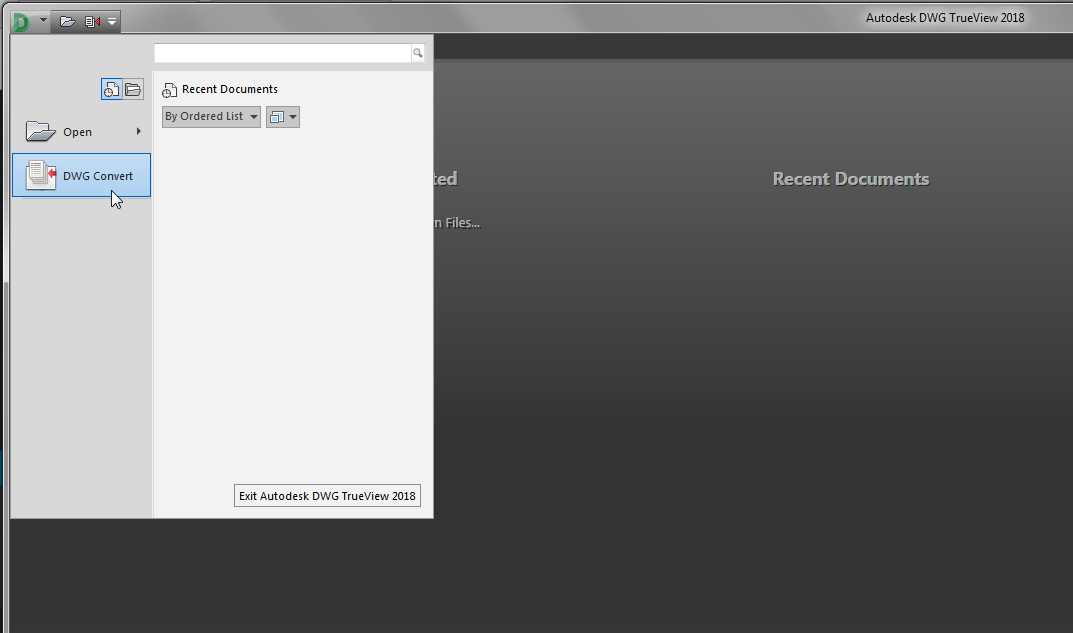
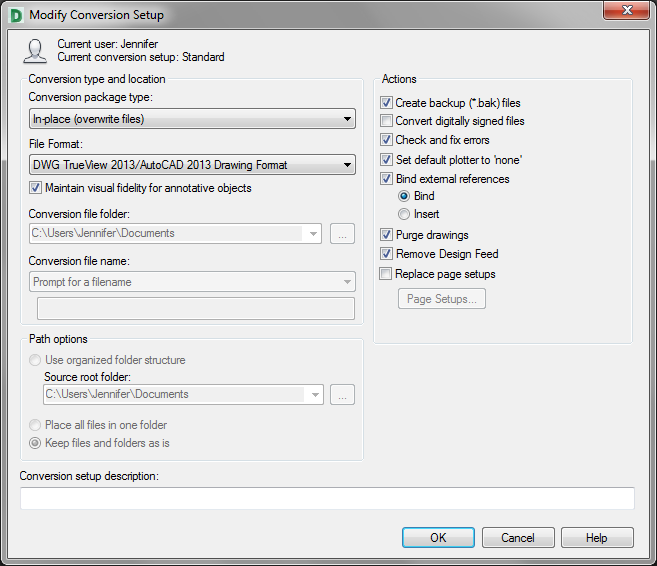
Some content on this website was prepared with AI assistance. Please verify important information with the manufacturer or original source before making purchasing or financial decisions.
If you find the material on this website helpful, please consider supporting That CAD Girl by purchasing our products or services.
If you are interested in purchasing products or services we do not offer, we would love to refer you to one of our Trusted Partners. Please click here to send us a message with your request.