
FAQ
Faq category: Autodesk Software
SEARCH THAT CAD GIRL SITE
xxWhat you should know about purchasing Carlson Software
+

About Carlson Software, the Company
About Carlson, the Software
Carlson programs work natively and produce DWG format files. There is NO need to convert, import or export – only Open and Save.
The programs are primarily delivered as “vertical” modules that can be installed and run on top of a generic-CAD platform.
Carlson’s desktop modules for land surveying, engineering and construction are built to run on top of the ITC’s IntelliCAD and Autodesk’s AutoCAD platforms. The modules include: Survey, Civil, Hydrology, GIS, Geology, Underground Mining, Surface Mining, Natural Regrade, Field, CADnet, GeoTech, Trench, Construction and Point Clouds.
Additionally, Survey and Takeoff are developed and run on top of an embedded AutoCAD (OEM).
You Have Options!
Purchase Carlson with the Platform that's Best for You
Carlson’s desktop programs can be installed as a standalone program on top of IntelliCAD or on top of your separately-purchased, full-AutoCAD-based program.
Each purchase includes a license of the latest version of IntelliCAD – it doesn’t have to be purchased separately.
Your separately-purchased, full-AutoCAD-based program can be AutoCAD, AutoCAD Map, Land Desktop, Civil 3D or other vertical – but does NOT include AutoCAD LT.
The following modules are available with IntelliCAD/for YOUR AutoCAD: Survey, Civil, Hydrology, GIS, Geology, Underground Mining, Surface Mining, Natural Regrade, Field, CADnet, GeoTech, Trench, Construction and Point Clouds
Carlson Survey and Takeoff can be purchased and installed standalone with embedded AutoCAD (also known as the OEM version).
Each purchase includes a license of the latest version of embedded AutoCAD (OEM) – it doesn’t have to be purchased separately.
Note that embedded AutoCAD (OEM) is more similar to AutoCAD LT than AutoCAD – so, experienced AutoCAD users may end up missing much of the functionality they are accustomed to.
The embedded AutoCAD (OEM) programs do not include IntelliCAD and do not require a separate purchase of AutoCAD.
Importantly, although both programs can be installed on the same computer, programs installed with the OEM platform will be completely separate from those installed with IntelliCAD/your AutoCAD. This means that you will not be able to work in a DWG file and simply switch between menus – you’ll have to close the drawing in one program in order to open it in the other.
Carlson's Versions vs AutoCAD's Versions
Carlson Software will run on earlier versions of AutoCAD; however, you cannot run a version of Carlson that is older than the AutoCAD. For instance, Carlson 2024 will run on AutoCAD 2018-2024 but Carlson 2022 will only run on AutoCAD 2018-2022.
Which Program or Modules Do I Need?
FAQ: I’m a land surveyor. What software do I need?
FAQ: I’m a civil engineer. What software do I need?
Programs with embedded AutoCAD (OEM)
FAQ: What features & menus are in Carlson Survey with embedded AutoCAD (OEM)? (a running thread)
FAQ: What features & menus are in Carlson Takeoff with embedded AutoCAD (OEM)? (a running thread)
Desktop Programs with IntelliCAD/for YOUR AutoCAD
FAQ: What features & menus are in the non-OEM Carlson Survey program? (a running thread)
FAQ: What features & menus are in Carlson Civil? (a running thread)
FAQ: What features & menus are in Carlson GIS? (a running thread)
FAQ: What features & menus are in Carlson Hydrology? (a running thread)
FAQ: What features & menus are in Carlson Point Cloud? (a running thread)
FAQ: What features & menus are in Carlson Construction? (a running thread)
FAQ: What features & menus are in Carlson CADNet? (a running thread)
FAQ: What features & menus are in Carlson GeoTech? (a running thread)
FAQ: What features & menus are in Carlson Trench? (a running thread)
Carlson iCAD
Retail Pricing for Carlson Software
| Program | Retail Price of Standalone (effective 7/10/2024) | Retail Price of Network |
|---|---|---|
| Select Suite - Pick 6 (from Survey, Civil, Hydrology, GIS, Point Cloud Basic, CadNet) | $ 4,950 | $ 5,445 |
| Select Suite - Pick 5 (from Survey, Civil, Hydrology, GIS, Point Cloud Basic, CadNet) | $ 4,650 | $ 5,115 |
| Civil Suite or Select Suite Pick 4 (from Survey, Civil, Hydrology, GIS, Point Cloud Basic, CadNet) | $ 4,250 | $ 4,675 |
| Select Suite - Pick 3 (from Survey, Civil, Hydrology, GIS, Point Cloud Basic, CadNet) | $ 3,850 | $ 4,235 |
| Select Suite - Pick 2 (from Survey, Civil, Hydrology, GIS, Point Cloud Basic, CadNet) | $ 3,350 | $ 3,685 |
| Survey | $ 2,150 | $ 2,365 |
| Civil | $ 1,950 | $ 2,145 |
| Hydrology | $ 1,550 | $ 1,705 |
| GIS | $ 1,250 | $ 1,375 |
| Point Cloud Basic | $ 2,000 | $ 2,200 |
| Point Cloud Advanced | $ 6,000 | $ 6,600 |
| Takeoff Suite (Construction, CADNet, Trench, GeoTech) | $ 7,500 | $ 8,250 |
| Construction | $ 3,950 | $ 4,345 |
| CADNet | $ 1,750 | $ 1,925 |
| Trench | $ 1,595 | $ 1,755.50 |
| GeoTech | $ 1,595 | $ 1,755.50 |
| Takeoff with embedded AutoCAD (OEM) | $ 9,000 | $ 9,900 |
| Survey with embedded AutoCAD (OEM) | $ 3,250 | $ 3,575 |
Upgrading Carlson Software
Upgrades are managed through the Annual Maintenance Plan which, essentially. allows users to pre-pay for future upgrades. As long as your Maintenance is active at the time a new version is released, you are eligible for an automatic upgrade to the new version.
See additional information about Maintenance below…
Survey and Takeoff with embedded AutoCAD (OEM)
Maintenance is NOT available for these products so upgrades are only available after a new version has been released.
The cost to upgrade Carlson’s OEM products is subject to change each year and varies depending on the program and how many versions behind you are.
However, Carlson never charges more than 50% of the current retail price to upgrade any license to the latest and greatest version of the software.
Carlson Software Annual Maintenance
Every new license of Carlson with IntelliCAD/for CAD includes 90 days of free Maintenance. This is Carlson’s way of ensuring that anyone who purchases a new license inside of that 90-day window can be assured of getting the free upgrade.
Renewing Maintenance Before it Expires
Renewing Maintenance is optional for users.
However, if you prefer to keep your software up-to-date when new versions are released, keeping the Maintenance plan active is the best way to do that.
If it is renewed prior to expiration, maintenance costs 10% of the retail price of the software.
Renewing Expired Maintenance
If your Maintenance has expired, you can pay the regular 10% Maintenance fee plus the expiration fee to activate your Maintenance for one-year. While Maintenance is active, you’ll be eligible for an immediate upgrade to the current version AND for automatic upgrades to any new versions released during the Maintenance year.
How Old is Too Old (to Renew)?
For licenses of Carlson with IntelliCAD/for CAD that are more than 4 years old, users can pay 50% of the retail price to activate Maintenance for 1-year.
While Maintenance is active, you’ll be eligible for an immediate upgrade to the current version AND for automatic upgrades to any new versions released during the Maintenance year.
See the tables below for sample pricing for Carlson Maintenance.
Carlson Software Maintenance Fees – per Product
Carlson’s policy on Software Maintenance can be viewed by clicking here
| Program | Retail Price of Standalone (effective 7/10/2024) | Annual Maintenance for Standalone | Retail Price of Network | Annual Maintenance for Network |
|---|---|---|---|---|
| Select Suite Pick 6 | $ 4,950 | $ 495 | $ 5,445 | $ 544.50 |
| Select Suite Pick 5 | $ 4,650 | $ 465 | $ 5,115 | $ 511.50 |
| Select Suite Pick 4 | $ 4,250 | $ 425 | $ 4,675 | $ 467.50 |
| Select Suite Pick 3 | $ 3,850 | $ 385 | $ 4,235 | $ 423.50 |
| Select Suite Pick 2 | $ 3,350 | $ 335 | $ 3,685 | $ 368.50 |
| Civil Suite | $ 4,250 | $ 425 | $ 4,675 | $ 467.50 |
| Survey | $ 2,150 | $ 215 | $ 2,365 | $ 236.50 |
| Civil | $ 1,950 | $ 195 | $ 2,145 | $ 214.50 |
| Hydrology | $ 1,550 | $ 155 | $ 1,705 | $ 170.50 |
| Point Cloud Basic | $ 2,000 | $ 200 | $ 2,200 | $ 220.00 |
| Point Cloud Advanced | $ 6,000 | $ 600 | $ 6,600 | $ 660.00 |
| GIS | $ 1,250 | $ 125 | $ 1,375 | $ 137.50 |
| Takeoff Suite | $ 7,500 | $ 750 | $ 8,250 | $ 825.00 |
| Construction | $ 3,950 | $ 395 | $ 4,345 | $ 434.50 |
| CADNet | $ 1,750 | $ 175 | $ 1,925 | $ 192.50 |
| Trench | $ 1,595 | $ 159.50 | $ 1,755 | $ 175.50 |
| GeoTech | $ 1,595 | $ 159.50 | $ 1,755 | $ 175.50 |
Carlson Software Maintenance & Expiration Fees
Carlson’s policy on Software Maintenance can be viewed by clicking here
| Maintenance Status | Annual Maintenance (Percentage of Retail) | Expiration Fee (Percentage of Retail) | Total Fee to Renew (Percentage of Retail) |
|---|---|---|---|
| Active | 10% | 0 | 10% |
| Expired, up to 1 year | 10% | 10% | 20% |
| Expired, up to 2 years | 10% | 20% | 30% |
| Expired, up to 3 years | 10% | 30% | 40% |
| Expired, more than 3 years | 10% | 40% | 50% |
Sample Pricing for Active and Expired Maintenance Renewal Fees
Carlson’s policy on Software Maintenance can be viewed by clicking here
| Program | # of Years Expired | Retail Price | Total Fee (Percentage of Retail) | Total Fee to Upgrade and/or Renew Maintenance for 1 Year |
|---|---|---|---|---|
| Survey | Not expired, maintenance is current | $ 2,150 | 10% | $ 215.00 |
| Survey | Expired for less than 1 year | $ 2,150 | 20% | $ 430.00 |
| Networked Survey | Expired for less than 1 year | $ 2,365 | 20% | $ 473.00 |
| Civil Suite or Select Suite Pick 4 | Not expired, maintenance is current | $ 4,250 | 10% | $ 425.00 |
| Civil Suite or Select Suite Pick 4 | Expired for less than 1 year | $ 4,250 | 20% | $ 850.00 |
| Networked Civil Suite or Select Suite Pick 4 | Expired for less than 1 year | $ 4,675 | 20% | $935.00 |
Carlson Licensing
A purchase of Carlson Software grants a perpetual license to the owner. This means that, once purchased, you “own it” and never need to pay additional fees to use it.
Carlson allows users to “network” their licenses for an additional fee. The fee is 10% of the retail price of the software being networked.
When installing their desktop software, Carlson recognizes 5 different “Reasons for Installation”:
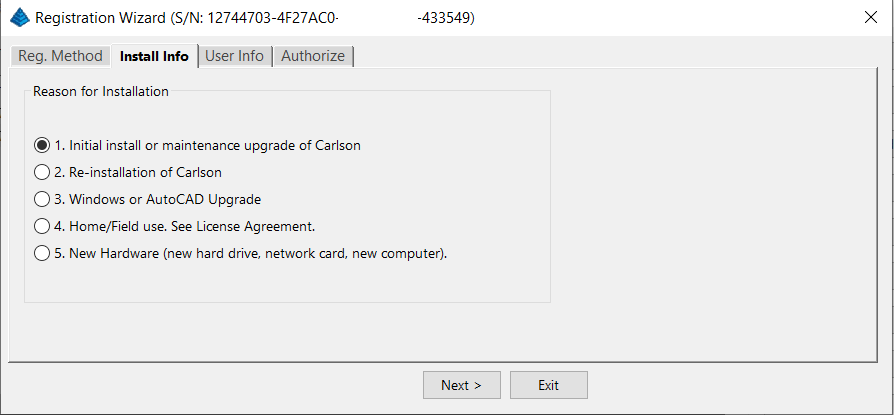
After installation and registration, Carlson provides a Registration Report that includes a “Change Key” and it’s a good idea to save the report and the change key.
And here’s a Pro-Tip for you! The Serial Number screen on your That CAD Girl Customer Portal has a “Customer Notes” section – that’s a great place to save your Change Key and other important information about each license!
FAQ: Does Carlson retire their products?
FAQ: What happens if I get a new computer and need to reinstall Carlson?
FAQ: Can I install my Carlson desktop software on two computers?
FAQ: Is it better to network Carlson than use standalone licenses?
FAQ: Does Carlson Software Still Offer Perpetual Licenses?
FAQ: How do I register my Carlson Software? And what are change keys?
System Requirements for Desktop Software
Technical Support & Training
You can see all the opportunities for training with That CAD Girl here and you can follow these links to see our FAQs about the training and technical support available from Carlson and That CAD Girl.
30-Day Trials
Once you decide to purchase, you won’t even need to uninstall. You can activate your software by simply updating your registration with your purchased serial number.
Frequently Asked Questions: What to Know Before Purchasing Carlson Software
1. What is Carlson Software and who should use it?
Carlson Software is a leading solution for land surveying, civil engineering, grading, and utility contractors. It offers powerful tools for site design, construction layout, data collection, and project management, making it ideal for professionals in land development and infrastructure projects.
2. What are the main features of Carlson Software for land development?
- Advanced survey data collection and processing
- 3D site modeling and earthwork calculations
- Road and subdivision design tools
- Utility and drainage design modules
- Seamless integration with GPS and total station hardware
- CAD drafting and mapping capabilities
- Automated grading and volume calculations
- Compatibility with DWG and DXF file formats
3. What types of licenses and versions are available?
Carlson Software offers perpetual, subscription, and network licenses. Choose from modules like Survey, Civil, Hydrology, GIS, and Takeoff. Bundle packages are available for comprehensive land development needs.
4. What are the system requirements and compatibility details?
Carlson Software runs on Windows-based PCs and is compatible with most CAD platforms, including AutoCAD and IntelliCAD. Check the latest system requirements on the Carlson website to ensure optimal performance.
5. How do I purchase Carlson Software?
You can buy Carlson Software directly from authorized dealers or the official Carlson website. Discounts may be available for multi-seat, educational, or government purchases.
6. Is technical support and training available?
Yes. Carlson provides extensive customer support, including phone, email, and online resources. Training options include webinars, tutorials, and in-person classes tailored for land surveyors and civil engineers.
7. Can I try Carlson Software before buying?
A free trial version is available for download. The trial allows you to explore core features relevant to surveying, civil engineering, grading, and utility design.
8. How are updates and upgrades handled?
Annual maintenance plans include software updates and technical support. Upgrades to new versions are available for users with active maintenance agreements.
9. What should I consider before purchasing?
- Ensure compatibility with your existing hardware and CAD platforms
- Identify which modules best fit your land development projects
- Review training and support options for your team
- Consider long-term maintenance and upgrade costs
10. Where can I find more information?
Visit the Carlson’s website or contact a local dealer for personalized advice on solutions for land surveying, civil engineering, grading, and utility contracting.
MicroSurvey Software: Your Questions Answered
About MicroSurvey
Who is MicroSurvey?
MicroSurvey is a Canadian software developer that has been creating software for land surveyors, engineers, and mapping professionals since 1985.
Software Platform Options
What makes MicroSurvey software unique?
MicroSurvey’s desktop programs run on 64-bit Windows computers and work natively with DWG files, eliminating the need for file conversion. Their software is built to run on various CAD platforms, including IntelliCAD, AutoCAD, and BricsCAD.
What are the different ways I can purchase and use MicroSurvey software?
- With IntelliCAD: MicroSurvey CAD can be installed as a standalone program with an embedded version of IntelliCAD included.
- With embedded AutoCAD (OEM): MicroSurvey embeddedCAD includes an embedded version of AutoCAD and is a standalone product. Note that its functionality is more similar to AutoCAD LT.
- With AutoCAD: MicroSurvey inCAD can be installed on top of your separately purchased, full version of AutoCAD-based programs (excluding AutoCAD LT).
- With BricsCAD: SurveyTools for BricsCAD can be installed on top of your BricsCAD, or you can bundle BricsCAD Pro with your purchase.
Licensing and Upgrades
What licensing options does MicroSurvey offer?
MicroSurvey provides both perpetual and subscription licensing. Licenses can be for a single user or floating (network) licenses that can be shared among users on the same network. Licensing is cloud-based, so no dongle is required.
How do software upgrades work?
Upgrades can be purchased for the current version from the previous version. Upgrades are also available to customers with an active Customer Care Package. Crossgrades to different editions or platforms may also be available.
Maintenance and Support
What is the MicroSurvey Customer Care Package (CCP)?
The CCP is a 12-month service plan that provides software updates and technical support. New software license purchases include one year of CCP.
Other MicroSurvey Products
What is MicroSurvey STAR*NET?
STAR*NET is software that adjusts and analyzes 2D/3D survey networks to improve accuracy. It runs on 64-bit versions of Windows 10 and 11.
What is MicroSurvey FieldGenius?
FieldGenius is data collection software for land surveyors that runs on Android and 64-bit versions of Windows 10 and 11. A legacy version for Windows devices is also available but is no longer updated.
Getting Started
How can I determine which MicroSurvey program is right for me?
It is recommended that you request a 30-day trial to test the software.
Carlson Software: Your Questions Answered
About Carlson Software
Who is Carlson Software?
Carlson Software, based in Maysville, Kentucky, has been a developer of software for land development professionals since 1983. They offer specialized modules for land surveying, civil engineering, construction, and mining industries.
Software Platform Options
What are my options for running Carlson Software?
Carlson’s desktop programs can be installed on top of IntelliCAD or a separately purchased full-AutoCAD-based program. A license for the latest version of IntelliCAD is included with each purchase. Compatible AutoCAD-based programs include AutoCAD, AutoCAD Map, Land Desktop, and Civil 3D, but not AutoCAD LT.
Does Carlson offer a standalone version with an embedded CAD engine?
Yes, Carlson Survey and Takeoff can be purchased with an embedded AutoCAD (OEM) version. This is a standalone product and does not require a separate purchase of AutoCAD. However, the functionality is more akin to AutoCAD LT.
Compatibility
What versions of AutoCAD are compatible with Carlson Software?
You can run Carlson Software on earlier versions of AutoCAD, but you cannot run a version of Carlson that is older than your AutoCAD version. For example, Carlson 2024 is compatible with AutoCAD 2018-2024, while Carlson 2022 works with AutoCAD 2018-2022.
Licensing and Upgrades
What type of license does Carlson offer?
Carlson Software offers perpetual licenses, meaning you own the software after purchase. They also provide network licensing for an additional fee.
How do software upgrades work?
Upgrades are managed through the Annual Maintenance Plan. If your maintenance is active when a new version is released, you receive an automatic upgrade. New licenses include 90 days of maintenance. The cost to upgrade OEM products varies.
Getting Started
Can I try the software before buying?
Yes, it is highly recommended to request a 30-day trial to test the software for your specific needs.
progeCAD Software: Your Questions Answered
About progeCAD
What is the story behind progeCAD?
Founded in 1985, progeCAD co-founded the IntelliCAD Technology Consortium (“ITC”) in 1999 to create a comprehensive and fairly priced alternative to AutoCAD. They offer a native DWG 2D/3D CAD software with a familiar interface and powerful features at a low cost.
progeCAD Software Features
What are the key features of progeCAD?
progeCAD works natively with AutoCAD DWG files without any conversion, ensuring complete compatibility. It features an “AutoCAD Like” interface and supports AutoCAD file types, fonts, and plotting styles. progeCAD Professional includes 3D ACIS Solid Modeling and realistic rendering. It also offers more functions than AutoCAD LT at a fraction of the price of other major CAD software.
Licensing Options
What licensing solutions does progeCAD offer?
- Single+ (SL): Allows installation and use on two computers by the same person, but not simultaneously.
- USB Portable (USB): Install on multiple computers and use the software on one computer at a time by plugging in a USB dongle.
- Network (NLM): Install on unlimited PCs on a network and use concurrently based on the number of licenses purchased. Licenses can be temporarily moved for offline use.
- Corporate One Site: Unlimited users at a single company location.
- Corporate Country: Unlimited users within the same country under one company name.
Maintenance and Support
What is iCARE?
iCARE is a one-year subscription-based maintenance and support program that provides all progeCAD updates, new versions, and free technical assistance.
Getting Started
Can I try progeCAD before I buy it?
Yes, it is highly recommended that you request a 30-day trial to test the software for yourself.
Why Buy from That CAD Girl?
Once you decide to purchase, you won’t even need to uninstall. You can activate your software by simply updating your registration with your purchased serial number.

Some content on this website was prepared with AI assistance. Please verify important information with the manufacturer or original source before making purchasing or financial decisions.
If you find the material on this website helpful, please consider supporting That CAD Girl by purchasing our products or services.
If you are interested in purchasing products or services we do not offer, we would love to refer you to one of our Trusted Partners. Please click here to send us a message with your request.
What should I buy if I need a basic CAD program (like AutoCAD LT)?
+In September, Carlson Software introduced a new program in their lineup: Carlson iCAD. This program is comparable to AutoCAD LT with basic drafting and inquiry tools but is built on IntelliCAD 8.3.
FAQ: What features are in Carlson iCAD? (a running thread)
View Carlson iCAD in our online store
If you truly, truy only need generic-CAD functionality, I recommend purchasing Carlson GMS with IntelliCAD. It’s the cheapest of all the desktop products and you can load this basic IntelliCAD menu:


Some content on this website was prepared with AI assistance. Please verify important information with the manufacturer or original source before making purchasing or financial decisions.
If you find the material on this website helpful, please consider supporting That CAD Girl by purchasing our products or services.
If you are interested in purchasing products or services we do not offer, we would love to refer you to one of our Trusted Partners. Please click here to send us a message with your request.
How do AutoCAD, IntelliCAD and BricsCAD compare for raster-to-vector capabilities? (a running thread)
+
This is a running thread. I’ll update it when AutoCAD, IntelliCAD or BricsCAD change what they can do natively with rasters and scans.
First, a quick definition so we’re talking about the same thing. Raster-to-vector conversion means taking a scanned picture of a drawing (pixels) and automatically turning the lines, arcs and text on that scan into real, editable CAD entities (polylines, arcs, text and so on). Attaching an image and tracing over it by hand is not conversion. Importing a vector PDF’s geometry is also not the same thing as converting a scan.
I get asked this a lot when someone has a scanned survey plat, an old topographic sheet or a blurry engineering drawing and wants that linework turned into CAD. So I lined up the three platforms people ask me about most: AutoCAD, IntelliCAD and BricsCAD.
As of October 9, 2026, this comparison is based on AutoCAD 2027, IntelliCAD 15.0 and BricsCAD V26. It covers only the native CAD platforms. It does not include third-party raster-to-vector apps or specialized toolsets. Those tools do exist and they are where the real conversion work happens.
Jump to:
- The comparison table
- What the rows actually mean
- So what do you do with a scanned drawing?
- What about third-party apps?
The comparison table
Here’s the side-by-side. “Yes” means the feature is built into the core platform. “No” means it isn’t.
| Feature | IntelliCAD 15 | BricsCAD V26 | AutoCAD 2027 |
|---|---|---|---|
| Attach raster images (JPG, PNG, TIFF) | Yes | Yes | Yes |
| Scale, rotate and position raster images | Yes | Yes | Yes |
| Manually trace raster drawings | Yes | Yes | Yes |
| Attach scanned PDFs as underlays | Yes | Yes | Yes |
| Import vector PDF geometry as CAD entities | Implementation-dependent | Yes | Yes |
| Automatically convert scanned lines to CAD entities | No | No | No |
| Convert scanned contour lines to polylines | No | No | No |
| OCR recognition of scanned text | No | No | No |
What the rows actually mean
All three platforms let you attach a JPG, PNG or TIFF, then scale, rotate and position it so you can draw over it. That’s the old-fashioned way and it still works just fine.
All three also let you attach a scanned PDF as an underlay. Same idea: the scan sits under your drawing and you trace what you need.
What none of them do natively is look at a scanned picture of lines and turn those pixels into editable polylines, arcs and text for you. No automatic line conversion. No contour-to-polyline magic. No OCR that reads the text off the scan. If you want that, you’re looking at a specialized raster-to-vector tool or a toolset that sits on top of the CAD program.
So what do you do with a scanned drawing?
For scanned survey plats, topographic maps and legacy engineering drawings, all three platforms land in the same place:
- Attach the image or PDF underlay.
- Scale and position it so it matches your coordinate system or known distances.
- Trace the linework you actually need… or run the scan through a dedicated raster-to-vector program first, then bring the resulting CAD entities in.
In other words, don’t pick AutoCAD, IntelliCAD or BricsCAD expecting a built-in “turn this scan into CAD” button. Pick them for the CAD work. Handle the conversion with a specialized tool when the volume of tracing would make you crazy.
What about third-party apps?
Yes, there are third-party apps (and a few specialized toolsets) that actually do raster-to-vector conversion. They are built for that job: reading scanned linework, cleaning it up and turning it into editable CAD geometry, sometimes with OCR for the text.
If conversion is a big part of your workflow, look at those tools separately. The comparison table above is about what the three CAD platforms themselves can and cannot do without that help.
Some content on this website was prepared with AI assistance. Please verify important information with the manufacturer or original source before making purchasing or financial decisions.
If you find the material on this website helpful, please consider supporting That CAD Girl by purchasing our products or services.
If you are interested in purchasing products or services we do not offer, we would love to refer you to one of our Trusted Partners. Please click here to send us a message with your request.
What you should know about purchasing MicroSurvey
+
About MicroSurvey Software
MicroSurvey Software, based in West Kelowna, British Columbia, has been developing survey and mapping software since 1985. MicroSurvey is part of Hexagon and serves surveyors, public safety and mapping professionals, with customers in over 100 countries. Its software is used for land surveying, mapping, law enforcement, forensics and accident reconstruction.
Click here to learn more about MicroSurvey Software
About the MicroSurvey Line of Products
MicroSurvey develops specialized software for land surveyors, civil engineers and construction professionals. Its products cover the workflow from field data collection through drafting, network adjustments and final deliverables, using industry-standard file formats such as DWG, DXF and LandXML.
MicroSurvey’s survey CAD software provides field to finish drafting, COGO, traverse adjustments, surface modeling, volume calculations and alignment design tools. It runs on your choice of CAD platform:
- MicroSurvey CAD runs standalone on an included IntelliCAD engine. Click here to learn more about MicroSurvey CAD
- MicroSurvey embeddedCAD runs standalone on an included AutoCAD OEM engine from Autodesk. Click here to learn more about MicroSurvey embeddedCAD
- MicroSurvey inCAD is a subscription-based plugin that adds MicroSurvey’s survey tools to your current Autodesk AutoCAD, Civil 3D or Map 3D subscription. Click here to learn more about MicroSurvey inCAD
- SurveyTools for BricsCAD is a subscription-based plugin that installs on top of a separately purchased license of BricsCAD. Click here to learn more about SurveyTools for BricsCAD
STAR*NET is least squares adjustment software that adjusts and analyzes 1D, 2D and 3D survey networks. It combines total station, level, GNSS and gyroscope data and supports GPS vectors, geoid modeling and detailed statistical reporting. Click here to learn more about STAR*NET
FieldGenius is field data collection software for total stations and GNSS receivers, with a map-based view, COGO, staking lists and cutsheet reporting. It runs on Windows and Android. Click here to learn more about FieldGenius
FieldGenius Legacy runs on Windows-based data collectors, tablets and desktop PCs. Click here to learn more about FieldGenius Legacy
Operating System
As of October 8, 2026, these are the supported operating systems for the current releases:
- MicroSurvey CAD 2027: Windows 11 (64-bit)
- MicroSurvey embeddedCAD 2027: Windows 11 (64-bit)
- MicroSurvey inCAD 2027: Windows 11 (64-bit)
- SurveyTools for BricsCAD V26: Windows 11 (64-bit)
- STAR*NET 14: Windows 10 and 11 (64-bit)
- FieldGenius: Windows 10 and 11 or Android
- FieldGenius Legacy: Windows 10, Windows Mobile and Windows CE
System Requirements
System requirements change with each release. See our MicroSurvey system requirements FAQ for the current requirements of each MicroSurvey desktop program.
CAD Platform
- MicroSurvey CAD: Standalone with an included IntelliCAD engine
- MicroSurvey embeddedCAD: Standalone with an included AutoCAD OEM engine
- MicroSurvey inCAD: Add-on for a current Autodesk AutoCAD, Civil 3D or Map 3D
- SurveyTools for BricsCAD: Add-on for BricsCAD (SurveyTools for BricsCAD V26 requires the latest BricsCAD V26)
How and Where to Purchase
When purchasing MicroSurvey software, you can buy directly from MicroSurvey or through its authorized dealer network. Pricing is subject to change without notice and varies by product, edition and license option.
To purchase MicroSurvey software, please contact MicroSurvey or an authorized MicroSurvey dealer.
Upgrades to New Versions and Crossgrades to Different License Types or Editions
New versions are included while your Customer Care Package (CCP) is current. With an active CCP you can update from inside the software by going to Help > Check for Updates. If you let your CCP lapse and renew more than 3 months after it expires, MicroSurvey prices the renewal as an upgrade.
MicroSurvey also offers an upgrade path for switching from USB key or network licenses to a floating license. To move between editions or products, contact MicroSurvey or an authorized MicroSurvey dealer about your options.
Click here to learn more about MicroSurvey maintenance and upgrades
License Options (License Types)
- USB License Key: The license is stored on a USB key plugged into the computer running the software. The key is activated after purchase and updated with MicroSurvey’s USB License Manager when new versions are released.
- Network License: The USB license key plugs into a license server computer on your network that runs MicroSurvey’s Network License Server software.
- Floating License: An internet-activated license that an administrator deploys, monitors and updates from an online MicroSurvey account. A floating license can be checked out for offline use, but nobody else can use that seat until it is checked back in or the checkout period ends.
Click here to learn more about MicroSurvey license options (license types)
License Terms
- Perpetual License: New perpetual licenses include a 12-month Customer Care Package (CCP). If your CCP expires, you can keep running the last version released before your CCP end date, but you lose access to new versions and MicroSurvey technical support until you renew. FieldGenius is available as a perpetual or subscription license.
- Subscription License: MicroSurvey inCAD and SurveyTools for BricsCAD are sold by subscription only and are activated with a License ID and Password. Without a current subscription, you can’t run new versions.
Refer to MicroSurvey’s End-User License Agreement (EULA) for the full license terms.
License Levels
Some MicroSurvey products are offered in more than one edition, each with different functionality. MicroSurvey’s pricing pages currently list:
- MicroSurvey CAD: Standard, Premium and Ultimate. The MicroSurvey CAD 2027 release notes also mention a Studio edition. Click here for the MicroSurvey CAD feature table
- MicroSurvey embeddedCAD: Premium. Click here for the MicroSurvey embeddedCAD feature table
- MicroSurvey inCAD: One level, sold by subscription. Click here for the MicroSurvey inCAD feature table
- SurveyTools for BricsCAD: One level, sold by subscription. Click here for the SurveyTools for BricsCAD feature table
- STAR*NET: Plus, Pro and Ultimate. Click here for the STAR*NET feature table
- FieldGenius: One level, sold as a subscription or perpetual license. Click here for the FieldGenius feature table
- FieldGenius Legacy: Premium. Click here for the FieldGenius Legacy feature table
Software Trials
MicroSurvey offers free 30-day demos of MicroSurvey CAD and FieldGenius. Its demo request page lists every MicroSurvey product. The MicroSurvey CAD demo is a complete, unrestricted version of the software. SurveyTools for BricsCAD also needs BricsCAD V26 installed, which you can try free for 30 days.
Click here to request a MicroSurvey demo
If you would like help requesting a trial of this software, please contact MicroSurvey or an authorized MicroSurvey dealer.
Support and Training Options
New MicroSurvey licenses include a 12-month Customer Care Package (CCP), formerly called the Annual Maintenance Subscription (AMS), which includes:
- Software updates and new versions
- Technical support from MicroSurvey’s experts
- Discounts on MicroSurvey live training and its on-demand online school
- Compatibility updates for the latest operating systems, IntelliCAD and AutoCAD versions
Click here to learn more about MicroSurvey’s Customer Care Package
MicroSurvey also offers self-paced online training courses, some of which are free.
Some content on this website was prepared with AI assistance. Please verify important information with the manufacturer or original source before making purchasing or financial decisions.
If you find the material on this website helpful, please consider supporting That CAD Girl by purchasing our products or services.
If you are interested in purchasing products or services we do not offer, we would love to refer you to one of our Trusted Partners. Please click here to send us a message with your request.
What’s the difference between Carlson’s annual maintenance and an Autodesk subscription?
+Please note: That CAD Girl is no longer an authorized Carlson Software dealer and isn't affiliated with Carlson. This article was accurate when it was written, but Carlson's products, pricing, licensing and policies may have changed since then, and we can't independently verify the current details.
We're still happy to offer Carlson training and support as far as we can without help from Carlson. For official or up-to-date information, please contact Carlson Software directly.
The main difference between Carlson’s maintenance plan and Autodesk’s subscription is that Carlson’s tech support is not tied to maintenance at all while Autodesk tech support is only available for no additional fee to those who are current on subscription.
Also, in the past few years, there have been so many changes to Autodesk’s Subscription policies that it’s practically impossible to keep up and know exactly what you’re getting for that big price tag.
Regardless of whether you’re current on maintenance, whether you’ve let it lapse, whether you’re using today’s version of the software or whether you’re using a version that’s 10 years old, tech support is free from Carlson.
You can view the Carlson Software Maintenance Policy here
Some content on this website was prepared with AI assistance. Please verify important information with the manufacturer or original source before making purchasing or financial decisions.
If you find the material on this website helpful, please consider supporting That CAD Girl by purchasing our products or services.
If you are interested in purchasing products or services we do not offer, we would love to refer you to one of our Trusted Partners. Please click here to send us a message with your request.
Is embedded AutoCAD (OEM) more like AutoCAD or AutoCAD LT?
+
Some content on this website was prepared with AI assistance. Please verify important information with the manufacturer or original source before making purchasing or financial decisions.
If you find the material on this website helpful, please consider supporting That CAD Girl by purchasing our products or services.
If you are interested in purchasing products or services we do not offer, we would love to refer you to one of our Trusted Partners. Please click here to send us a message with your request.
Is Carlson Field to Finish the same as Land Desktop or Civil 3d Description Keys?
+
Some content on this website was prepared with AI assistance. Please verify important information with the manufacturer or original source before making purchasing or financial decisions.
If you find the material on this website helpful, please consider supporting That CAD Girl by purchasing our products or services.
If you are interested in purchasing products or services we do not offer, we would love to refer you to one of our Trusted Partners. Please click here to send us a message with your request.
What versions of AutoCAD & IntelliCAD & Windows does Carlson run on top of? Does it run on AutoCAD LT? (a running thread)
+
Carlson Desktop Software with IntelliCAD or for Your AutoCAD
Carlson can be installed on top of any full-AutoCAD-based program such as AutoCAD, AutoCAD Map, Land Desktop or Civil 3d.
Carlson cannot be installed on top of any version AutoCAD LT.
| Carlson Version | AutoCAD & IntelliCAD Platforms | Windows Platforms |
|---|---|---|
| 2024 | AutoCAD 2018-2024, IntelliCAD 10.1a and 11.1 | 64 bit Windows |
| 2023 | AutoCAD 2018-2023, IntelliCAD 10.1a and 11.0 | 64 bit Windows |
| 2022 | AutoCAD 2017-2022, IntelliCAD 10.0a and 10.1a | 64 bit Windows 10 |
| 2021 | AutoCAD 2017-2021, Intellicad 10.0a | 64 bit Windows 10 |
| 2020 | AutoCAD 2015-2020, IntelliCAD 9.2 | 64 bit Windows 10 |
| 2019 | AutoCAD 2010-2019, IntelliCAD 9 | 32 or 64 bit Windows Vista, 7, 8, 8.1, and 10 |
| 2018 | AutoCAD 2010-2018, IntelliCAD 8.2 | 32 or 64 bit Windows Vista, 7, 8, 8.1, and 10 |
| 2017 | AutoCAD 2010-2017, IntelliCAD 8.2 | 32 or 64 bit Windows Vista, 7, 8, 8.1, and 10 |
| 2016 | AutoCAD 2007-2016, IntelliCAD 8.1 | 32 or 64 bit Windows Vista, 7, 8, 8.1, and 10 |
| 2015 | AutoCAD 2007-2015, IntelliCAD 8.0 | XP, 32 or 64 bit Windows Vista, 7, 8 and 8.1 |
| 2014 | AutoCAD 2004-2014, IntelliCAD 7.2 | XP, 32 or 64 bit Windows Vista, 7, 8 and 8.1 |
Carlson Desktop Software with Embedded AutoCAD (OEM)
| Carlson Version | Embedded AutoCAD Engine | Windows Platforms |
|---|---|---|
| Survey 2024 | 20222 | 64 bit Windows |
| Survey 2023 | 2022 | 64 bit Windows |
| Survey 2022/Takeoff R12 | 2022 | 64 bit Windows |
| Survey 2021 | 2018 | 64 bit Windows |
| Survey 2020 | 2018 | 64 bit Windows |
| Survey 2019/Takeoff R11 | 2018 | 64 bit Windows |
| Survey 2018/Takeoff R10 | 2018 | Windows 7, 8, 8.1, and 10 |
| Survey 2017/Takeoff R9 | 2013 | Windows XP, 7, 8, 8.1, and 10 |
| Survey 2016 | 2013 | Windows XP, 7, 8, 8.1, and 10 |
| Survey 2015/Takeoff R8 | 2013 | Windows XP, 7, 8, 8.1, and 10 |
| Survey 2014/Takeoff R7 | 2013 | Windows XP, 7, 8, 8.1, and 10 |
Some content on this website was prepared with AI assistance. Please verify important information with the manufacturer or original source before making purchasing or financial decisions.
If you find the material on this website helpful, please consider supporting That CAD Girl by purchasing our products or services.
If you are interested in purchasing products or services we do not offer, we would love to refer you to one of our Trusted Partners. Please click here to send us a message with your request.
How can I access and use my old Civil 3d, Land Desktop, Eagle Point or Terra Model data?
+From my Picks and Clicks: LandXML Data article in Professional Surveyor
What Is LandXML?
LandXML refers to a file format (.xml) containing data that has been generated from a civil engineering or land surveying software program.
If you’re hearing about it for the first time and want to learn more about the uses and acceptance of the LandXML initiative, visit www.landxml.org. According to their page LandXML.org in a Nutshell, “… LandXML.org is committed to providing a non-proprietary data standard (LandXML), driven by an industry consortium of partners.”
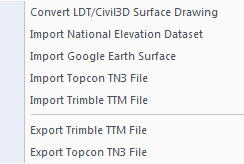
Simply put, the easiest way to convert, transfer, and archive data between Civil 3D, Carlson Software, Land Desktop, Eagle Point, TerraModel, and many other programs is to use the Import from LandXML and Export to LandXML functions available in these programs. Additionally, many machine control systems allow you to import LandXML files. I am most familiar with the Carlson and Autodesk families of civil/survey programs, so most examples in this article refer to them.
For a little more current look at where LandXML is today, you don’t want to miss this archived webinar from September 2015: If You’re Not Using LandXML, You Should Be… Yes, All of You!
The very best advice I can give to anyone who has years of archived Land Desktop, Terra Model or Eagle Point data and is still able to get into and run those programs is to start exporting all of it to LandXML files – starting yesterday! Many of these programs will be (or already are) impossible to re-install on new Windows computers so take advantage of it while you can.
Since LandXML is the industry standard, having all that data in the generic XML format virtually guarantees that you will be able to convert and work with it in any new software package you use in the future.
In addition to LandXML, Carlson gives you a bunch of different ways to import, export and convert data to and from other desktop, field and machine control software. For instance, here’s the menu for Import/Export Surface Data that’s in Construction, Civil & Survey:
Civil 3d data is, by far, the most difficult data to share… In some cases it’s literally impossible to save data such as points and surfaces and be able to use it in any previous version of Civil 3d!
However, you can use the EXPORTTOAUTOCAD commands in Civil 3d to basically explode all the custom entities so they can be opened and used in other programs or in earlier versions of Civil 3d. Of course, by exploding everything, you essentially lose any perceived benefit of working on the drawing in Civil 3d.
Some content on this website was prepared with AI assistance. Please verify important information with the manufacturer or original source before making purchasing or financial decisions.
If you find the material on this website helpful, please consider supporting That CAD Girl by purchasing our products or services.
If you are interested in purchasing products or services we do not offer, we would love to refer you to one of our Trusted Partners. Please click here to send us a message with your request.
How can I install Land Desktop on a Windows 7 computer?
+
I had actually forgotten about this but recently had to re-install Land Desktop myself and I figured it was worth sharing. This method is not guaranteed but it just might work.
Instead of trying to install Land Desktop from the original DVD, try copying the contents of the DVD to a new folder on the hard drive of the Windows 7 machine. Then, run the installation from there by clicking on the Setup.exe file.
I haven’t tried this with anything newer than Windows 7 but it worked flawlessly on my Windows 7 64 bit computer.
Some content on this website was prepared with AI assistance. Please verify important information with the manufacturer or original source before making purchasing or financial decisions.
If you find the material on this website helpful, please consider supporting That CAD Girl by purchasing our products or services.
If you are interested in purchasing products or services we do not offer, we would love to refer you to one of our Trusted Partners. Please click here to send us a message with your request.
Compared to AutoCAD or IntelliCAD, what would I miss in the embedded AutoCAD (OEM) versions of Survey & Takeoff? (a running thread)
+Some AutoCAD commands, such as the Layer Tools that used to be in Express Tools and are now in the Layers II toolbar of AutoCAD, have been built into the Carlson menus. So even though you may not find the Layers II toolbar you can still freeze and isolate layers by picking entities on the screen.
I’ll keep this post as a running thread and will add to it as I come across functions or features you may miss.
- In OEM – Can’t load LSP files (verified in 2016). This is possible in AutoCAD and IntelliCAD.
- In OEM – Can’t change command aliases (acad.pgp) or Carlson QuickKeys (verified in 2016) – although you may find a workaround in this Carlson KB Article:Bits and Pieces. This is possible in AutoCAD and IntelliCAD.
- In OEM – The command REGEN is available but REGENALL is not (verified in 2016). This is possible in AutoCAD and IntelliCAD.
- In OEM – Carlson Startup Settings (aka Launch Options) such as setting a default template (.dwt) file are not available in the OEM (verified in 2016). This is possible in AutoCAD and IntelliCAD.
- In OEM and IntelliCAD – Express Tools aren’t available. However, you can use Carlson’s Layer Tools and Layer Toolbar as a workaround to replace the Express Tools Layers commands and the Layers II toolbar.
Some content on this website was prepared with AI assistance. Please verify important information with the manufacturer or original source before making purchasing or financial decisions.
If you find the material on this website helpful, please consider supporting That CAD Girl by purchasing our products or services.
If you are interested in purchasing products or services we do not offer, we would love to refer you to one of our Trusted Partners. Please click here to send us a message with your request.
If I buy Carlson, should I go with the embedded AutoCAD (OEM)? Or with IntelliCAD? or just buy AutoCAD?
+
Some content on this website was prepared with AI assistance. Please verify important information with the manufacturer or original source before making purchasing or financial decisions.
If you find the material on this website helpful, please consider supporting That CAD Girl by purchasing our products or services.
If you are interested in purchasing products or services we do not offer, we would love to refer you to one of our Trusted Partners. Please click here to send us a message with your request.
Can I buy my AutoCAD from you?
+
Some content on this website was prepared with AI assistance. Please verify important information with the manufacturer or original source before making purchasing or financial decisions.
If you find the material on this website helpful, please consider supporting That CAD Girl by purchasing our products or services.
If you are interested in purchasing products or services we do not offer, we would love to refer you to one of our Trusted Partners. Please click here to send us a message with your request.
I miss my Land Desktop/LDD! What is my next, best option?
+I really do miss the days when we had several options for our design software but the market has consolidated down to, pretty much, Civil 3d or Carlson Software.
My biases are obviously clear but, in my opinion, Carlson is far and away the closest thing to an upgrade to Land Desktop that’s on the market today. Carlson has a lot of the dynamic functionality (RoadNet, LotNet, Design Pad Template, etc.) that we wanted in Land Desktop. But, the entities created by these cool automated tools are all standard CAD entities such as polylines and 3d polylines and text.
The benefit is that, when you get to the end of your design and need to pinpoint and tweak an area, you have the option of doing basic CAD-editing of standard polylines or text to make changes the old-fashioned way.
One of my complaints about Civil 3d is that users get very little credit for knowing AutoCAD. Civil 3d requires you to create “Styles” for everything and these styles override basic CAD management of all other properties such as colors, layers, linetypes, text styles, formatting and so on.
Here is one of my favorite examples to illustrate my point. I have a 100 x 200 lot below that has a label inside for area in square footage and acres. The labels are generic and ugly but I can change that later. At this point, all I want to do is add a silly comma so that the area in SF reads “20,000 SF”.
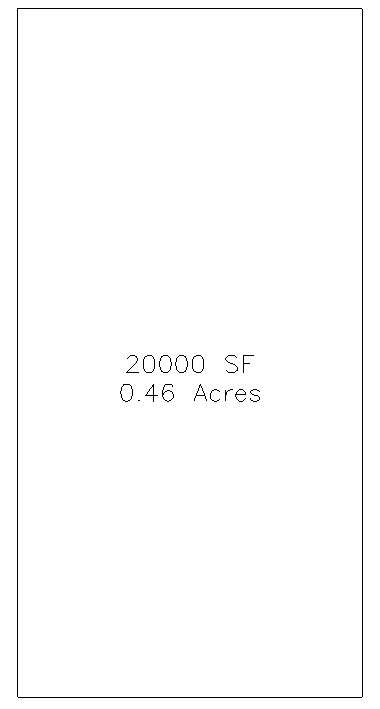
If I’m in Carlson, I double-click on the label and edit it – because it’s CAD and it’s text.
If I’m in Civil 3d, that label is tied to the parcel-object and the style of the object must be changed. Unless you explode the object and lose all the perceived benefits of Civil 3d, there are many clicks and digging deep into dialog boxes to make the same change.
Some content on this website was prepared with AI assistance. Please verify important information with the manufacturer or original source before making purchasing or financial decisions.
If you find the material on this website helpful, please consider supporting That CAD Girl by purchasing our products or services.
If you are interested in purchasing products or services we do not offer, we would love to refer you to one of our Trusted Partners. Please click here to send us a message with your request.
Whew, what’s with all these changes to Autodesk purchasing, renting, subscriptions, etc…? Can you help?
+My answer is: I have no earthly idea and God bless Carlson Software for loving their customers and making it so easy!
In all seriousness, Autodesk’s pricing and purchasing model is changing so often and in substantial ways, I can’t keep up with it either.
I am not an Autodesk reseller so I can’t help other than to make referrals and give my opinion. But, I have a couple Autodesk resellers that I trust and who have helped me keep my own licenses of AutoCAD and Civil 3d straight over the years. They have also been hugely helpful to my Carlson customers needing to purchase licenses of AutoCAD.
Feel free to email me for a referral.
Some content on this website was prepared with AI assistance. Please verify important information with the manufacturer or original source before making purchasing or financial decisions.
If you find the material on this website helpful, please consider supporting That CAD Girl by purchasing our products or services.
If you are interested in purchasing products or services we do not offer, we would love to refer you to one of our Trusted Partners. Please click here to send us a message with your request.
Is IntelliCAD more like AutoCAD or AutoCAD LT?
+Now, you also shouldn’t expect IntelliCAD to be the equivalent of today’s AutoCAD. IntelliCAD is a generic version of AutoCAD and will have the feel of an older “model” of AutoCAD and be missing some of the bells and whistles included in newer releases of AutoCAD.
But, it’s more customizable, supports LISP routines and 3D drafting.
Follow these links to see my FAQs that explain the differences between AutoCAD, Carlson’s IntelliCAD and the embedded AutoCAD (OEM) platforms.
You may also want to read this Software Review: AutoCAD and IntelliCAD that I wrote for Professional Surveyor Magazine several years ago.
Some content on this website was prepared with AI assistance. Please verify important information with the manufacturer or original source before making purchasing or financial decisions.
If you find the material on this website helpful, please consider supporting That CAD Girl by purchasing our products or services.
If you are interested in purchasing products or services we do not offer, we would love to refer you to one of our Trusted Partners. Please click here to send us a message with your request.
What’s the difference between Carlson with IntelliCAD and with the embedded AutoCAD (OEM) platform?
+Whether you’re using Carlson Survey or Takeoff on the IntelliCAD or embedded AutoCAD (OEM) platform, the Survey and Takeoff functionality will be identical. Any differences are going to be strictly limited to the underlying engine – IntelliCAD or embedded AutoCAD.
- From a feature and functionality standpoint, IntelliCAD will be closer to a full AutoCAD and embedded AutoCAD (OEM) will be closer to an AutoCAD LT.
- IntelliCAD is generic version of AutoCAD and tracks closer to a 4-5 year old version of AutoCAD. See this FAQ comparing IntelliCAD and AutoCAD
- Embedded AutoCAD (OEM) will look more like today’s AutoCAD and may have more of the current bells and whistles – but it’ll also be missing some key functionality such as the ability to create aliases (command shortcuts) and load LISP routines. See this FAQ comparing embedded AutoCAD (OEM) and AutoCAD
It’s a work in progress but you can check out this FAQ where I’m starting a list of the differences between the two programs.
Some content on this website was prepared with AI assistance. Please verify important information with the manufacturer or original source before making purchasing or financial decisions.
If you find the material on this website helpful, please consider supporting That CAD Girl by purchasing our products or services.
If you are interested in purchasing products or services we do not offer, we would love to refer you to one of our Trusted Partners. Please click here to send us a message with your request.
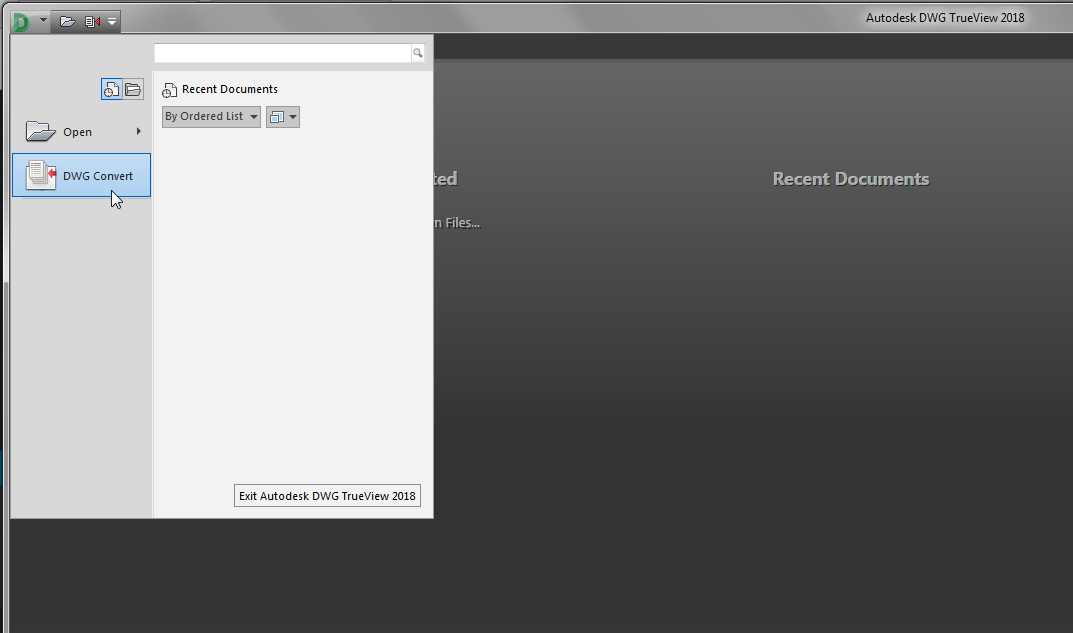
Use DWG Convert to save DWG files to an earlier version
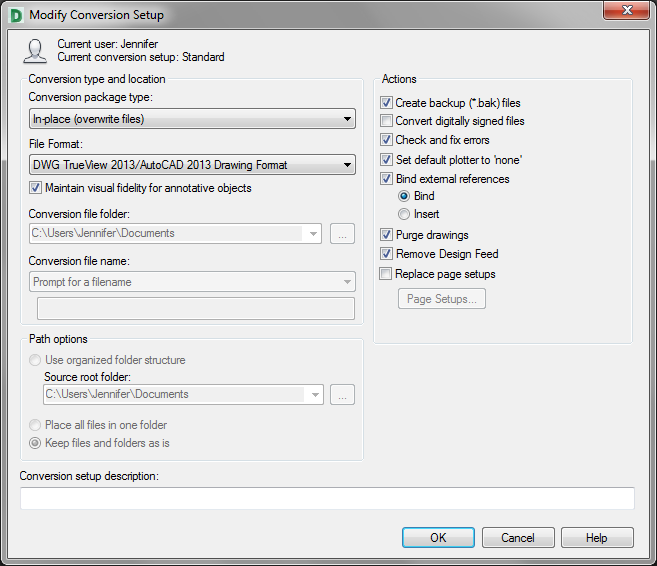
+DWG TrueView is FREE utility available from Autodesk. They release a new version of this program every year, just like their other products.
With the True Convert utility you can convert any newer version DWG or DXF to any earlier version. I’d recommend you enable the option that creates a .bak file with the original just in case you need it later.
Inside the True Convert utility you can also enable several other options that will run routines such as Audit, Purge, XREF Binding, etc. during the convert process.
You can download DWG True View 2018 here.
Some content on this website was prepared with AI assistance. Please verify important information with the manufacturer or original source before making purchasing or financial decisions.
If you find the material on this website helpful, please consider supporting That CAD Girl by purchasing our products or services.
If you are interested in purchasing products or services we do not offer, we would love to refer you to one of our Trusted Partners. Please click here to send us a message with your request.