
FAQ
Faq category: Software Updates
SEARCH THAT CAD GIRL SITE
How is the price of Carlson maintenance calculated?
+However, if Maintenance is not renewed prior to expiration, a 1-year Maintenance Plan costs 20% of software list price and increases by 10% per year after the expiration date.
But, regardless of how many years you’ve fallen behind, Carlson will never charge more than 50% of the current retail price of the software in order to bring your license up to the current version.
If your license is not currently on maintenance, you can pay the maintenance fee plus an expiration fee which will both upgrade you to the current version of the program AND include any upgrades that are released within the maintenance year.
Carlson’s policy on Software Maintenance can be viewed by clicking here.
That CAD Girl tries to keep a copy of your most current Maintenance Report uploaded and available to you on your That CAD Girl Customer Portal.
Click here to request pricing for your Maintenance Renewals or Upgrades – if you upload a current Maintenance or Upgrade Report you received from Carlson, you may receive discounted renewal or upgrade pricing!
FAQ: I can’t seem to keep up with my Carlson maintenance – Can you help?
FAQ: What is Carlson Software Maintenance? And why should I buy it from That CAD Girl?
| Maintenance Status | Annual Maintenance (Percentage of Retail) | Expiration Fee (Percentage of Retail) | Total Fee to Renew (Percentage of Retail) |
|---|---|---|---|
| Active | 10% | 0 | 10% |
| Expired, up to 1 year | 10% | 10% | 20% |
| Expired, up to 2 years | 10% | 20% | 30% |
| Expired, up to 3 years | 10% | 30% | 40% |
| Expired, more than 3 years | 10% | 40% | 50% |
| Program | Retail Price of Standalone (effective 7/10/2024) | Annual Maintenance for Standalone | Retail Price of Network | Annual Maintenance for Network |
|---|---|---|---|---|
| Select Suite Pick 6 | $ 4,950 | $ 495 | $ 5,445 | $ 544.50 |
| Select Suite Pick 5 | $ 4,650 | $ 465 | $ 5,115 | $ 511.50 |
| Select Suite Pick 4 | $ 4,250 | $ 425 | $ 4,675 | $ 467.50 |
| Select Suite Pick 3 | $ 3,850 | $ 385 | $ 4,235 | $ 423.50 |
| Select Suite Pick 2 | $ 3,350 | $ 335 | $ 3,685 | $ 368.50 |
| Civil Suite | $ 4,250 | $ 425 | $ 4,675 | $ 467.50 |
| Survey | $ 2,150 | $ 215 | $ 2,365 | $ 236.50 |
| Civil | $ 1,950 | $ 195 | $ 2,145 | $ 214.50 |
| Hydrology | $ 1,550 | $ 155 | $ 1,705 | $ 170.50 |
| Point Cloud Basic | $ 2,000 | $ 200 | $ 2,200 | $ 220.00 |
| Point Cloud Advanced | $ 6,000 | $ 600 | $ 6,600 | $ 660.00 |
| GIS | $ 1,250 | $ 125 | $ 1,375 | $ 137.50 |
| Takeoff Suite | $ 7,500 | $ 750 | $ 8,250 | $ 825.00 |
| Construction | $ 3,950 | $ 395 | $ 4,345 | $ 434.50 |
| CADNet | $ 1,750 | $ 175 | $ 1,925 | $ 192.50 |
| Trench | $ 1,595 | $ 159.50 | $ 1,755 | $ 175.50 |
| GeoTech | $ 1,595 | $ 159.50 | $ 1,755 | $ 175.50 |
Sample Upgrade & Maintenance Renewal Pricing
| Program | # of Years Expired | Retail Price | Total Fee (Percentage of Retail) | Total Fee to Upgrade and/or Renew Maintenance for 1 Year |
|---|---|---|---|---|
| Survey | Not expired, maintenance is current | $ 2,150 | 10% | $ 215.00 |
| Survey | Expired for less than 1 year | $ 2,150 | 20% | $ 430.00 |
| Networked Survey | Expired for less than 1 year | $ 2,365 | 20% | $ 473.00 |
| Civil Suite or Select Suite Pick 4 | Not expired, maintenance is current | $ 4,250 | 10% | $ 425.00 |
| Civil Suite or Select Suite Pick 4 | Expired for less than 1 year | $ 4,250 | 20% | $ 850.00 |
| Networked Civil Suite or Select Suite Pick 4 | Expired for less than 1 year | $ 4,675 | 20% | $935.00 |

Some content on this website was prepared with AI assistance. Please verify important information with the manufacturer or original source before making purchasing or financial decisions.
If you find the material on this website helpful, please consider supporting That CAD Girl by purchasing our products or services.
If you are interested in purchasing products or services we do not offer, we would love to refer you to one of our Trusted Partners. Please click here to send us a message with your request.
xxWhat you should know about purchasing Carlson Software
+

About Carlson Software, the Company
About Carlson, the Software
Carlson programs work natively and produce DWG format files. There is NO need to convert, import or export – only Open and Save.
The programs are primarily delivered as “vertical” modules that can be installed and run on top of a generic-CAD platform.
Carlson’s desktop modules for land surveying, engineering and construction are built to run on top of the ITC’s IntelliCAD and Autodesk’s AutoCAD platforms. The modules include: Survey, Civil, Hydrology, GIS, Geology, Underground Mining, Surface Mining, Natural Regrade, Field, CADnet, GeoTech, Trench, Construction and Point Clouds.
Additionally, Survey and Takeoff are developed and run on top of an embedded AutoCAD (OEM).
You Have Options!
Purchase Carlson with the Platform that's Best for You
Carlson’s desktop programs can be installed as a standalone program on top of IntelliCAD or on top of your separately-purchased, full-AutoCAD-based program.
Each purchase includes a license of the latest version of IntelliCAD – it doesn’t have to be purchased separately.
Your separately-purchased, full-AutoCAD-based program can be AutoCAD, AutoCAD Map, Land Desktop, Civil 3D or other vertical – but does NOT include AutoCAD LT.
The following modules are available with IntelliCAD/for YOUR AutoCAD: Survey, Civil, Hydrology, GIS, Geology, Underground Mining, Surface Mining, Natural Regrade, Field, CADnet, GeoTech, Trench, Construction and Point Clouds
Carlson Survey and Takeoff can be purchased and installed standalone with embedded AutoCAD (also known as the OEM version).
Each purchase includes a license of the latest version of embedded AutoCAD (OEM) – it doesn’t have to be purchased separately.
Note that embedded AutoCAD (OEM) is more similar to AutoCAD LT than AutoCAD – so, experienced AutoCAD users may end up missing much of the functionality they are accustomed to.
The embedded AutoCAD (OEM) programs do not include IntelliCAD and do not require a separate purchase of AutoCAD.
Importantly, although both programs can be installed on the same computer, programs installed with the OEM platform will be completely separate from those installed with IntelliCAD/your AutoCAD. This means that you will not be able to work in a DWG file and simply switch between menus – you’ll have to close the drawing in one program in order to open it in the other.
Carlson's Versions vs AutoCAD's Versions
Carlson Software will run on earlier versions of AutoCAD; however, you cannot run a version of Carlson that is older than the AutoCAD. For instance, Carlson 2024 will run on AutoCAD 2018-2024 but Carlson 2022 will only run on AutoCAD 2018-2022.
Which Program or Modules Do I Need?
FAQ: I’m a land surveyor. What software do I need?
FAQ: I’m a civil engineer. What software do I need?
Programs with embedded AutoCAD (OEM)
FAQ: What features & menus are in Carlson Survey with embedded AutoCAD (OEM)? (a running thread)
FAQ: What features & menus are in Carlson Takeoff with embedded AutoCAD (OEM)? (a running thread)
Desktop Programs with IntelliCAD/for YOUR AutoCAD
FAQ: What features & menus are in the non-OEM Carlson Survey program? (a running thread)
FAQ: What features & menus are in Carlson Civil? (a running thread)
FAQ: What features & menus are in Carlson GIS? (a running thread)
FAQ: What features & menus are in Carlson Hydrology? (a running thread)
FAQ: What features & menus are in Carlson Point Cloud? (a running thread)
FAQ: What features & menus are in Carlson Construction? (a running thread)
FAQ: What features & menus are in Carlson CADNet? (a running thread)
FAQ: What features & menus are in Carlson GeoTech? (a running thread)
FAQ: What features & menus are in Carlson Trench? (a running thread)
Carlson iCAD
Retail Pricing for Carlson Software
| Program | Retail Price of Standalone (effective 7/10/2024) | Retail Price of Network |
|---|---|---|
| Select Suite - Pick 6 (from Survey, Civil, Hydrology, GIS, Point Cloud Basic, CadNet) | $ 4,950 | $ 5,445 |
| Select Suite - Pick 5 (from Survey, Civil, Hydrology, GIS, Point Cloud Basic, CadNet) | $ 4,650 | $ 5,115 |
| Civil Suite or Select Suite Pick 4 (from Survey, Civil, Hydrology, GIS, Point Cloud Basic, CadNet) | $ 4,250 | $ 4,675 |
| Select Suite - Pick 3 (from Survey, Civil, Hydrology, GIS, Point Cloud Basic, CadNet) | $ 3,850 | $ 4,235 |
| Select Suite - Pick 2 (from Survey, Civil, Hydrology, GIS, Point Cloud Basic, CadNet) | $ 3,350 | $ 3,685 |
| Survey | $ 2,150 | $ 2,365 |
| Civil | $ 1,950 | $ 2,145 |
| Hydrology | $ 1,550 | $ 1,705 |
| GIS | $ 1,250 | $ 1,375 |
| Point Cloud Basic | $ 2,000 | $ 2,200 |
| Point Cloud Advanced | $ 6,000 | $ 6,600 |
| Takeoff Suite (Construction, CADNet, Trench, GeoTech) | $ 7,500 | $ 8,250 |
| Construction | $ 3,950 | $ 4,345 |
| CADNet | $ 1,750 | $ 1,925 |
| Trench | $ 1,595 | $ 1,755.50 |
| GeoTech | $ 1,595 | $ 1,755.50 |
| Takeoff with embedded AutoCAD (OEM) | $ 9,000 | $ 9,900 |
| Survey with embedded AutoCAD (OEM) | $ 3,250 | $ 3,575 |
Upgrading Carlson Software
Upgrades are managed through the Annual Maintenance Plan which, essentially. allows users to pre-pay for future upgrades. As long as your Maintenance is active at the time a new version is released, you are eligible for an automatic upgrade to the new version.
See additional information about Maintenance below…
Survey and Takeoff with embedded AutoCAD (OEM)
Maintenance is NOT available for these products so upgrades are only available after a new version has been released.
The cost to upgrade Carlson’s OEM products is subject to change each year and varies depending on the program and how many versions behind you are.
However, Carlson never charges more than 50% of the current retail price to upgrade any license to the latest and greatest version of the software.
Carlson Software Annual Maintenance
Every new license of Carlson with IntelliCAD/for CAD includes 90 days of free Maintenance. This is Carlson’s way of ensuring that anyone who purchases a new license inside of that 90-day window can be assured of getting the free upgrade.
Renewing Maintenance Before it Expires
Renewing Maintenance is optional for users.
However, if you prefer to keep your software up-to-date when new versions are released, keeping the Maintenance plan active is the best way to do that.
If it is renewed prior to expiration, maintenance costs 10% of the retail price of the software.
Renewing Expired Maintenance
If your Maintenance has expired, you can pay the regular 10% Maintenance fee plus the expiration fee to activate your Maintenance for one-year. While Maintenance is active, you’ll be eligible for an immediate upgrade to the current version AND for automatic upgrades to any new versions released during the Maintenance year.
How Old is Too Old (to Renew)?
For licenses of Carlson with IntelliCAD/for CAD that are more than 4 years old, users can pay 50% of the retail price to activate Maintenance for 1-year.
While Maintenance is active, you’ll be eligible for an immediate upgrade to the current version AND for automatic upgrades to any new versions released during the Maintenance year.
See the tables below for sample pricing for Carlson Maintenance.
Carlson Software Maintenance Fees – per Product
Carlson’s policy on Software Maintenance can be viewed by clicking here
| Program | Retail Price of Standalone (effective 7/10/2024) | Annual Maintenance for Standalone | Retail Price of Network | Annual Maintenance for Network |
|---|---|---|---|---|
| Select Suite Pick 6 | $ 4,950 | $ 495 | $ 5,445 | $ 544.50 |
| Select Suite Pick 5 | $ 4,650 | $ 465 | $ 5,115 | $ 511.50 |
| Select Suite Pick 4 | $ 4,250 | $ 425 | $ 4,675 | $ 467.50 |
| Select Suite Pick 3 | $ 3,850 | $ 385 | $ 4,235 | $ 423.50 |
| Select Suite Pick 2 | $ 3,350 | $ 335 | $ 3,685 | $ 368.50 |
| Civil Suite | $ 4,250 | $ 425 | $ 4,675 | $ 467.50 |
| Survey | $ 2,150 | $ 215 | $ 2,365 | $ 236.50 |
| Civil | $ 1,950 | $ 195 | $ 2,145 | $ 214.50 |
| Hydrology | $ 1,550 | $ 155 | $ 1,705 | $ 170.50 |
| Point Cloud Basic | $ 2,000 | $ 200 | $ 2,200 | $ 220.00 |
| Point Cloud Advanced | $ 6,000 | $ 600 | $ 6,600 | $ 660.00 |
| GIS | $ 1,250 | $ 125 | $ 1,375 | $ 137.50 |
| Takeoff Suite | $ 7,500 | $ 750 | $ 8,250 | $ 825.00 |
| Construction | $ 3,950 | $ 395 | $ 4,345 | $ 434.50 |
| CADNet | $ 1,750 | $ 175 | $ 1,925 | $ 192.50 |
| Trench | $ 1,595 | $ 159.50 | $ 1,755 | $ 175.50 |
| GeoTech | $ 1,595 | $ 159.50 | $ 1,755 | $ 175.50 |
Carlson Software Maintenance & Expiration Fees
Carlson’s policy on Software Maintenance can be viewed by clicking here
| Maintenance Status | Annual Maintenance (Percentage of Retail) | Expiration Fee (Percentage of Retail) | Total Fee to Renew (Percentage of Retail) |
|---|---|---|---|
| Active | 10% | 0 | 10% |
| Expired, up to 1 year | 10% | 10% | 20% |
| Expired, up to 2 years | 10% | 20% | 30% |
| Expired, up to 3 years | 10% | 30% | 40% |
| Expired, more than 3 years | 10% | 40% | 50% |
Sample Pricing for Active and Expired Maintenance Renewal Fees
Carlson’s policy on Software Maintenance can be viewed by clicking here
| Program | # of Years Expired | Retail Price | Total Fee (Percentage of Retail) | Total Fee to Upgrade and/or Renew Maintenance for 1 Year |
|---|---|---|---|---|
| Survey | Not expired, maintenance is current | $ 2,150 | 10% | $ 215.00 |
| Survey | Expired for less than 1 year | $ 2,150 | 20% | $ 430.00 |
| Networked Survey | Expired for less than 1 year | $ 2,365 | 20% | $ 473.00 |
| Civil Suite or Select Suite Pick 4 | Not expired, maintenance is current | $ 4,250 | 10% | $ 425.00 |
| Civil Suite or Select Suite Pick 4 | Expired for less than 1 year | $ 4,250 | 20% | $ 850.00 |
| Networked Civil Suite or Select Suite Pick 4 | Expired for less than 1 year | $ 4,675 | 20% | $935.00 |
Carlson Licensing
A purchase of Carlson Software grants a perpetual license to the owner. This means that, once purchased, you “own it” and never need to pay additional fees to use it.
Carlson allows users to “network” their licenses for an additional fee. The fee is 10% of the retail price of the software being networked.
When installing their desktop software, Carlson recognizes 5 different “Reasons for Installation”:
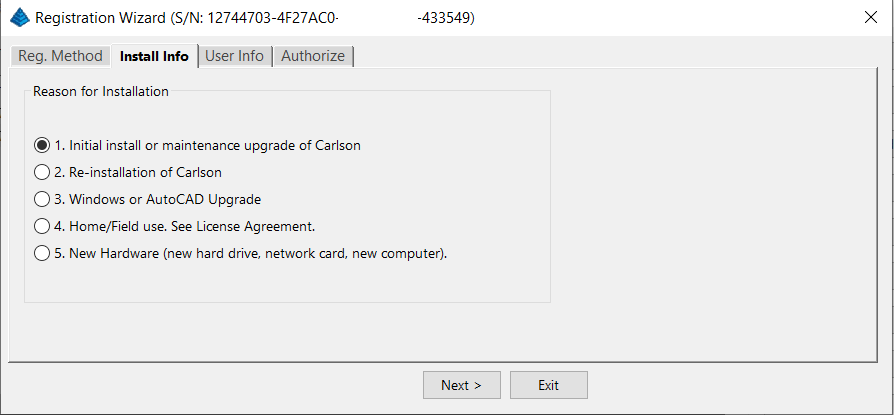
After installation and registration, Carlson provides a Registration Report that includes a “Change Key” and it’s a good idea to save the report and the change key.
And here’s a Pro-Tip for you! The Serial Number screen on your That CAD Girl Customer Portal has a “Customer Notes” section – that’s a great place to save your Change Key and other important information about each license!
FAQ: Does Carlson retire their products?
FAQ: What happens if I get a new computer and need to reinstall Carlson?
FAQ: Can I install my Carlson desktop software on two computers?
FAQ: Is it better to network Carlson than use standalone licenses?
FAQ: Does Carlson Software Still Offer Perpetual Licenses?
FAQ: How do I register my Carlson Software? And what are change keys?
System Requirements for Desktop Software
Technical Support & Training
You can see all the opportunities for training with That CAD Girl here and you can follow these links to see our FAQs about the training and technical support available from Carlson and That CAD Girl.
30-Day Trials
Once you decide to purchase, you won’t even need to uninstall. You can activate your software by simply updating your registration with your purchased serial number.
Frequently Asked Questions: What to Know Before Purchasing Carlson Software
1. What is Carlson Software and who should use it?
Carlson Software is a leading solution for land surveying, civil engineering, grading, and utility contractors. It offers powerful tools for site design, construction layout, data collection, and project management, making it ideal for professionals in land development and infrastructure projects.
2. What are the main features of Carlson Software for land development?
- Advanced survey data collection and processing
- 3D site modeling and earthwork calculations
- Road and subdivision design tools
- Utility and drainage design modules
- Seamless integration with GPS and total station hardware
- CAD drafting and mapping capabilities
- Automated grading and volume calculations
- Compatibility with DWG and DXF file formats
3. What types of licenses and versions are available?
Carlson Software offers perpetual, subscription, and network licenses. Choose from modules like Survey, Civil, Hydrology, GIS, and Takeoff. Bundle packages are available for comprehensive land development needs.
4. What are the system requirements and compatibility details?
Carlson Software runs on Windows-based PCs and is compatible with most CAD platforms, including AutoCAD and IntelliCAD. Check the latest system requirements on the Carlson website to ensure optimal performance.
5. How do I purchase Carlson Software?
You can buy Carlson Software directly from authorized dealers or the official Carlson website. Discounts may be available for multi-seat, educational, or government purchases.
6. Is technical support and training available?
Yes. Carlson provides extensive customer support, including phone, email, and online resources. Training options include webinars, tutorials, and in-person classes tailored for land surveyors and civil engineers.
7. Can I try Carlson Software before buying?
A free trial version is available for download. The trial allows you to explore core features relevant to surveying, civil engineering, grading, and utility design.
8. How are updates and upgrades handled?
Annual maintenance plans include software updates and technical support. Upgrades to new versions are available for users with active maintenance agreements.
9. What should I consider before purchasing?
- Ensure compatibility with your existing hardware and CAD platforms
- Identify which modules best fit your land development projects
- Review training and support options for your team
- Consider long-term maintenance and upgrade costs
10. Where can I find more information?
Visit the Carlson’s website or contact a local dealer for personalized advice on solutions for land surveying, civil engineering, grading, and utility contracting.
MicroSurvey Software: Your Questions Answered
About MicroSurvey
Who is MicroSurvey?
MicroSurvey is a Canadian software developer that has been creating software for land surveyors, engineers, and mapping professionals since 1985.
Software Platform Options
What makes MicroSurvey software unique?
MicroSurvey’s desktop programs run on 64-bit Windows computers and work natively with DWG files, eliminating the need for file conversion. Their software is built to run on various CAD platforms, including IntelliCAD, AutoCAD, and BricsCAD.
What are the different ways I can purchase and use MicroSurvey software?
- With IntelliCAD: MicroSurvey CAD can be installed as a standalone program with an embedded version of IntelliCAD included.
- With embedded AutoCAD (OEM): MicroSurvey embeddedCAD includes an embedded version of AutoCAD and is a standalone product. Note that its functionality is more similar to AutoCAD LT.
- With AutoCAD: MicroSurvey inCAD can be installed on top of your separately purchased, full version of AutoCAD-based programs (excluding AutoCAD LT).
- With BricsCAD: SurveyTools for BricsCAD can be installed on top of your BricsCAD, or you can bundle BricsCAD Pro with your purchase.
Licensing and Upgrades
What licensing options does MicroSurvey offer?
MicroSurvey provides both perpetual and subscription licensing. Licenses can be for a single user or floating (network) licenses that can be shared among users on the same network. Licensing is cloud-based, so no dongle is required.
How do software upgrades work?
Upgrades can be purchased for the current version from the previous version. Upgrades are also available to customers with an active Customer Care Package. Crossgrades to different editions or platforms may also be available.
Maintenance and Support
What is the MicroSurvey Customer Care Package (CCP)?
The CCP is a 12-month service plan that provides software updates and technical support. New software license purchases include one year of CCP.
Other MicroSurvey Products
What is MicroSurvey STAR*NET?
STAR*NET is software that adjusts and analyzes 2D/3D survey networks to improve accuracy. It runs on 64-bit versions of Windows 10 and 11.
What is MicroSurvey FieldGenius?
FieldGenius is data collection software for land surveyors that runs on Android and 64-bit versions of Windows 10 and 11. A legacy version for Windows devices is also available but is no longer updated.
Getting Started
How can I determine which MicroSurvey program is right for me?
It is recommended that you request a 30-day trial to test the software.
Carlson Software: Your Questions Answered
About Carlson Software
Who is Carlson Software?
Carlson Software, based in Maysville, Kentucky, has been a developer of software for land development professionals since 1983. They offer specialized modules for land surveying, civil engineering, construction, and mining industries.
Software Platform Options
What are my options for running Carlson Software?
Carlson’s desktop programs can be installed on top of IntelliCAD or a separately purchased full-AutoCAD-based program. A license for the latest version of IntelliCAD is included with each purchase. Compatible AutoCAD-based programs include AutoCAD, AutoCAD Map, Land Desktop, and Civil 3D, but not AutoCAD LT.
Does Carlson offer a standalone version with an embedded CAD engine?
Yes, Carlson Survey and Takeoff can be purchased with an embedded AutoCAD (OEM) version. This is a standalone product and does not require a separate purchase of AutoCAD. However, the functionality is more akin to AutoCAD LT.
Compatibility
What versions of AutoCAD are compatible with Carlson Software?
You can run Carlson Software on earlier versions of AutoCAD, but you cannot run a version of Carlson that is older than your AutoCAD version. For example, Carlson 2024 is compatible with AutoCAD 2018-2024, while Carlson 2022 works with AutoCAD 2018-2022.
Licensing and Upgrades
What type of license does Carlson offer?
Carlson Software offers perpetual licenses, meaning you own the software after purchase. They also provide network licensing for an additional fee.
How do software upgrades work?
Upgrades are managed through the Annual Maintenance Plan. If your maintenance is active when a new version is released, you receive an automatic upgrade. New licenses include 90 days of maintenance. The cost to upgrade OEM products varies.
Getting Started
Can I try the software before buying?
Yes, it is highly recommended to request a 30-day trial to test the software for your specific needs.
progeCAD Software: Your Questions Answered
About progeCAD
What is the story behind progeCAD?
Founded in 1985, progeCAD co-founded the IntelliCAD Technology Consortium (“ITC”) in 1999 to create a comprehensive and fairly priced alternative to AutoCAD. They offer a native DWG 2D/3D CAD software with a familiar interface and powerful features at a low cost.
progeCAD Software Features
What are the key features of progeCAD?
progeCAD works natively with AutoCAD DWG files without any conversion, ensuring complete compatibility. It features an “AutoCAD Like” interface and supports AutoCAD file types, fonts, and plotting styles. progeCAD Professional includes 3D ACIS Solid Modeling and realistic rendering. It also offers more functions than AutoCAD LT at a fraction of the price of other major CAD software.
Licensing Options
What licensing solutions does progeCAD offer?
- Single+ (SL): Allows installation and use on two computers by the same person, but not simultaneously.
- USB Portable (USB): Install on multiple computers and use the software on one computer at a time by plugging in a USB dongle.
- Network (NLM): Install on unlimited PCs on a network and use concurrently based on the number of licenses purchased. Licenses can be temporarily moved for offline use.
- Corporate One Site: Unlimited users at a single company location.
- Corporate Country: Unlimited users within the same country under one company name.
Maintenance and Support
What is iCARE?
iCARE is a one-year subscription-based maintenance and support program that provides all progeCAD updates, new versions, and free technical assistance.
Getting Started
Can I try progeCAD before I buy it?
Yes, it is highly recommended that you request a 30-day trial to test the software for yourself.
Why Buy from That CAD Girl?
Once you decide to purchase, you won’t even need to uninstall. You can activate your software by simply updating your registration with your purchased serial number.
Some content on this website was prepared with AI assistance. Please verify important information with the manufacturer or original source before making purchasing or financial decisions.
If you find the material on this website helpful, please consider supporting That CAD Girl by purchasing our products or services.
If you are interested in purchasing products or services we do not offer, we would love to refer you to one of our Trusted Partners. Please click here to send us a message with your request.
What you should know about purchasing CMS IntelliCAD
+
Jump to:
- About CAD-Manufacturing Solutions (CMS)
- About CMS IntelliCAD
- Operating System
- System Requirements for CMS IntelliCAD 15.0
- CAD Platform
- How and Where to Purchase
- Upgrades to New Versions, Competitive Upgrades and Crossgrades
- License Types
- License Terms
- Editions
- Software Trials
- Support & Training Options
About CAD-Manufacturing Solutions (CMS)
CAD-Manufacturing Solutions Inc (CMS), based in Azle Texas, has over 30 years of experience in the CAD industry. Originally known for its proprietary ProCADD software, CMS now develops and markets CMS IntelliCAD, which is built on the powerful and customizable IntelliCAD Technology Consortium (ITC) platform.
The team behind CMS has been deeply involved in CAD software development for decades and continues to rely on CMS IntelliCAD internally, including at a partner corporation focused on advanced crane innovation and design.
Click here to learn more about CAD-Manufacturing Solutions (CMS)
About CMS IntelliCAD
CMS IntelliCAD is a DWG-native CAD application offering 2D drafting, 3D modeling and BIM capabilities. It includes AutoCAD-like menus, a ribbon interface, advanced rendering and custom development via LISP, VBA, .NET, IRX and SDS.
The software is designed to support users transitioning from AutoCAD or other IntelliCAD-based platforms and includes customizable workspaces, menus, toolbars and Command: line access.
All editions support CAD standards, external references (Xrefs), DGN underlays and interoperability with other CAD and GIS formats.
What’s new in 15.0? The current version, CMS IntelliCAD 15.0, adds Drawing Compare (preview), AI photorealistic rendering (you plug in your own Google Gemini API key), the “Lookout” PAN method, live FILLET and CHAMFER previews and the ability to compile protected LISP (.FAS and .VLX). Click here for What’s new in CMS IntelliCAD 15.0
Click here to learn more about CMS IntelliCAD
Click here for a comparison between CMS IntelliCAD and AutoCAD
Operating System
CMS IntelliCAD 15.0 runs on 64-bit Microsoft Windows. Windows 10 is the minimum supported version. There is no 32-bit version anymore.
There’s no macOS version. CMS says running it in a virtual 64-bit Windows machine on a Mac requires a USB dongle license.
System Requirements for CMS IntelliCAD 15.0
- Operating System: 64-bit Microsoft Windows 10 or newer, kept updated and supported by Microsoft
- Processor: Intel Core i5 or comparable (faster recommended). Multi-core processors are supported.
- System Memory: 3 GB free RAM minimum for a full installation; 8 GB recommended
- Hard Disk Space: 6.5 GB free disk space for a full installation
- Display and Graphics: 1024 x 768 resolution or higher; graphics driver must support OpenGL ES (or switch CMS IntelliCAD to OpenGL). A dedicated graphics card with its own memory is recommended.
- Input Devices: Keyboard and mouse or other pointing device
Click here to learn more about System Requirements for CMS IntelliCAD
CAD Platform
All CMS IntelliCAD editions (PE, PE Plus and Easy Run) are built on the IntelliCAD platform. Version 15.0 is based on the IntelliCAD 15.0 engine and opens and saves DWG files up through the current 2018 format (used by AutoCAD 2018 through 2026).
How and Where to Purchase
CMS IntelliCAD can be purchased directly from CMS or through an authorized CMS IntelliCAD dealer.
Pricing is subject to change without notice and varies depending on edition, license type and add-ons.
If you would like a referral from That CAD Girl to one of our trusted partners, please click here to Send Us a Message with your request.
Upgrades to New Versions, Competitive Upgrades and Crossgrades
CMS IntelliCAD offers upgrades from previous versions, crossgrades between editions and competitive upgrades for users of other CAD programs. A valid serial number is required for any upgrade or crossgrade.
Maintenance builds within the same version (for example, a new 15.0 build) are free for licensed users. CMS strongly recommends that users of older versions upgrade, since newer Windows 11 security rules can block older builds from launching.
License Types
- Standalone: one user on ONE computer, even if you’d never use two computers at the same time. Move it with Help > License Manager > Deactivate on the old computer, then activate on the new one. Transfers are unlimited when you deactivate first. The two-activations-per-year limit applies only when you activate without a prior deactivation; a paid Support Subscription covers those extras.
- USB dongle: the dongle is the license. Install on any 64-bit Windows computer and run it wherever the dongle is plugged in, with no activation or deactivation. CMS offers a free USB Dongle Maker for 15.0 PE Plus (it needs a PE Plus Activation Key that hasn’t been activated yet). Replacements for lost or damaged dongles are a paid item.
- It isn’t listed in the online store right now, so ask CMS or an authorized CMS IntelliCAD dealer if you need it.
- Network: PE Plus concurrent (floating) seats, sold in packs such as 3, 5 and 10 users. Users can borrow a seat for up to 30 days.
- Easy Run: PE only, streamed to your Windows computer using Turbo.net technology. One user, no License Manager activation and it updates itself.
For step-by-step activation and moving to a new computer, see our FAQ: How do I download, install and activate CMS IntelliCAD?
License Terms
- Perpetual license: One-time payment (Standalone, USB dongle and Network)
- 365-day license lease
- Subscription: Easy Run is sold as an annual subscription that’s always kept up to date
Editions
- Premium Edition (PE): 2D/3D drafting, DWG compatibility, BIM attach (RVT and RFA), rendering and LISP/VBA/.NET customization
- Premium Edition Plus (PE Plus): Adds 3D ACIS solids, BIM import (IFC and RVT), STEP and IGES import/export and AEC entities like walls, doors, windows and stairs
Software Trials
CMS IntelliCAD can run as a free trial for 15 days. Download it from the CMS website and click Register Later when the registration window appears. After the trial, a valid commercial license is required for continued use.
If you would like our help requesting a trial of this software from an authorized CMS IntelliCAD dealer, please click here to Send Us a Message with your request.
Support & Training Options
- Free community forum: forums.intellicadms.com
- Optional annual CMS IntelliCAD Support Subscription: email technical support and license management, including extra activations
- Sales phone: +1 (817) 221-8855 (sales only)
- Online training courses (4 levels, 56 videos): free for customers running updated CMS IntelliCAD licenses
Click here for more information about CMS IntelliCAD training and support
Some content on this website was prepared with AI assistance. Please verify important information with the manufacturer or original source before making purchasing or financial decisions.
If you find the material on this website helpful, please consider supporting That CAD Girl by purchasing our products or services.
If you are interested in purchasing products or services we do not offer, we would love to refer you to one of our Trusted Partners. Please click here to send us a message with your request.
How do I download, install and activate Topcon MAGNET Office?
+Note: With the v2026.0 release, Topcon returned its office and field software to the MAGNET name. Topcon Office is now MAGNET Office, Topcon Field is now MAGNET Field and version numbers now follow the year (for example, MAGNET Office 2026.0).
Good news: once you’ve done it once, it’s pretty painless! Topcon MAGNET Office is downloaded from myTopcon NOW!, installed with a standard Windows installer and activated online with your Topcon ID and serial number.
This FAQ walks you through all of it, plus what to do when you get a new computer. Our screenshots were taken before the rebrand, so some screens may still say Topcon Office instead of MAGNET Office. The steps are the same.
Before you start, make sure your computer meets the MAGNET Office system requirements and has an internet connection for activation.
Jump to:
- Do I need a myTopcon account?
- How do I download MAGNET Office?
- How do I install MAGNET Office?
- How do I activate MAGNET Office?
- What happens the first time I open MAGNET Office?
- How do I reinstall MAGNET Office on a new computer?
- Can I install MAGNET Office on more than one computer?
- Where can I find more help from Topcon?
Do I need a myTopcon account?
Yes. You need a myTopcon account to download MAGNET Office and to watch Topcon’s activation videos. If you already have one, skip ahead to downloading MAGNET Office.
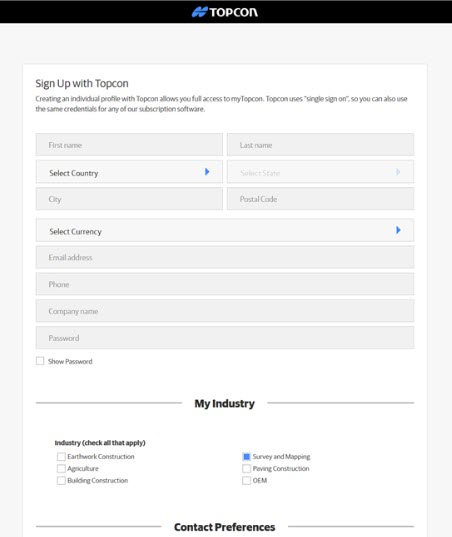
- Click here to create a myTopcon account.
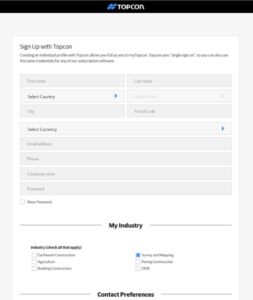
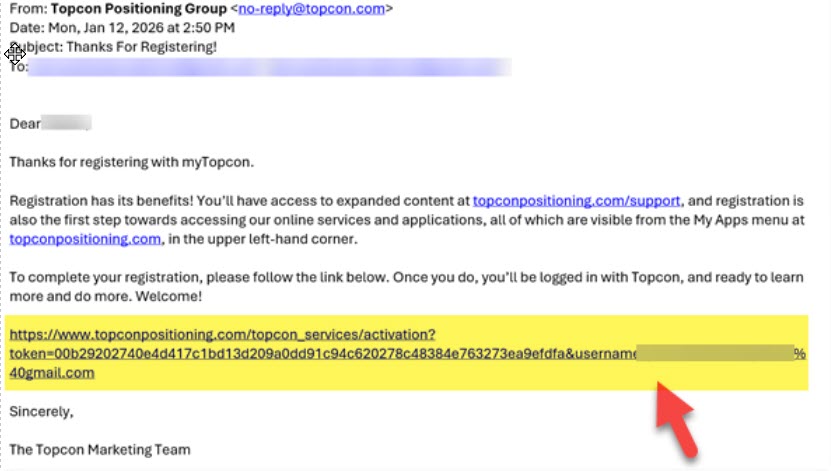
- Check the email address you registered with for a “Thanks For Registering” email from Topcon. Click the link near the bottom of that email to complete your registration.

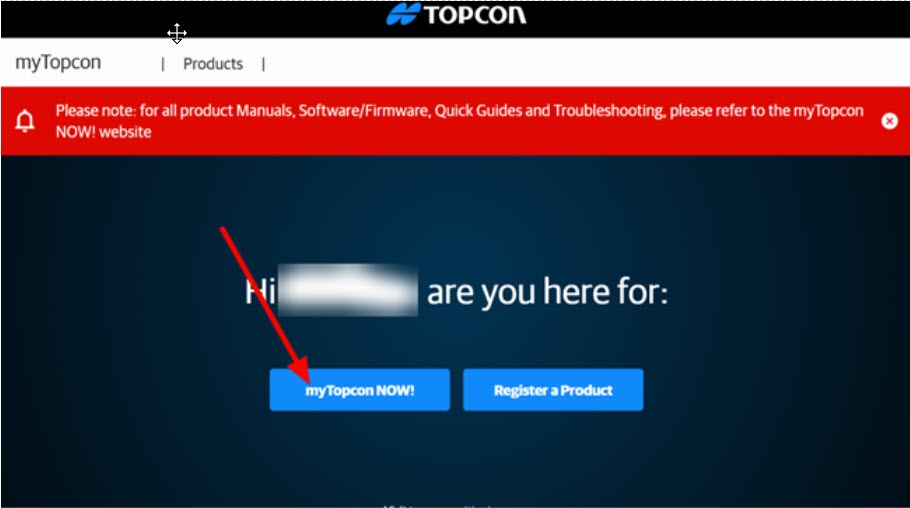
- myTopcon opens in your browser and a video may play over the page. When it’s over, close the video. You’ll see a page with your name on it. Click myTopcon Now!

How do I download MAGNET Office?
- Log in to myTopcon NOW! with your myTopcon username and password.

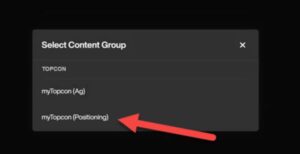
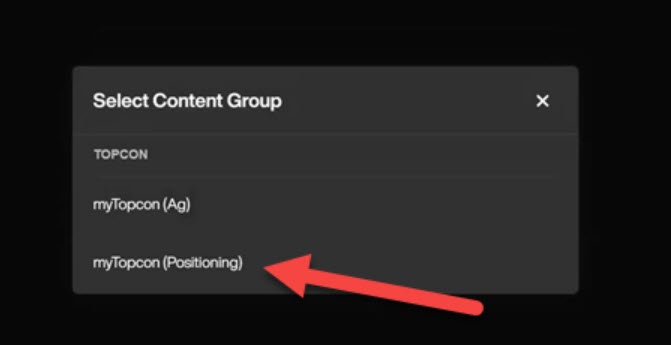
- When asked to select a content group, click myTopcon (Positioning).
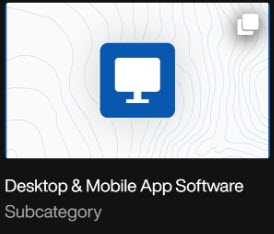
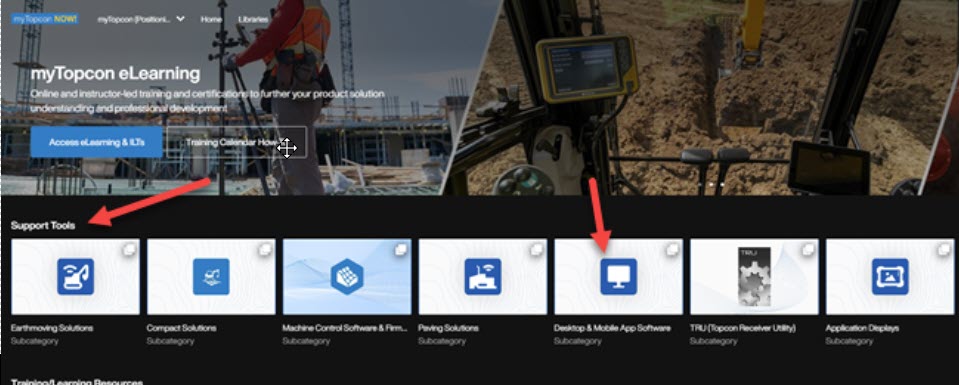
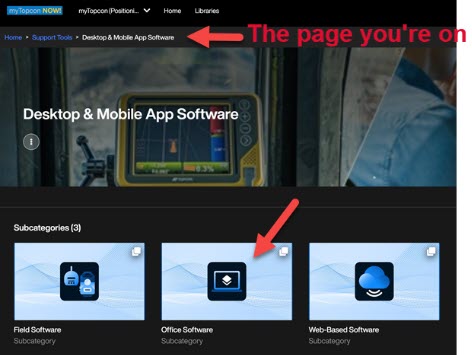
- The first row of options on the myTopcon NOW! home page is Support Tools. On that row, click the square labeled Desktop & Mobile App Software.

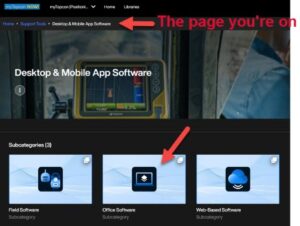
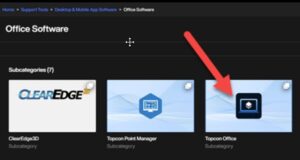
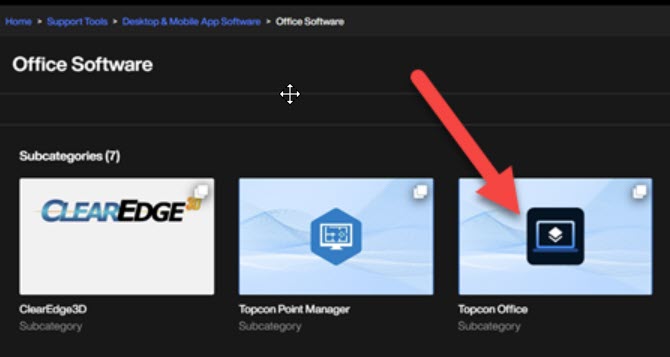
- Under the software subcategories, click Office Software.
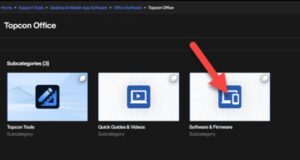
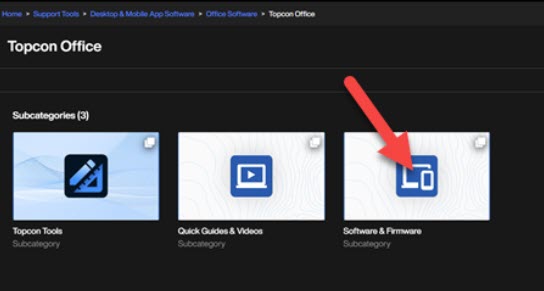
- Click the product you want to download. In our screenshot it’s still listed as Topcon Office.
- Click Software and Firmware.
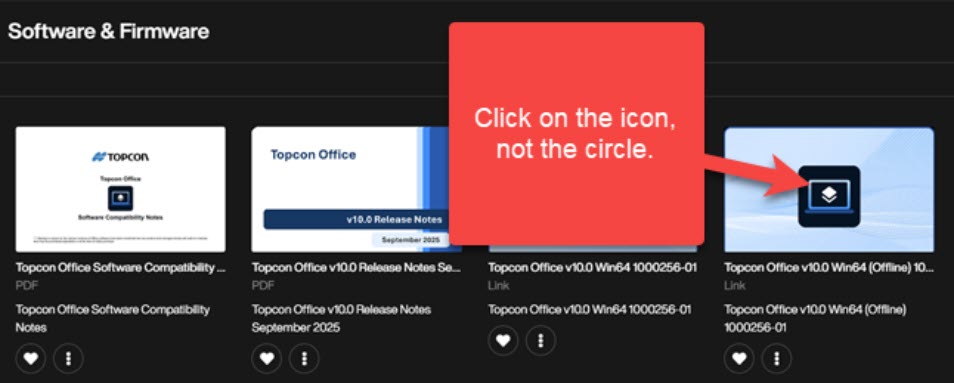
- Click the installer for the latest version. Be sure to click the icon, not the circle in the corner!

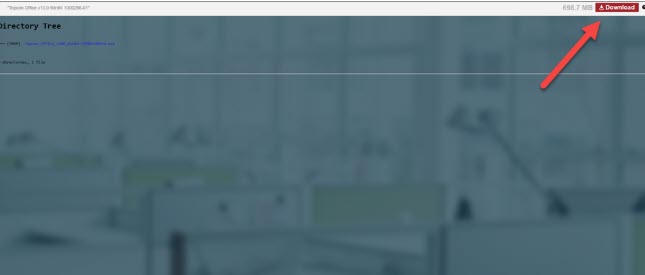
- Click the red Download button in the upper right corner of the screen. The download may take a few minutes depending on your internet connection.



How do I install MAGNET Office?
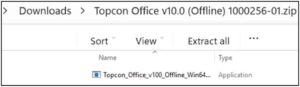
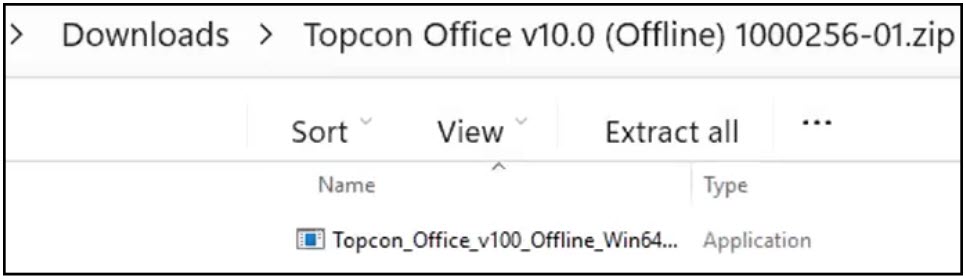
- When the download is finished, find the zip file in your Downloads folder. Right-click it and choose Extract All, then start the installer from the extracted files.
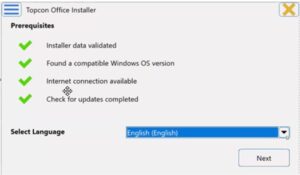
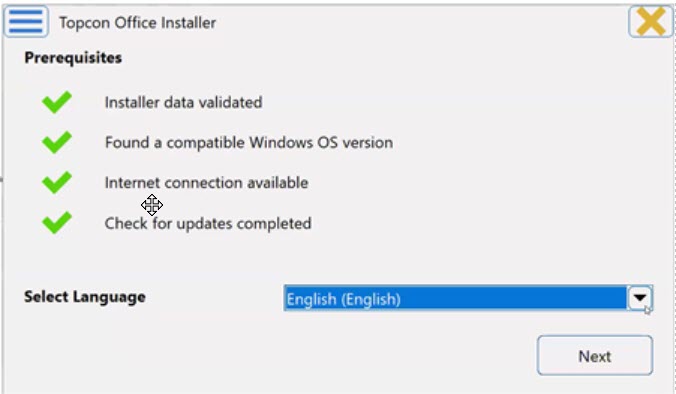
- Select your language and click Next.
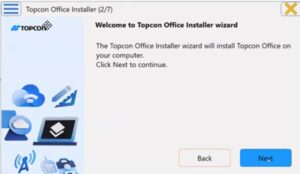
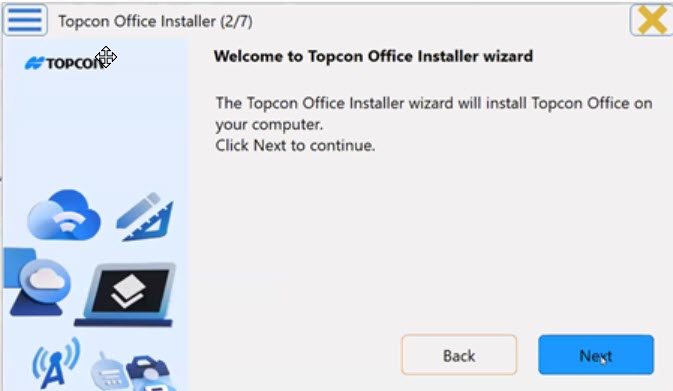
- When the Installer Wizard opens, click Next.
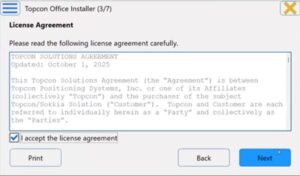
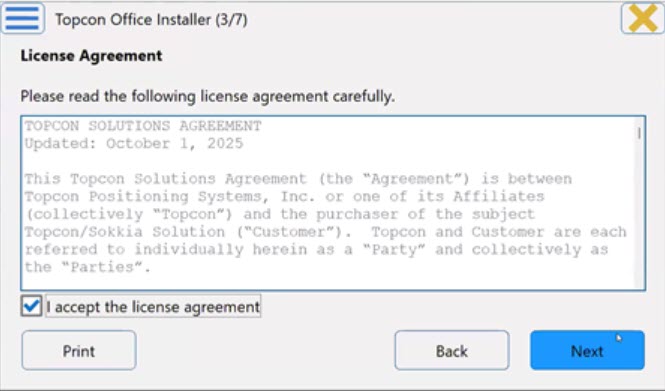
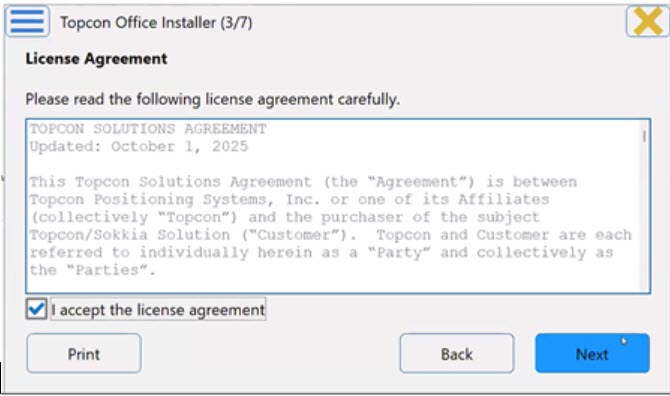
- Read the license agreement, check I accept the license agreement (click Print if you want a copy) and click Next.
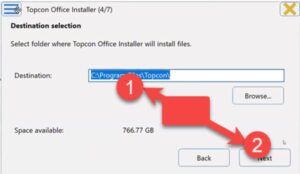
- Choose where you want the software installed and click Next.
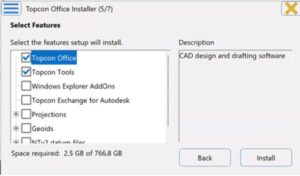
- Select the features you want to install and click Install.
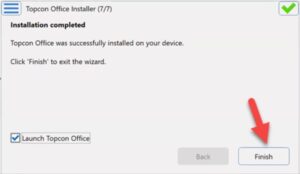
- When the installation is complete, make sure Launch is checked and click Finish.
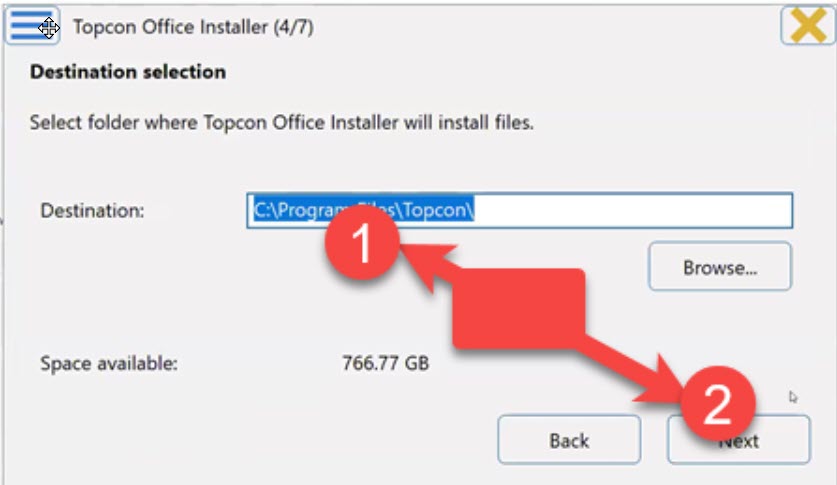
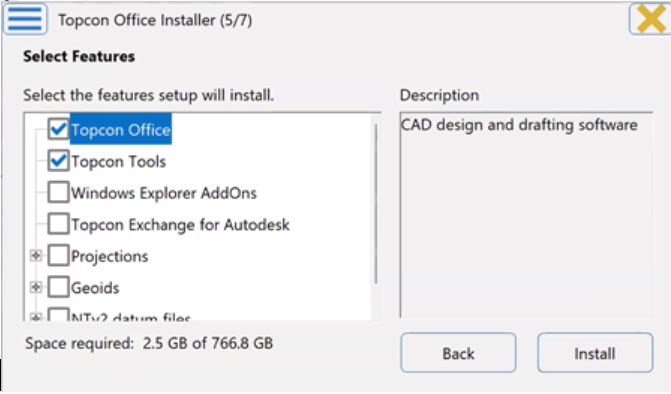
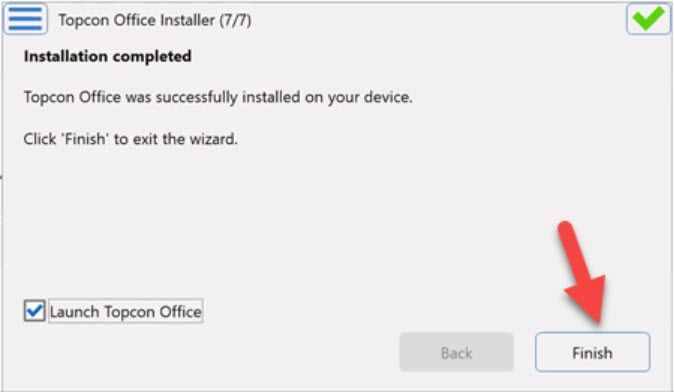
How do I activate MAGNET Office?
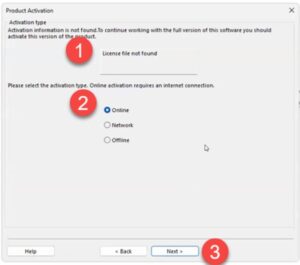
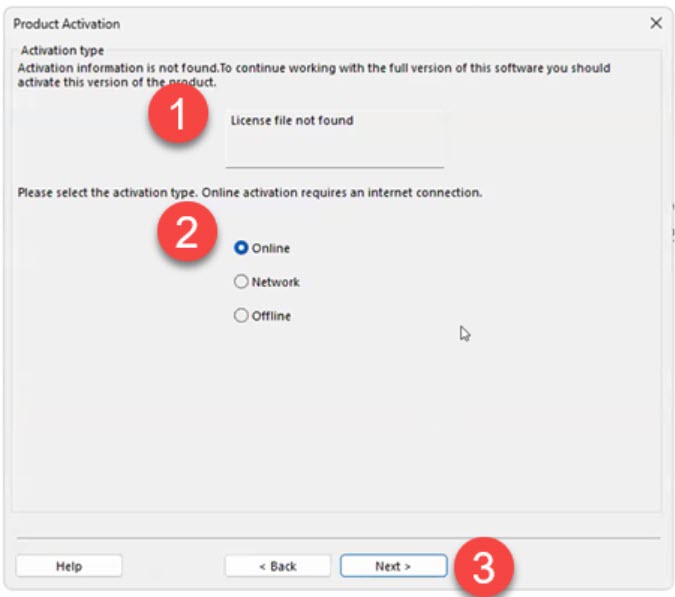
The first time you launch MAGNET Office, you’ll see a License file not found message. Don’t panic! That’s expected because your serial number hasn’t been activated yet.
Have your serial number and your Topcon ID (your myTopcon / MAGNET Enterprise login) handy, then:
- On the Product Activation screen, select Online and click Next.
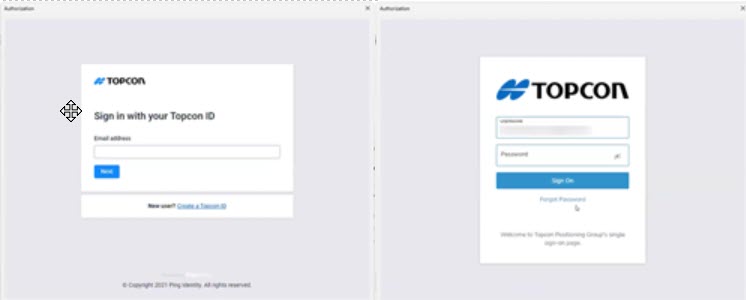
- Sign in with your Topcon ID.

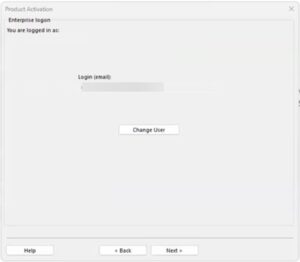
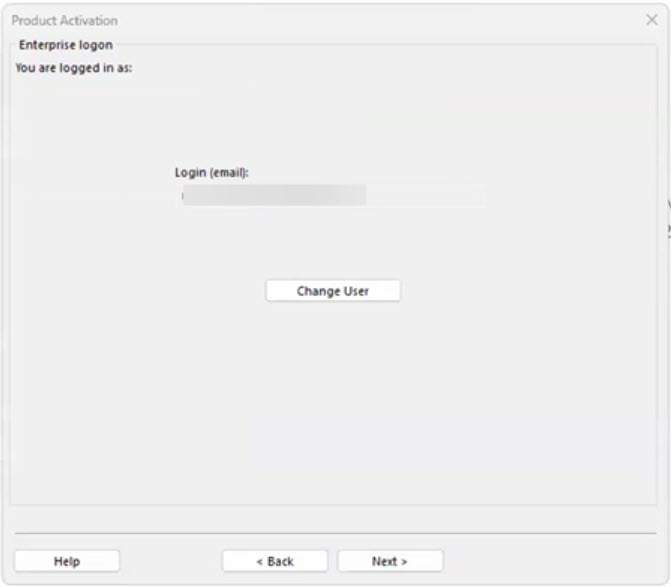
- You’re now logged in to Enterprise (the cloud side of your Topcon account). This step is required to activate your license. Check that your email address is correct in the Login field and click Next.
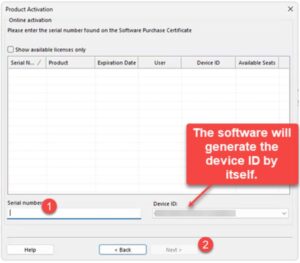
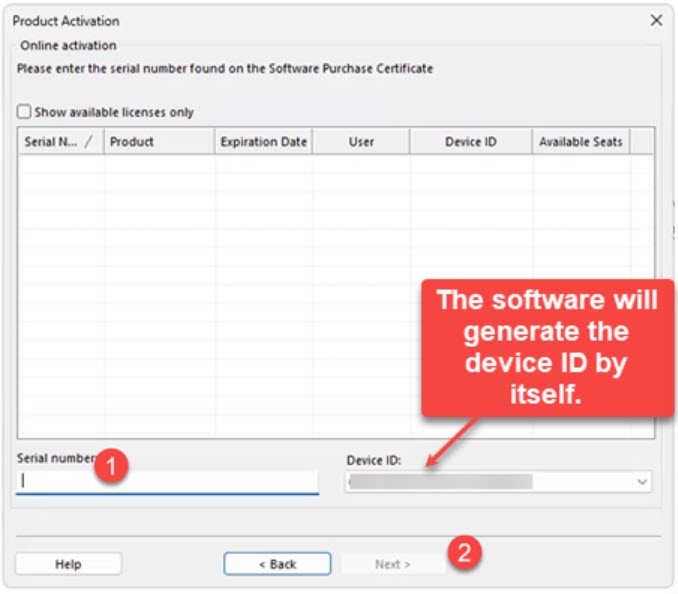
- Enter your serial number and click Next.
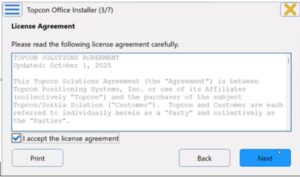
- Check I accept the terms of the license agreement and click Next.
- Review the Activation Result screen and click Finish.
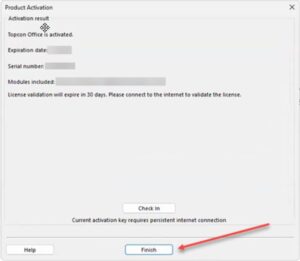
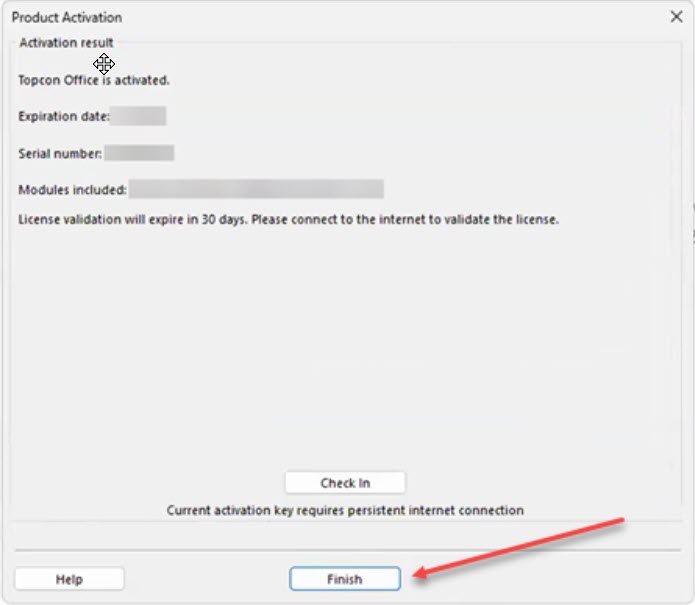
Topcon also has an offline activation method for computers that can’t get online. The catch: a license activated offline can’t use Topcon’s license Check In / Check Out feature, which is how you move a license to another computer. So I always recommend activating online if you can.
What happens the first time I open MAGNET Office?
You can launch MAGNET Office from the Windows Start menu or by typing its name in the Windows Search bar.
The first time it opens, the Program Setup Wizard walks you through some basic setup:
- Fill in the User Details, review the Folders and click Next.
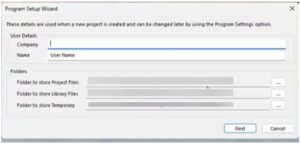
- Select your settings and click Finish.
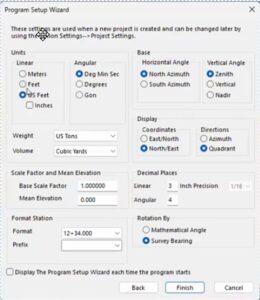
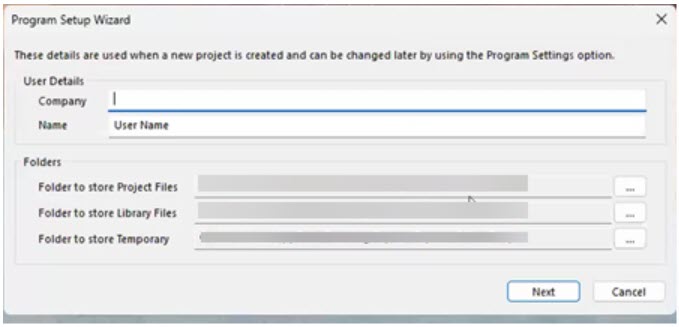
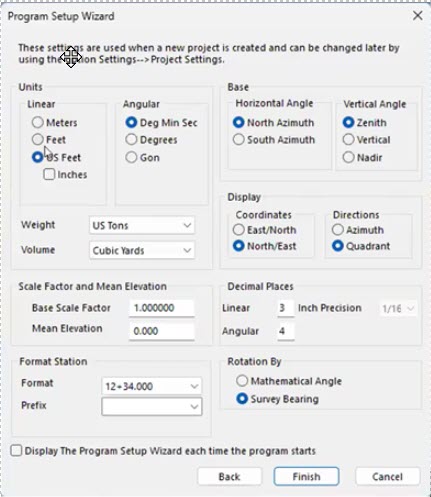
That’s it. MAGNET Office is installed, activated and ready for your configurations and projects!
How do I reinstall MAGNET Office on a new computer?
No problem. Your license is tied to the computer it’s activated on, so the trick is to release it from the old computer before you activate it on the new one. Topcon calls this Check In.
On the old computer (while it still works and is online):
- Open MAGNET Office and go to Help > License.
- Select Check In.
- Enter your Topcon ID (MAGNET Enterprise) credentials and click Next.
- Topcon warns you that the license will be checked in and the program will restart in Demo Mode. Select I understand and wish to continue and click Next.
On the new computer:
- Download and install MAGNET Office the same way you did the first time.
- Activate it online with the same serial number.
A few things to keep in mind:
- Check In only works for licenses that were activated online. If yours was activated offline, contact your dealer or Topcon support before you retire the old computer.
- If the old computer died before you could check the license in, contact your dealer or Topcon support to get the license released.
- MAGNET Office can also open in Demo Mode after you update to a new version or renew your Service Plan or Subscription. When that happens, just reactivate online with your serial number. Topcon’s Reactivating Topcon Office quick guide walks you through it.
Can I install MAGNET Office on more than one computer?
Installing isn’t really the limit. Activation is.
Each MAGNET Office serial number is activated on one computer at a time. Without an active license, MAGNET Office runs in Demo Mode. So if you want to work at the office one week and on your laptop the next, you can check the license in on one computer and activate it on the other, using the steps above.
If you need MAGNET Office running on two computers at the same time, you’ll need a license for each one. Talk to an authorized Topcon dealer about your options. See also What you should know about purchasing Topcon.
Where can I find more help from Topcon?
Topcon has quick guides and short videos for activation, Check In / Check Out and reactivation. The videos require a myTopcon NOW! login.
- Quick Guide PDF: MAGNET Office Online Activation
- Quick Guide PDF: MAGNET Office Offline Activation
- Quick Guide PDF: MAGNET Office License Check In and Check Out
- Quick Guide PDF: Reactivating Topcon Office
- Quick Guide Video: Topcon Office License Activation
- Quick Guide Video: Topcon Office License Check-in
Want to know what’s new in the latest release? See our running thread on recent improvements to MAGNET Office.
Some content on this website was prepared with AI assistance. Please verify important information with the manufacturer or original source before making purchasing or financial decisions.
If you find the material on this website helpful, please consider supporting That CAD Girl by purchasing our products or services.
If you are interested in purchasing products or services we do not offer, we would love to refer you to one of our Trusted Partners. Please click here to send us a message with your request.
What you should know about purchasing Carlson
+
About Carlson Software, the Company
Carlson Software, founded in 1983 and headquartered in Maysville, Kentucky, is a developer of CAD-based software for land surveying, civil engineering, construction and mining. The company provides desktop software, data collection solutions and OEM hardware integration through an extensive global dealer network. Carlson is known for delivering customer-focused software with perpetual licenses, low maintenance fees and long-term product support.
Click here to learn more about Carlson Software, the Company
About the Software
Carlson Software offers modular desktop solutions for land development professionals. Core modules for surveying, civil engineering and construction include Survey, Civil, GIS, Hydrology, Construction, CADnet, Trench and GeoTech.
Carlson works with both IntelliCAD and AutoCAD platforms and maintains full compatibility with DWG file formats. Specialized software is also available for 3D point cloud processing and embedded field data collection using Carlson SurvPC.
Carlson’s website
Operating System Compatibility
- Carlson 2020–2025 with IntelliCAD 9.x–12.x: 64-bit Windows 7, 8, 8.1, 10, 11
- Carlson on AutoCAD 2022 Embedded: Windows 10 and 11 (64-bit only)
- Takeoff R12, R13 / Survey OEM 2022–2025: Windows 10 and 11 (64-bit only)
- Vista and 32-bit versions are not supported
System Requirements
Carlson 2020–2025 with IntelliCAD 9.x–12.x:
- Minimum CPU: Intel Pentium 4 or comparable
- Recommended CPU: Intel i5 or i7 (use cpubenchmark.net for comparisons)
- Minimum RAM: 2 GB (64-bit Windows 7–11); 8+ GB recommended
- Graphics card: Compatible with OpenGL 1.4 or higher
- Recommended GPU: Discrete Nvidia Geforce preferred; ATI/AMD acceptable but less consistent driver support
- Not recommended: Nvidia Quadro and powerful gaming cards
Carlson with AutoCAD 2022 Embedded (including Takeoff R12, R13 / Survey OEM 2022–2025):
- OS: 64-bit Windows 10 or 11
- Processor: Basic 2.5–2.9 GHz; Recommended 3+ GHz
- RAM: 8 GB minimum, 16 GB recommended
- Disk Space: 10 GB free for installation
- Monitor: 1920 x 1080 or higher, up to 3840 x 2160
- Display card: Minimum 1 GB GPU with DirectX 11; Recommended 4 GB GPU with DirectX 12
- Browser: Internet Explorer 11 or later
Click here to learn more about Carlson’s System Requirements
CAD Platform Options
Carlson Software modules provide options for CAD platform:
- “for CAD” programs include a license of IntelliCAD
- Embedded AutoCAD (OEM) programs include a license of AutoCAD OEM
- Modules with IntelliCAD can also be installed on full AutoCAD, AutoCAD Map or Civil 3D
How and Where to Purchase
Carlson Software is available for purchase directly from Carlson or through an authorized dealer network.
Upgrades and Crossgrades
Carlson users can purchase upgrades from older versions at discounted prices. Crossgrades are also available for switching between platforms or changing product bundles.
Maintenance customers receive version upgrades annually (typically each fall). Users without maintenance can upgrade their perpetual license at any time.
License Types and Terms
- Perpetual Standalone: One-time purchase with two activations per seat
- Perpetual Network: Floating license with server-based access and license borrowing
Users may choose software modules individually or as part of bundled suites such as Survey/Civil, Civil Suite or Takeoff Suite.
Software Trials
Free 30-day trials of Carlson desktop software are available.
Support and Training Options
Carlson Software provides technical support by email and phone.
That CAD Girl offers a variety of training options for CAD and Carlson Software including live, custom training, recorded sessions and printed manuals.
Some content on this website was prepared with AI assistance. Please verify important information with the manufacturer or original source before making purchasing or financial decisions.
If you find the material on this website helpful, please consider supporting That CAD Girl by purchasing our products or services.
If you are interested in purchasing products or services we do not offer, we would love to refer you to one of our Trusted Partners. Please click here to send us a message with your request.
What is “The Little CAD Engine That Could” Website?
+Across all software platforms, the nature of bug fixes is that, when you fix one… you might create several more. And the new ones may be absolute show-stoppers that Murphy’s Law guarantees will happen on a weekend when projects need to be completed and no one is on-duty at Carlson to help.
Fear of that happening on a broad-scale is one reason that Carlson only posts a new Build, with updates to both the IntelliCAD and Carlson programs, every few months.
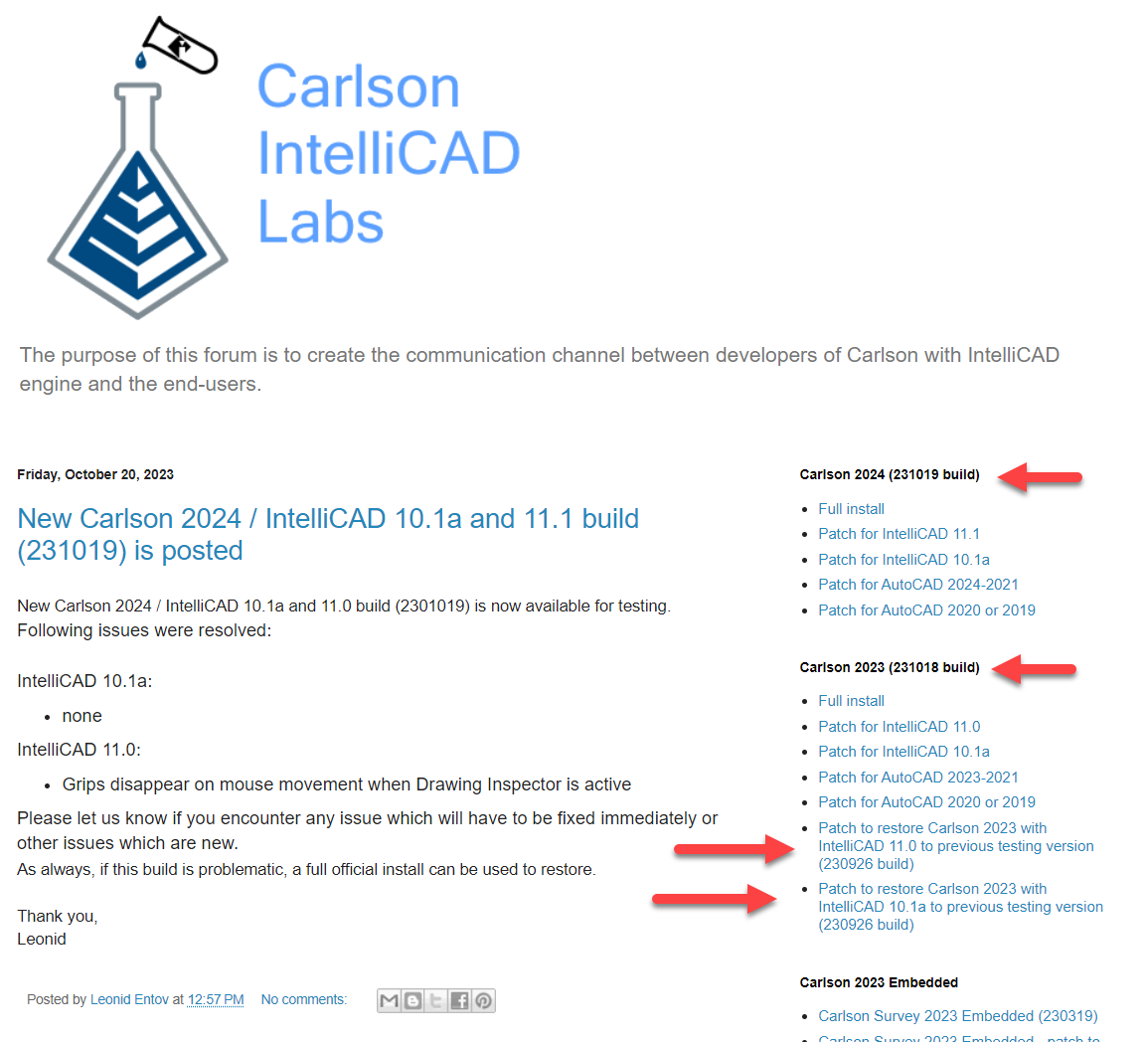
So, as a way to incorporate and test more often, Carlson’s development team has been posting interim TESTING Builds to a separate website – The Little CAD Engine That Could – for many years.
Users who are comfortable working in testing/beta releases of Carlson with IntelliCAD can find additional testing Builds at this website and, if you report a bug to Carlson Support, they may point you here as well.
Two of my favorite things about the posted Builds at The Little CAD Engine That Could are
1) there is a Comment section that allows the developers to describe the bugs that have been fixed in the Build and allows users to provide feedback and comments and
2) in addition to providing links to update to the newer testing Build, they also provide links to revert to previous Builds that may end up being more stable.
FAQ: How do I know if I’m running the latest build of my Carlson Software?
FAQ: How can I find out when new versions or builds of Carlson are released?
FAQ: What is the latest and greatest version/build of my Carlson Software? (a running thread)
FAQ: Where do I find the build date or build number of my Carlson Software?
Some content on this website was prepared with AI assistance. Please verify important information with the manufacturer or original source before making purchasing or financial decisions.
If you find the material on this website helpful, please consider supporting That CAD Girl by purchasing our products or services.
If you are interested in purchasing products or services we do not offer, we would love to refer you to one of our Trusted Partners. Please click here to send us a message with your request.
What are the recent improvements to Topcon’s MAGNET Office software? (a running thread)
+
Note: With the v2026.0 release, Topcon returned its office and field software to the MAGNET name. Topcon Office is now MAGNET Office, Topcon Field is now MAGNET Field and version numbers now follow the year (for example, MAGNET Office 2026.0).
Topcon release notes provide information about each release including System Requirements, New Features and Improvements and bug fixes. Pick a release below to jump to our quick take and the hot features, then follow the link to the full notes. Newest releases are listed first.
Jump to a release:
- MAGNET Office v2026.0 (July 2026)
- Topcon Office v10.1 (December 2025)
- Topcon Tools v10.0 (September 2025)
- Topcon Office v9.1.1 (April 2025)
- Topcon Office v9.1 (January 2025)
MAGNET Office v2026.0
Effective July 2026: click here for the MAGNET Office v2026.0 Release Notes (PDF from Topcon, opens at New Features and Improvements)
MAGNET Office 2026.0 is a big one and not just because of the return to the MAGNET name. We love having an AI chatbot right inside the program for quick answers. The long list of import and point cloud upgrades will save real time in the office.
- AI Chatbot – Get quick, context-aware answers and troubleshooting help without leaving the program.
- Twist Screen – Rotate the view so North is not at the top, for display only, without touching your coordinates.
- Right-Click Search – Find and run a command by typing any part of its name.
- Spell Check – Catch typos in project text as you type or check the whole job at once.
- Lane Marking Extraction – Pull road lane lines from point clouds as elevated strings ready for resurfacing work.
We’re excited to announce that our Topcon/Sokkia suite of products is returning back to the “MAGNET” name to unify our solutions and continue with the widely accepted products.
As part of this change, version numbers will now follow a year-based format (eg: MAGNET Office 2026.0), making it easier to identify the latest release.
Topcon Office v10.1
Effective December 2025: click here for the Topcon Office v10.1 Release Notes (PDF from Topcon, opens at Improvements and Resolutions)
Topcon Office v10.1 is a light maintenance release that is mostly fixes plus one nice addition for international teams. If you work with GeoTIFFs, PDF backgrounds or merged DTMs, it is worth the update.
- Chinese Language Option – Switch the program to Chinese under Help > Languages.
- Merge DTM Fix – Merging three or more DTMs works correctly again.
- GeoTIFF Orientation Fix – GeoTIFF images no longer display flipped.
- Transparent PNG Backgrounds – Background images now honor PNG transparency.
- PDF Vector Import Fix – Vectors now import from PDFs that have no layers and a dot in the file name.
Topcon Tools v10.0
Effective September 2025: Topcon has not posted public release notes for this version. Registered users can find them by signing in to myTopcon with a Topcon ID or ask an authorized Topcon dealer for a copy.
Topcon Tools v10.0 focused on processing and reporting, which is where Tools users spend most of their time. The new least squares adjustment and direct Excel and Word reports are the standouts for us.
- New Least Squares Adjustment – Adjust survey data with a new least squares routine and a matching report item.
- Excel and Word Reports – Send reports straight to Microsoft Excel or Word with cleaner formatting.
- Ionospheric Delay Maps – Use IONEX files during GNSS post-processing for ionospheric corrections.
- Tectonic Plate Motion Models – Calculate velocities and import or export coordinates with velocities in the coordinate calculator.
- Civil 3D 2025 and Revit 2025 Support – Keep exchanging data with current Autodesk releases.
Topcon Office v9.1.1
Effective April 2025: Topcon has not posted public release notes for this version. Registered users can find them by signing in to myTopcon with a Topcon ID or ask an authorized Topcon dealer for a copy.
Topcon Office v9.1.1 is a small patch release with critical fixes only, so there is nothing new to learn. If you were on v9.1 and ran into any of the issues below, this update is worth installing.
- Opening Jobs With Title Block Images – Jobs with an image in a drawing title block open again.
- DWG Export With Custom Linestyles – Exports no longer fail when ByLayer linework uses a custom linestyle.
- LS Transformation Results – Fixed incorrect 2D results when using only two point pairs in world coordinates.
- Takeoff Manager Tolerance – Overlapping subgrades get a higher tolerance in the Site Prep module.
- PDF Import Stability – Fixed a crash when importing certain PDF files.
Topcon Office v9.1
Effective January 2025: Topcon has not posted public release notes for this version. Registered users can find them by signing in to myTopcon with a Topcon ID or ask an authorized Topcon dealer for a copy.
Topcon Office v9.1 was a strong release for anyone who works from PDF plans. Layered PDF backgrounds with vector snapping make tracing cleaner and the rewritten LS Transformation cuts down on manual height adjustments.
- PDF Layers in Background Images – Keep and toggle individual PDF pages and layers in a panel that stays open while you work.
- Vector Snap for PDFs – Snap to endpoints, midpoints and intersections in vector PDFs.
- Rewritten LS Transformation – Choose 2D, 2D+1D or 3D methods with automatic height adjustment and a new report.
- Over-Excavate Takeoff Surfaces – Combine a design or subgrade surface with over-excavation areas into one surface (Site Prep).
- Road Templates as Corridor Templates – Import TP3, RD3 and MJF road templates straight into the corridor template library.
Some content on this website was prepared with AI assistance. Please verify important information with the manufacturer or original source before making purchasing or financial decisions.
If you find the material on this website helpful, please consider supporting That CAD Girl by purchasing our products or services.
If you are interested in purchasing products or services we do not offer, we would love to refer you to one of our Trusted Partners. Please click here to send us a message with your request.
What are the recent improvements to MicroSurvey software? (a running thread)
+As of October 8, 2026, the current releases are MicroSurvey CAD 2027, embeddedCAD 2027, inCAD 2027, SurveyTools for BricsCAD V26 and STAR*NET 14.
Jump to:
- MicroSurvey CAD (2027 | 2026)
- MicroSurvey embeddedCAD (2027 | 2026.1 and 2026)
- MicroSurvey inCAD (2027 | 2026.1 and 2026)
- SurveyTools for BricsCAD (V26 | V25)
- MicroSurvey STAR*NET (14 | 13)
MicroSurvey CAD
MicroSurvey CAD 2027 (July 2026)
Version 27.0.3.9964, released July 29, 2026
MicroSurvey CAD 2027 is a big one. It moves from the IntelliCAD 11.1 engine to 14.1, which brings a long list of everyday drafting upgrades along with faster performance on large surfaces. If you’ve been waiting for a good reason to upgrade, this is it.
Hot features:
- Faster TIN navigation – pan, zoom and orbit are now 70% faster with large TIN surface files.
- Smarter Trim and Extend – no need to preselect boundaries and Trim, Offset and Extend preview the result before you click.
- Dark theme – a new dark theme (plus light and gray) to reduce eye strain.
- Tables and data extraction – pull drawing data into tables and export table contents to CSV.
- QR codes – add QR codes to your drawings with the new QRTEXT and QRLEADER commands.
Release notes: MicroSurvey CAD 2027 Release Notes
MicroSurvey CAD 2026 (November 2025)
Version 26.0.2.8725, released November 25, 2025
The 2026 release is all about organizing your field data. Survey Groups sort your points and linework automatically on import, so building a clean surface or exporting just your control points takes a few clicks instead of a lot of layer juggling.
Hot features:
- Survey Groups – sort points, linework, blocks and text into groups you can show, hide and filter.
- AutoMAP “Add to Survey Groups” – points go into the right groups automatically when you import field data.
- Miscoded Points group – points with descriptions that aren’t in your AutoMAP land in one place for review.
- Point cloud import (Ultimate) – import e57, LAS and PTX point clouds without additional software licenses.
- Floating license visibility – see which computer has checked out a floating cloud license.
Release notes: MicroSurvey CAD 2026 Release Notes
Older versions: MicroSurvey CAD release history
MicroSurvey embeddedCAD
MicroSurvey embeddedCAD 2027 (July 2026)
Version 27.0.2.9991, released July 28, 2026
embeddedCAD 2027 moves to the AutoCAD OEM 2027 engine, so you get the latest platform along with MicroSurvey’s survey tools. New block conversion and geometry cleanup tools also help tidy up messy drawings.
Hot features:
- 2027 engine – runs on the AutoCAD OEM 2027 engine for the latest performance and stability.
- BSEARCH – finds identical objects and converts them into blocks.
- Geometry Cleanup palette – a new palette for reviewing and cleaning up drawing geometry.
- Background image loading – raster images can load in the background while a drawing opens.
- Faster Active Coordinate Editor – selecting rows with click and drag or Shift+click is much faster.
Release notes: MicroSurvey embeddedCAD 2027 Release Notes
MicroSurvey embeddedCAD 2026.1 and 2026 (May 2026 and November 2025)
Version 26.1.1.9667, released May 28, 2026 | Version 26.0.2.8682, released November 21, 2025
The 2026 release moved embeddedCAD to the AutoCAD OEM 2026 engine and 2026.1 followed with Survey Groups. 2026.1 also made busy commands a lot quicker, which you’ll notice on big projects.
Hot features:
- Survey Groups (2026.1) – automatically sort field data into groups by point description using AutoMAP.
- Faster commands (2026.1) – MOVE, Recoordinate Traverse and FieldGenius SyncWizard take about 40% of the time they used to on average.
- Smart Points right-click actions (2026.1) – Move, Move with Leader, Rotate and Reset right from the context menu.
- 2026 engine (2026) – runs on the AutoCAD OEM 2026 engine.
- Label style presets (2026) – a new .msz file replaces the old .cfg file for sharing label style presets.
Release notes (covers both versions): MicroSurvey embeddedCAD 2026.1 Release Notes
Older versions: MicroSurvey embeddedCAD release history
MicroSurvey inCAD
MicroSurvey inCAD 2027 (July 2026)
Version 27.0.2.10036, released July 28, 2026 (subscription only)
inCAD 2027 keeps MicroSurvey’s survey tools current with the 2027 releases of AutoCAD, Civil 3D and Map 3D. It’s mostly a compatibility release with a welcome speed-up and several fixes.
Hot features:
- 2027 support – works with the 2027 releases of AutoCAD, Civil 3D and Map 3D.
- Faster Active Coordinate Editor – selecting rows with click and drag or Shift+click is much faster.
- Label fixes – Windows fonts in your labeling defaults no longer cause a font file error and label scale factors carry over from older drawings.
Release notes: MicroSurvey inCAD 2027 Release Notes
MicroSurvey inCAD 2026.1 and 2026 (May 2026 and November 2025)
Version 26.1.1.9666, released May 28, 2026 | Version 26.0.2.8681, released November 21, 2025 (subscription only)
inCAD 2026 added support for the 2026 releases of AutoCAD, Civil 3D and Map 3D. Then 2026.1 brought Survey Groups and a big speed boost for everyday commands.
Hot features:
- Survey Groups (2026.1) – automatically sort field data into groups by point description using AutoMAP.
- Faster commands (2026.1) – MOVE, Recoordinate Traverse and FieldGenius SyncWizard take about 40% of the time they used to on average.
- Miscoded Points group (2026.1) – points with descriptions that aren’t in your AutoMAP land in one place for review.
- 2026 support (2026) – works with the 2026 releases of AutoCAD, Civil 3D and Map 3D.
- License check-out confirmation (2026) – a confirmation dialog before you take a floating network license offline.
Release notes (covers both versions): MicroSurvey inCAD 2026.1 Release Notes
Older versions: MicroSurvey inCAD release history
SurveyTools for BricsCAD
SurveyTools for BricsCAD V26 (February 2026)
Version 26.0.2.9121, released February 17, 2026
SurveyTools V26 brings MicroSurvey’s survey tools to BricsCAD V26, so you can work in the latest BricsCAD release. Licensing is also more flexible for subscription customers.
Hot features:
- BricsCAD V26 support – runs on the latest BricsCAD V26.
- Offline use with subscription licenses – a floating license can now be checked out for offline use when you have a subscription license.
- Floating license visibility – see which computer has checked out a floating cloud license.
- Faster copy and paste – CopyClip, PasteClip and Copy are much faster than in the previous release.
- Label style presets – a new .msz file replaces the old .cfg file for sharing label style presets.
Release notes: SurveyTools for BricsCAD V26 Release Notes
SurveyTools for BricsCAD V25 (June 2025)
Version 25.0.2.7580, released June 2, 2025
V25 brought Survey Groups to SurveyTools, which makes it much easier to keep field data organized without complicated layer names. Note that it needs BricsCAD V25.2 or newer within V25.
Hot features:
- BricsCAD V25.2 support – runs on BricsCAD V25.2 or newer (still V25.x).
- Survey Groups – sort points, lines, polylines, blocks and labels into groups you can show, hide and filter.
- AutoMAP “Add to Survey Groups” – points go into the right groups automatically when you import field data.
- Miscoded group – points with descriptions that aren’t in your AutoMAP land in one place for review.
- Filter by group – list only one group in the Active Coordinate Editor, making it easy to export just those points.
Release notes: SurveyTools for BricsCAD V25 Release Notes
Older versions: SurveyTools for BricsCAD release history
MicroSurvey STAR*NET
MicroSurvey STAR*NET 14 (February 2026)
Released February 19, 2026
STAR*NET 14 makes the Network Plot fast and smooth, even on large networks. It also makes it easier to run adjustments as automated scripts on virtual machines and servers without graphics hardware.
Hot features:
- Faster Network Plot – zoom, pan and orbit your network with minimal delays.
- View cube – an interactive view cube makes it easy to rotate and view your data.
- No Graphics option – install a version without the Network Plot that skips the graphics requirements.
- Auto Adjust from the command line – run /autoadjust with the same settings you use in the program.
- Chinese Traditional – multi-language support is back, so you can run STAR*NET in English or Chinese Traditional.
Release notes: MicroSurvey STAR*NET 14 Release Notes
MicroSurvey STAR*NET 13 (July 2024)
Released July 9, 2024
STAR*NET 13 helps catch a common field problem: the same point coded two different ways. It flags inconsistent descriptions and allows longer descriptions so nothing gets cut off.
Hot features:
- Inconsistent description checking – compares descriptions for repeated point IDs and appends any differences using your own delimiter.
- Inconsistent Description Summary – lists each flagged point with a link to the file line so you can review and edit it.
- Longer descriptions – the maximum description length went from 48 to 128 characters.
- Network plot font – choose the font used in the network plot window.
Release notes: MicroSurvey STAR*NET 13 Release Notes
Older versions: MicroSurvey STAR*NET release history
Ready to upgrade? Contact an authorized MicroSurvey dealer about your options.
Some content on this website was prepared with AI assistance. Please verify important information with the manufacturer or original source before making purchasing or financial decisions.
If you find the material on this website helpful, please consider supporting That CAD Girl by purchasing our products or services.
If you are interested in purchasing products or services we do not offer, we would love to refer you to one of our Trusted Partners. Please click here to send us a message with your request.
What are the recent improvements to BricsCAD? (a running thread)
+As of October 8, 2026, the current release is BricsCAD V26.2.08 (September 15, 2026).
Jump to:
- BricsCAD V26.2 (March 2026)
- BricsCAD V26.1 (October 2025)
- BricsCAD V25.2 (March 2025)
- BricsCAD V25.1 (October 2024)
BricsCAD V26.2 (March 2026)
V26.2 is a big mid-cycle update with a focus on making everyday work easier. The new BricsCAD Assist panel puts help right inside the program and the new FILTER panel makes it much easier to select exactly what you need. Civil users also get DEM surface import and export plus more than 20 civil improvements.
Hot features:
- BricsCAD Assist – an AI-powered chat panel that brings documentation, how-to tips and guidance right into BricsCAD.
- FILTER – build a query on DWG, BIM or mechanical properties to select or deselect exactly the entities you want.
- Health Advisor – checks each open drawing’s health in the background and lets you know when it can be improved.
- PDFSHXTEXT – converts SHX text in PDFs into editable text, so there’s no need to retype it.
- DEM surface import and export – bring DEM, GeoTIFF and ASCII Grid surface data into and out of BricsCAD.
Release notes for each V26.2 build (Windows):
- BricsCAD V26.2.08 – September 15, 2026 (fixes)
- BricsCAD V26.2.07 – June 23, 2026 (adds BIMPURGE to clean up oversized BIM library files)
- BricsCAD V26.2.05 – May 26, 2026 (fixes)
- BricsCAD V26.2.04 – April 28, 2026 (IFC import now brings in geocoordinates)
- BricsCAD V26.2.03 – March 31, 2026 (the V26.2 feature release)
Mac and Linux: Mac release notes | Linux release notes
Overview: What’s New in BricsCAD V26
BricsCAD V26.1 (October 2025)
V26 arrived in October 2025 with a long list of improvements across core CAD, civil, BIM, mechanical and point clouds in its first build. Two things to plan for before you upgrade: add-ons built on .NET must be rebuilt for .NET 8 and BricsCAD Shape has been discontinued. If you rely on add-ons, check with the developer that a V26 version is available.
Hot features:
- Stretch 3D solids with grips – select a face or edge and drag its grip to reshape a solid right in model space.
- MEASUREGEOM – measure distances, radii, angles, areas and volumes with one command.
- Civil section lines and section views – create sections along an alignment or string from TIN surfaces, gradings, strings, solids and more.
- TIN Volume Report – export a volume report to a CSV file or insert it as a table in the drawing.
- POINTCLOUDTRACE – draw connected polylines over a point cloud with a single click per segment.
Release notes for each V26.1 build (Windows):
- BricsCAD V26.1.08 – January 20, 2026 (BCOUNT with an empty selection now counts every block in the drawing)
- BricsCAD V26.1.07 – December 9, 2025 (files opened together from Windows Explorer can now open in the same BricsCAD session)
- BricsCAD V26.1.06 – November 12, 2025 (fixes)
- BricsCAD V26.1.05 – October 21, 2025 (the V26 launch release)
Mac and Linux: Mac release notes | Linux release notes
BricsCAD V25.2 (March 2025)
V25.2 was all about speed and polish. Printing, publishing and live sections can be up to 10 times faster in some cases and several everyday commands got friendlier. BricsCAD BIM also became officially certified for IFC4 Reference View (Architecture).
Hot features:
- Faster printing and publishing – print and publish jobs can run up to 10 times faster in certain cases.
- Faster live sections – drawings that contain a live section perform up to 10 times faster.
- ATTACH and CLIP – one command to attach and one to clip xrefs, images and PDFs.
- 3D Offset – offset lines, polylines, 3D polylines and civil strings while handling elevation differences.
- KML and KMZ import and export – bring KML and KMZ map files into BricsCAD and send your data back out.
Release notes for each V25.2 build (Windows):
- BricsCAD V25.2.07 – June 9, 2025 (the final V25 build)
- BricsCAD V25.2.06 – May 12, 2025
- BricsCAD V25.2.05 – April 14, 2025
- BricsCAD V25.2.04 – March 28, 2025
- BricsCAD V25.2.03 – March 17, 2025 (the V25.2 feature release)
Mac and Linux: Mac release notes | Linux release notes
Overview: What’s New in BricsCAD V25
BricsCAD V25.1 (October 2024)
V25 launched in October 2024 with a new Open dialog, a Set-Up Wizard and the new Civil String object that later releases build on. This version also announced that BricsCAD Shape would be retired in V26.
Hot features:
- New Open dialog – faster drawing selection, quick access folders, in-folder search and path pasting.
- Set-Up Wizard – choose a Classic, Modern or Tool Bars interface on a clean install.
- Civil Strings – a new 3D object made of line and curve segments, organized in String Groups.
- Line and curve labels – label line and curve segments in your civil drawings.
- SOLIDIFY – converts watertight mesh data into 3D solids.
Release notes for each V25.1 build (Windows):
- BricsCAD V25.1.07 – December 16, 2024
- BricsCAD V25.1.06 – November 18, 2024
- BricsCAD V25.1.05 – October 23, 2024 (the V25 launch release)
Mac and Linux: Mac release notes | Linux release notes
Need the release notes in another language? See Where can I find the release notes? in the BricsCAD Help Center.
Ready to upgrade? Contact an authorized BricsCAD dealer about your options.
Some content on this website was prepared with AI assistance. Please verify important information with the manufacturer or original source before making purchasing or financial decisions.
If you find the material on this website helpful, please consider supporting That CAD Girl by purchasing our products or services.
If you are interested in purchasing products or services we do not offer, we would love to refer you to one of our Trusted Partners. Please click here to send us a message with your request.
What you should know about purchasing Topcon
+
- About Topcon Positioning Systems
- About MAGNET Office, MAGNET Field and MAGNET Enterprise
- Operating System
- System Requirements
- CAD Platform
- How and Where to Purchase
- Upgrades to New Versions and Crossgrades to Different License Types or Modules
- License Options
- License Terms
- License Levels (Modules)
- Software Trials
- Support and Training Options
About Topcon Positioning Systems
Topcon Positioning Systems, headquartered in Livermore, California, develops precision positioning technology, software and workflow solutions for the construction, geomatics and agriculture markets. Its European headquarters are in Zoetermeer, Netherlands. Its parent company, Topcon Corporation, was founded in 1932 and is headquartered in Tokyo, Japan.
Click here to learn more about Topcon Positioning Systems
About MAGNET Office, MAGNET Field and MAGNET Enterprise
With the v2026.0 release, Topcon returned its office and field software to the MAGNET name. Topcon Office is now MAGNET Office, Topcon Field is now MAGNET Field and version numbers now follow the year (for example, MAGNET Office 2026.0). The products work together to move survey and construction data between the office, the field and machine control.
MAGNET Office (formerly Topcon Office) is CAD and design software for contractors and surveyors. It combines plans and survey data to build 3D digital terrain models for site survey, layout and machine control. Optional Site Prep and Survey modules add road and site design and finished survey CAD deliverables. Click here to learn more about MAGNET Office
MAGNET Field (formerly Topcon Field) is data collection software that turns a rugged tablet or compatible Android device into a field controller for Topcon GNSS receivers, robotic total stations, scanning robotic total stations and digital levels. It is used for land surveying, stakeout, construction layout, roadwork and utility mapping. Click here to learn more about MAGNET Field
MAGNET Enterprise (also called Topcon Enterprise) is a cloud service for sharing project data between office teams, field crews and machine operators. Files can be shared and converted for use in MAGNET Office, Sitelink3D and Autodesk or Bentley software. Click here for Topcon’s software eBook (PDF), which covers MAGNET Enterprise
Sitelink3D is a web-based service for managing, monitoring and supporting job sites. It syncs design data between the office, machines and field crews and offers remote view and control of connected machines. Click here to learn more about Sitelink3D
Not sure which products you need? See Which Topcon / MAGNET software do I need for the office? and Which Topcon / MAGNET software do I need in the field?
Operating System
As of October 8, 2026, these are the supported operating systems for the current releases:
- MAGNET Office 2026.0: Windows 10 and 11 (64-bit)
- MAGNET Field 2026.0: Windows tablets and compatible Android devices
- MAGNET Enterprise and Sitelink3D: Web-based services used through a web browser
System Requirements
System requirements change with each release. See our Topcon MAGNET Office system requirements FAQ for the current requirements.
CAD Platform
MAGNET Office is a standalone Windows program with its own drafting, design and surface modeling tools. It does not run on top of another CAD program. It imports and exports AutoCAD DWG and DXF files, and MAGNET Office 2026.0 added import of Revit (RVT) models.
If you also work in AutoCAD or Revit, Topcon Exchange for Autodesk adds a ribbon to those programs for creating Topcon machine control and survey files and sending them to the field through MAGNET Enterprise.
How and Where to Purchase
When purchasing Topcon software, you buy through Topcon’s network of authorized dealers and distribution partners. Pricing is subject to change without notice and varies by product, license term and selected modules.
To purchase Topcon software, please contact an authorized Topcon dealer.
Upgrades to New Versions and Crossgrades to Different License Types or Modules
New versions are included while your subscription or your Topcon Software Service Plan is current. Software downloads, activation and support resources are available through your myTopcon account.
Perpetual licenses include the first year of the Service Plan. After that, you renew the Service Plan each year to keep receiving new versions and support.
You can add the Site Prep or Survey module to MAGNET Office as your needs grow. To add modules or move between subscription and perpetual licensing, contact your Topcon dealer about your options.
To see what has changed in recent releases, see What are the recent improvements to Topcon’s MAGNET Field and Office software?
License Options
- Online Activation: MAGNET Office licenses are activated online, so you need an internet connection to activate the software.
- Check In / Check Out: Licenses managed through MAGNET Enterprise can be checked in and checked out so they can be moved between computers and shared across your team. Ask an authorized Topcon dealer how many seats you need and how offline use works for your licenses.
License Terms
- Perpetual License (Permanent License): A one-time purchase that includes the first year of the Topcon Software Service Plan for maintenance, updates and support, plus one year of MAGNET Enterprise. After the first year, the Service Plan is renewed annually for a fee.
- Subscription License: Includes the Service Plan, access to the latest features in each release and MAGNET Enterprise for the length of the subscription. Subscriptions are typically sold in 1- or 3-year terms, so check with an authorized Topcon dealer for current options.
- Sitelink3D (Service Points): Sitelink3D uses Topcon’s Service Point model. You add credit to your myTopcon account and points are used only when the service is in use.
License Levels (Modules)
MAGNET Office is sold as base software with optional modules:
- MAGNET Office: The base software for Sitelink3D and Enterprise connectivity, machine control and layout data prep and building 3D digital terrain models
- Site Prep Module: Adds road, site, corridor and resurfacing design, 2D PDF to 3D job files and takeoff and material quantities
- Survey Module: Adds finished survey CAD deliverables for property plots, subdivisions and land development and includes MAGNET Tools for processing and adjusting total station, GNSS and digital level data
Click here to learn more about MAGNET Office license levels (modules)
For help choosing a combination, see Which Topcon / MAGNET software do I need for the office?
Software Trials
To try the complete MAGNET Office or MAGNET Field software without limitation, Topcon dealers can provide a 30-day trial license.
If you would like help requesting a trial of this software, please contact an authorized Topcon dealer.
Support and Training Options
Topcon provides software downloads, documentation and support resources through myTopcon.
Click here for myTopcon support
MAGNET Office also has built-in help. Click the ? icon at the top right of a dialog or panel for context help, or use the AI chatbot added in MAGNET Office 2026.0 under Help > Chatbot.
For free and paid MAGNET Office training, see What training is available for Topcon / MAGNET Office?
Some content on this website was prepared with AI assistance. Please verify important information with the manufacturer or original source before making purchasing or financial decisions.
If you find the material on this website helpful, please consider supporting That CAD Girl by purchasing our products or services.
If you are interested in purchasing products or services we do not offer, we would love to refer you to one of our Trusted Partners. Please click here to send us a message with your request.
What you should know about purchasing BricsCAD
+
About BricsCAD
BricsCAD is a DWG-compatible CAD platform built for 2D drafting, 3D modeling, mechanical design and building information modeling (BIM). BricsCAD is now part of Octave, the software company spun off from Hexagon.
Click here to learn more about Octave
About BricsCAD-Based Software
BricsCAD supports 2D drafting, 3D modeling, mechanical design and BIM workflows. BricsCAD offers multiple editions built on the same platform:
- BricsCAD Lite – 2D drafting
- BricsCAD Pro – 2D and 3D modeling
- BricsCAD BIM
- BricsCAD Mechanical
- BricsCAD Ultimate – all-in-one suite
The applications offer a familiar AutoCAD-like interface and full compatibility with DWG, DXF, DGN, IFC and point cloud formats. BricsCAD runs on Windows, macOS and Linux and includes smart tools such as Blockify and CopyGuided.
Click here for a BricsCAD vs AutoCAD comparison
System Requirements
System requirements change with each release. See our BricsCAD system requirements FAQ for the current requirements on Windows, macOS and Linux.
CAD Platform
All BricsCAD applications (Lite, Pro, BIM, etc.) are built on the same BricsCAD core platform.
How and Where to Purchase
BricsCAD is available directly from BricsCAD and through authorized BricsCAD dealers. Pricing varies by edition and add-ons.
To purchase BricsCAD, please contact an authorized BricsCAD dealer.
Upgrades and Crossgrades
Perpetual licenses can be kept current with BricsCAD Maintenance, which includes automatic upgrades and support, or by purchasing version upgrades.
Subscription licenses include Priority Support and access to all new versions during the subscription term.
If you want to move between editions (e.g. Lite to Pro or Pro to BIM), contact an authorized BricsCAD dealer about your upgrade options.
License Options (License Modes)
- Academic License: Free 12-month access for students and faculty, renewable annually with valid academic ID
- Single-User License: One computer, one user, one OS
- Network License: Shared access on LAN (Local Area Network); available for perpetual or subscription licenses with 1-year maintenance
- Volume License: One license key used across a defined user base; available for perpetual or subscription licensing and includes a 1-year maintenance contract
Click to learn more about BricsCAD license options (license modes)
License Terms (License Types)
- Perpetual License
- Subscription License
Click to learn more about BricsCAD license terms (license types)
License Levels
- BricsCAD Lite: 2D drafting; no 3D modeling; supports LISP and APIs
- BricsCAD Pro: Adds full 3D modeling, rendering, constraints and 3rd-party application support
- BricsCAD BIM: All Pro features plus streamlined BIM workflow using DWG
- BricsCAD Mechanical: All Pro features plus complete mechanical toolset including sheet metal
- BricsCAD Ultimate: Combines BIM and Mechanical in one platform
Click here to learn more about BricsCAD license levels
Software Trials
You can trial BricsCAD Ultimate for 30 days. All features are enabled during this period. Use the SETLICENSELEVEL command to test other levels. After 30 days, a valid commercial license is required.
Click here to learn more about BricsCAD trial mode
If you would like help requesting a trial of this software, please contact an authorized BricsCAD dealer.
Support and Training Options
BricsCAD provides onboarding and learning resources through the BricsCAD Learning portal.
Technical support is available via the BricsCAD Help Center, including their knowledge base and ticket system.
Some content on this website was prepared with AI assistance. Please verify important information with the manufacturer or original source before making purchasing or financial decisions.
If you find the material on this website helpful, please consider supporting That CAD Girl by purchasing our products or services.
If you are interested in purchasing products or services we do not offer, we would love to refer you to one of our Trusted Partners. Please click here to send us a message with your request.
What you should know about purchasing MicroSurvey
+
About MicroSurvey Software
MicroSurvey Software, based in West Kelowna, British Columbia, has been developing survey and mapping software since 1985. MicroSurvey is part of Hexagon and serves surveyors, public safety and mapping professionals, with customers in over 100 countries. Its software is used for land surveying, mapping, law enforcement, forensics and accident reconstruction.
Click here to learn more about MicroSurvey Software
About the MicroSurvey Line of Products
MicroSurvey develops specialized software for land surveyors, civil engineers and construction professionals. Its products cover the workflow from field data collection through drafting, network adjustments and final deliverables, using industry-standard file formats such as DWG, DXF and LandXML.
MicroSurvey’s survey CAD software provides field to finish drafting, COGO, traverse adjustments, surface modeling, volume calculations and alignment design tools. It runs on your choice of CAD platform:
- MicroSurvey CAD runs standalone on an included IntelliCAD engine. Click here to learn more about MicroSurvey CAD
- MicroSurvey embeddedCAD runs standalone on an included AutoCAD OEM engine from Autodesk. Click here to learn more about MicroSurvey embeddedCAD
- MicroSurvey inCAD is a subscription-based plugin that adds MicroSurvey’s survey tools to your current Autodesk AutoCAD, Civil 3D or Map 3D subscription. Click here to learn more about MicroSurvey inCAD
- SurveyTools for BricsCAD is a subscription-based plugin that installs on top of a separately purchased license of BricsCAD. Click here to learn more about SurveyTools for BricsCAD
STAR*NET is least squares adjustment software that adjusts and analyzes 1D, 2D and 3D survey networks. It combines total station, level, GNSS and gyroscope data and supports GPS vectors, geoid modeling and detailed statistical reporting. Click here to learn more about STAR*NET
FieldGenius is field data collection software for total stations and GNSS receivers, with a map-based view, COGO, staking lists and cutsheet reporting. It runs on Windows and Android. Click here to learn more about FieldGenius
FieldGenius Legacy runs on Windows-based data collectors, tablets and desktop PCs. Click here to learn more about FieldGenius Legacy
Operating System
As of October 8, 2026, these are the supported operating systems for the current releases:
- MicroSurvey CAD 2027: Windows 11 (64-bit)
- MicroSurvey embeddedCAD 2027: Windows 11 (64-bit)
- MicroSurvey inCAD 2027: Windows 11 (64-bit)
- SurveyTools for BricsCAD V26: Windows 11 (64-bit)
- STAR*NET 14: Windows 10 and 11 (64-bit)
- FieldGenius: Windows 10 and 11 or Android
- FieldGenius Legacy: Windows 10, Windows Mobile and Windows CE
System Requirements
System requirements change with each release. See our MicroSurvey system requirements FAQ for the current requirements of each MicroSurvey desktop program.
CAD Platform
- MicroSurvey CAD: Standalone with an included IntelliCAD engine
- MicroSurvey embeddedCAD: Standalone with an included AutoCAD OEM engine
- MicroSurvey inCAD: Add-on for a current Autodesk AutoCAD, Civil 3D or Map 3D
- SurveyTools for BricsCAD: Add-on for BricsCAD (SurveyTools for BricsCAD V26 requires the latest BricsCAD V26)
How and Where to Purchase
When purchasing MicroSurvey software, you can buy directly from MicroSurvey or through its authorized dealer network. Pricing is subject to change without notice and varies by product, edition and license option.
To purchase MicroSurvey software, please contact MicroSurvey or an authorized MicroSurvey dealer.
Upgrades to New Versions and Crossgrades to Different License Types or Editions
New versions are included while your Customer Care Package (CCP) is current. With an active CCP you can update from inside the software by going to Help > Check for Updates. If you let your CCP lapse and renew more than 3 months after it expires, MicroSurvey prices the renewal as an upgrade.
MicroSurvey also offers an upgrade path for switching from USB key or network licenses to a floating license. To move between editions or products, contact MicroSurvey or an authorized MicroSurvey dealer about your options.
Click here to learn more about MicroSurvey maintenance and upgrades
License Options (License Types)
- USB License Key: The license is stored on a USB key plugged into the computer running the software. The key is activated after purchase and updated with MicroSurvey’s USB License Manager when new versions are released.
- Network License: The USB license key plugs into a license server computer on your network that runs MicroSurvey’s Network License Server software.
- Floating License: An internet-activated license that an administrator deploys, monitors and updates from an online MicroSurvey account. A floating license can be checked out for offline use, but nobody else can use that seat until it is checked back in or the checkout period ends.
Click here to learn more about MicroSurvey license options (license types)
License Terms
- Perpetual License: New perpetual licenses include a 12-month Customer Care Package (CCP). If your CCP expires, you can keep running the last version released before your CCP end date, but you lose access to new versions and MicroSurvey technical support until you renew. FieldGenius is available as a perpetual or subscription license.
- Subscription License: MicroSurvey inCAD and SurveyTools for BricsCAD are sold by subscription only and are activated with a License ID and Password. Without a current subscription, you can’t run new versions.
Refer to MicroSurvey’s End-User License Agreement (EULA) for the full license terms.
License Levels
Some MicroSurvey products are offered in more than one edition, each with different functionality. MicroSurvey’s pricing pages currently list:
- MicroSurvey CAD: Standard, Premium and Ultimate. The MicroSurvey CAD 2027 release notes also mention a Studio edition. Click here for the MicroSurvey CAD feature table
- MicroSurvey embeddedCAD: Premium. Click here for the MicroSurvey embeddedCAD feature table
- MicroSurvey inCAD: One level, sold by subscription. Click here for the MicroSurvey inCAD feature table
- SurveyTools for BricsCAD: One level, sold by subscription. Click here for the SurveyTools for BricsCAD feature table
- STAR*NET: Plus, Pro and Ultimate. Click here for the STAR*NET feature table
- FieldGenius: One level, sold as a subscription or perpetual license. Click here for the FieldGenius feature table
- FieldGenius Legacy: Premium. Click here for the FieldGenius Legacy feature table
Software Trials
MicroSurvey offers free 30-day demos of MicroSurvey CAD and FieldGenius. Its demo request page lists every MicroSurvey product. The MicroSurvey CAD demo is a complete, unrestricted version of the software. SurveyTools for BricsCAD also needs BricsCAD V26 installed, which you can try free for 30 days.
Click here to request a MicroSurvey demo
If you would like help requesting a trial of this software, please contact MicroSurvey or an authorized MicroSurvey dealer.
Support and Training Options
New MicroSurvey licenses include a 12-month Customer Care Package (CCP), formerly called the Annual Maintenance Subscription (AMS), which includes:
- Software updates and new versions
- Technical support from MicroSurvey’s experts
- Discounts on MicroSurvey live training and its on-demand online school
- Compatibility updates for the latest operating systems, IntelliCAD and AutoCAD versions
Click here to learn more about MicroSurvey’s Customer Care Package
MicroSurvey also offers self-paced online training courses, some of which are free.
Some content on this website was prepared with AI assistance. Please verify important information with the manufacturer or original source before making purchasing or financial decisions.
If you find the material on this website helpful, please consider supporting That CAD Girl by purchasing our products or services.
If you are interested in purchasing products or services we do not offer, we would love to refer you to one of our Trusted Partners. Please click here to send us a message with your request.
What’s the difference between Carlson’s annual maintenance and an Autodesk subscription?
+Please note: That CAD Girl is no longer an authorized Carlson Software dealer and isn't affiliated with Carlson. This article was accurate when it was written, but Carlson's products, pricing, licensing and policies may have changed since then, and we can't independently verify the current details.
We're still happy to offer Carlson training and support as far as we can without help from Carlson. For official or up-to-date information, please contact Carlson Software directly.
The main difference between Carlson’s maintenance plan and Autodesk’s subscription is that Carlson’s tech support is not tied to maintenance at all while Autodesk tech support is only available for no additional fee to those who are current on subscription.
Also, in the past few years, there have been so many changes to Autodesk’s Subscription policies that it’s practically impossible to keep up and know exactly what you’re getting for that big price tag.
Regardless of whether you’re current on maintenance, whether you’ve let it lapse, whether you’re using today’s version of the software or whether you’re using a version that’s 10 years old, tech support is free from Carlson.
You can view the Carlson Software Maintenance Policy here
Some content on this website was prepared with AI assistance. Please verify important information with the manufacturer or original source before making purchasing or financial decisions.
If you find the material on this website helpful, please consider supporting That CAD Girl by purchasing our products or services.
If you are interested in purchasing products or services we do not offer, we would love to refer you to one of our Trusted Partners. Please click here to send us a message with your request.
How do I know if I’m running the latest build of my Carlson Software?
+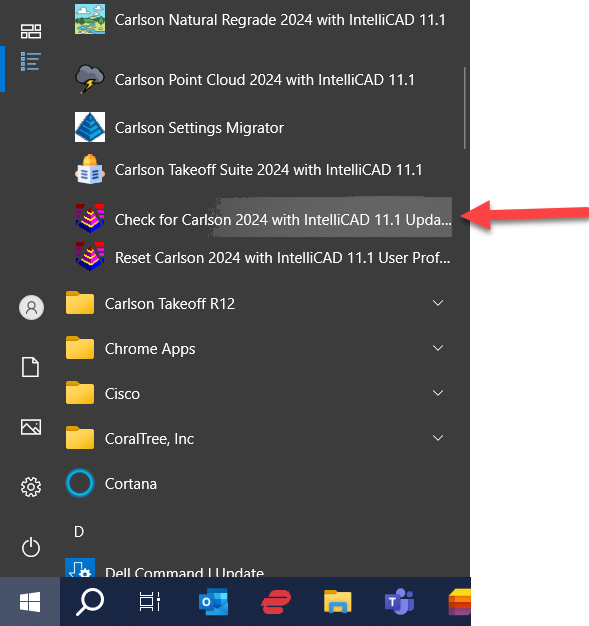
FAQ: Where do I find the build date or build number of my Carlson Software?
FAQ: What is the latest and greatest version/build of my Carlson Software? (a running thread)
FAQ: How can I find out when new versions or builds of Carlson are released?
Some content on this website was prepared with AI assistance. Please verify important information with the manufacturer or original source before making purchasing or financial decisions.
If you find the material on this website helpful, please consider supporting That CAD Girl by purchasing our products or services.
If you are interested in purchasing products or services we do not offer, we would love to refer you to one of our Trusted Partners. Please click here to send us a message with your request.
What is the latest and greatest version/build of my Carlson Software? (a running thread)
+FAQ: Where do I find the build date or build number of my Carlson Software?
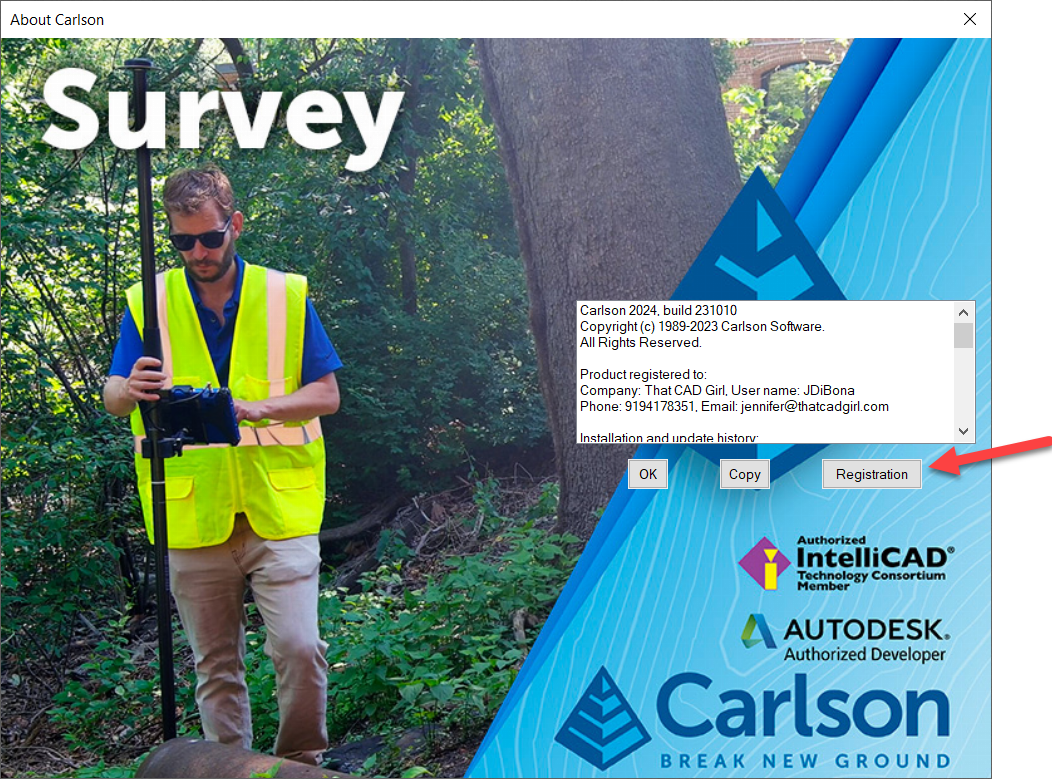
Next, click to highlight your Serial Number and click Downloads to open the download screen specific to your product and version.
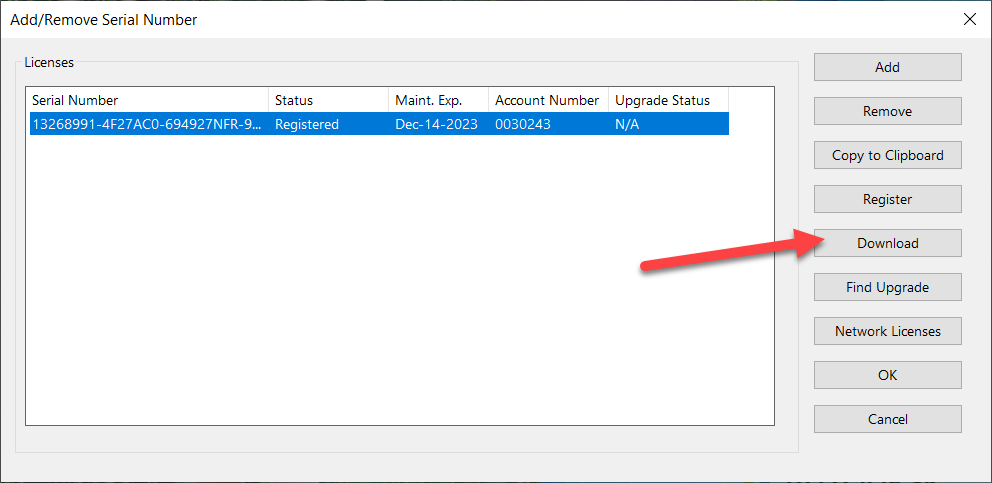
Carlson Survey/Civil/Mining/Takeoff for CAD
This can be installed on AutoCAD or with included Intellicad.
The following modules are included: Survey, Civil, Hydrology, GIS, Basic Mining, Geology, Underground Mining, Surface Mining, Natural Regrade, Field, CADnet, GeoTech, Trench, Construction and Point Clouds.
| Version | Build Date |
|---|---|
| 2027 | 10/5/2026 |
| 2026 | 9/29/2026 |
| 2025 | 2/12/2025 |
| 2024 | 6/25/2024 |
| 2023 | 9/26/2023 |
| 2022 | 10/11/2022 |
| 2021 | 3/16/2022 |
| 2020 | 9/2/2021 |
| 2019 | 12/20/2019 |
| 2018 | 5/20/2019 |
| 2017 | 11/15/2017 |
| 2016 | 6/29/2016 |
| 2015 | 7/28/2015 |
| 2014 | 8/11/2014 |
Carlson Survey with Embedded AutoCAD (OEM)
| Version | Build Date |
|---|---|
| 2024 | 7/29/2024 |
| 2023 | 11/14/2022 |
| 2022 | 7/22/2022 |
| 2021 | 2/14/2022 |
| 2020 | 6/23/2020 |
| 2019 | 6/28/2019 |
| 2018 | 9/27/2018 |
| 2017 | 6/22/2017 |
| 2016 | 6/15/2016 |
| 2015 | 5/8/2015 |
| 2014 | 7/14/2014 |
Carlson Takeoff with Embedded AutoCAD (OEM)
| Version | Build Date |
|---|---|
| 2022/R13 | 9/15/2024 |
| 2022/R12 | 2/15/2024 |
| 2022/R12 | 6/25/2022 |
| 2020/R11 | 3/10/2021 |
| 2018/R10 | 2/26/2019 |
| 2017/R9 | 7/3/2017 |
| 2016/R8 | 12/11/2015 |
| 2015/R7 | 9/26/2016 |
| 2014/R6 | 5/16/2013 |
SurvPC Data Collection Software
| Version | Build Date |
|---|---|
| 7.xx | 8/29/2023 |
| 6.00 | 7/10/2018 |
| 5.08 | 12/8/2017 |
| 5.06 | 8/1/2017 |
| 5.05 | 4/3/2017 |
| 5.04 | 12/12/2016 |
| 5.03 | 9/6/2016 |
| 5.02 | 7/25/2016 |
| 4.07 | 11/19/2015 |
| 4.06 | 7/23/2015 |
| 4.05 | 5/15/2015 |
| 4.03 | 12/17/2014 |
| 3.03 | 1/24/2014 |
SurvCE Data Collection Software
| Version | Build Date |
|---|---|
| 6.17 | 2/3/2023 |
| 6.16 | 8/16/2022 |
| 6.09 | 1/21/2021 |
| 6.08 | 9/29/2020 |
| 6.07 | 8/4/2020 |
| 6.03 | 5/3/2019 |
| 6.02 | 1/31/2019 |
| 6.00 | 7/10/2018 |
| 5.08 | 12/8/2017 |
| 5.06 | 8/1/2017 |
| 5.05 | 4/3/2017 |
| 5.03 | 9/6/2016 |
| 5.02 | 7/25/2016 |
| 4.07 | 11/19/2015 |
| 4.06 | 7/23/2015 |
| 4.05 | 5/15/2015 |
| 4.03 | 12/17/2014 |
| 3.03 | 1/24/2014 |
Precision 3D Software (Topo, Drill, Blast and Hydro)
| Version | Build Date |
|---|---|
| 2024 | 5/1/2024 |
| 2023 | 8/25/2023 |
| 2022 | 6/16/2023 |
| 2022 | 2/28/2023 |
| 2021 | 7/15/2021 |
| 2021 | 5/14/21 |
| 2020 | 12/11/2020 |
| 2019 | 8/13/2019 |
| 2018 | 1/9/2018 |
| 2017 | 11/19/2017 |
| 2016 | 6/6/2016 |
| 2015 | 6/10/2016 |
Some content on this website was prepared with AI assistance. Please verify important information with the manufacturer or original source before making purchasing or financial decisions.
If you find the material on this website helpful, please consider supporting That CAD Girl by purchasing our products or services.
If you are interested in purchasing products or services we do not offer, we would love to refer you to one of our Trusted Partners. Please click here to send us a message with your request.
How can I find out when new versions or builds of Carlson are released?
+You can also refer to the FAQ below for an active list of the most recent builds for most of the desktop and Carlson field software programs.
FAQ: What is the latest and greatest version/build of my Carlson Software? (a running thread)
FAQ: How do I know if I’m running the latest build of my Carlson Software?
FAQ: Where do I find the build date or build number of my Carlson Software?
Some content on this website was prepared with AI assistance. Please verify important information with the manufacturer or original source before making purchasing or financial decisions.
If you find the material on this website helpful, please consider supporting That CAD Girl by purchasing our products or services.
If you are interested in purchasing products or services we do not offer, we would love to refer you to one of our Trusted Partners. Please click here to send us a message with your request.
How do I register my Carlson Software? And what are change keys?
+Pro-Tip! The Serial Number screen on your That CAD Girl Customer Portal has a “Customer Notes” section – that’s a great place to save your Change Key and other important information about each license!
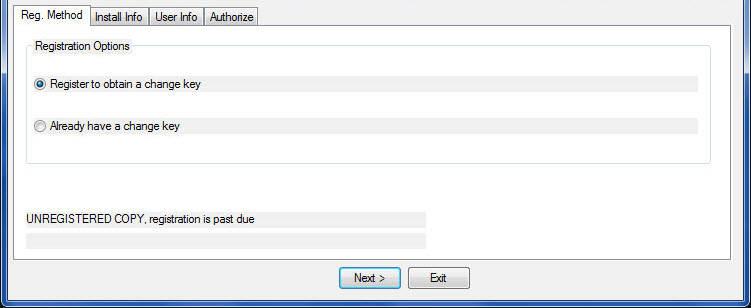
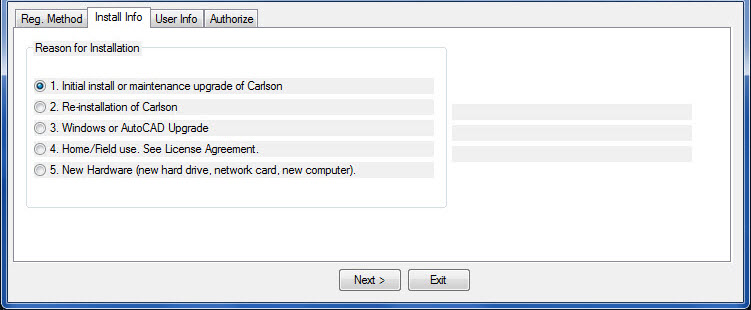
- Initial install or maintenance upgrade of Carlson
- Re-installation of Carlson
- Windows or AutoCAD Upgrade
- Home/Field use. See License Agreement.
- New Hardware (new hard drive, network card, new computer)
Some content on this website was prepared with AI assistance. Please verify important information with the manufacturer or original source before making purchasing or financial decisions.
If you find the material on this website helpful, please consider supporting That CAD Girl by purchasing our products or services.
If you are interested in purchasing products or services we do not offer, we would love to refer you to one of our Trusted Partners. Please click here to send us a message with your request.
[FAQ027] Are there any problems running Carlson on Windows 10?
+
Carlson Software running on Windows 10 seems to present just a couple of issues: registration and graphics card/performance. If you encounter any issues you may also want to check in here to see if you can narrow down the problem: KB 1078: Troubleshooting Guide.
Registration:
When Windows 10 originally came out, Carlson 2015 and earlier versions would not install and Carlson had to change the program to make it work, so Carlson 2016 was the first one supported on Windows 10. Microsoft may have changed Windows 10 since then and it’s possible that these versions will install today.
If you ARE able to install these versions, Carlson will able to help with the registration; however, every time Windows 10 has major update, Carlson products prior to the 2017 release will likely lose their registration and will have to be re-registered because Windows changes the signature that was used for the initial registration. Carlson has re-worked this mechanism to avoid the problem in later releases.
Graphics Cards and Performance Issues:
Carlson KB1108: Slow entities creation and modification on Windows 10
Carlson KB1123: Changing graphics card settings to use your dedicated GPU on a Windows computer
Carlson KB1131: NVidia video card: visual artifacts, pixelized lines, wrong text display
Only one that seems to show up every once in awhile… But it’s Microsoft’s fault!!
Windows 10 does updates – automatic updates – a lot. And, sometimes these updates can mess with your Carlson license registration. Carlson has free technical support so you can always call 606.564.5028 or email them at [email protected] during regular business hours but, if this happens on a weekend, their support staff is probably out enjoying Kentucky bourbon. Or something.
So, when Murphy’s Law strikes, you can refer to this Knowledge Base article on Carlson’s website: Carlson KB 995: Windows 10 effect on previously registered software.
Some content on this website was prepared with AI assistance. Please verify important information with the manufacturer or original source before making purchasing or financial decisions.
If you find the material on this website helpful, please consider supporting That CAD Girl by purchasing our products or services.
If you are interested in purchasing products or services we do not offer, we would love to refer you to one of our Trusted Partners. Please click here to send us a message with your request.
What are the improvements to Carlson over previous versions? (a running thread)
+
Carlson released the 2020 version of their desktop products on October 1, 2019. Click here to download a PDF of improvements in Carlson 2020 products.
Carlson released the 2018 version of their desktop products on August 31, 2017. Click here to download a PDF of improvements in Carlson 2018 products.
Some content on this website was prepared with AI assistance. Please verify important information with the manufacturer or original source before making purchasing or financial decisions.
If you find the material on this website helpful, please consider supporting That CAD Girl by purchasing our products or services.
If you are interested in purchasing products or services we do not offer, we would love to refer you to one of our Trusted Partners. Please click here to send us a message with your request.
I can’t seem to keep up with my Carlson maintenance – Can you help?
+Carlson generates and sends renewal notices automatically but they are only sent to you and the Carlson reseller located nearest to you geographically. However, you are free to purchase new licenses, upgrades or maintenance directly from Carlson or any Authorized Reseller.
If you’ve recently received a Maintenance Renewal or OEM Upgrade notice from Carlson Software, you can forward that report to your Dealer of Choice and ask for them to provide a custom proposal.
Some content on this website was prepared with AI assistance. Please verify important information with the manufacturer or original source before making purchasing or financial decisions.
If you find the material on this website helpful, please consider supporting That CAD Girl by purchasing our products or services.
If you are interested in purchasing products or services we do not offer, we would love to refer you to one of our Trusted Partners. Please click here to send us a message with your request.
Do I qualify for an automatic upgrade to the new version of Carlson?
+With every new license of Carlson that includes IntelliCAD or runs on top of your AutoCAD, Carlson includes 90 days of free Maintenance at no charge. This is Carlson’s way of guaranteeing that, if a new version of the software is released within 90 days of purchase, you will automatically be upgraded.
Also, you have the option of purchasing Maintenance for any of the desktop software with IntelliCAD or for your AutoCAD.
Bottom line: If your Maintenance is current when a new version is released, you’re eligible for an automatic upgrade to the new version.
Follow this link then click on Request a Custom Proposal to get pricing for upgrades or maintenance renewal or even just to request a report of your current licensing.
Some content on this website was prepared with AI assistance. Please verify important information with the manufacturer or original source before making purchasing or financial decisions.
If you find the material on this website helpful, please consider supporting That CAD Girl by purchasing our products or services.
If you are interested in purchasing products or services we do not offer, we would love to refer you to one of our Trusted Partners. Please click here to send us a message with your request.
Where do I find the build date or build number of my Carlson Software?
+The number shown here roughly corresponds to the date that the updated file was posted to Carlson’s downloads page using a YY/MM/DD format. You can reference this FAQ to determine the current build of the software you have installed.
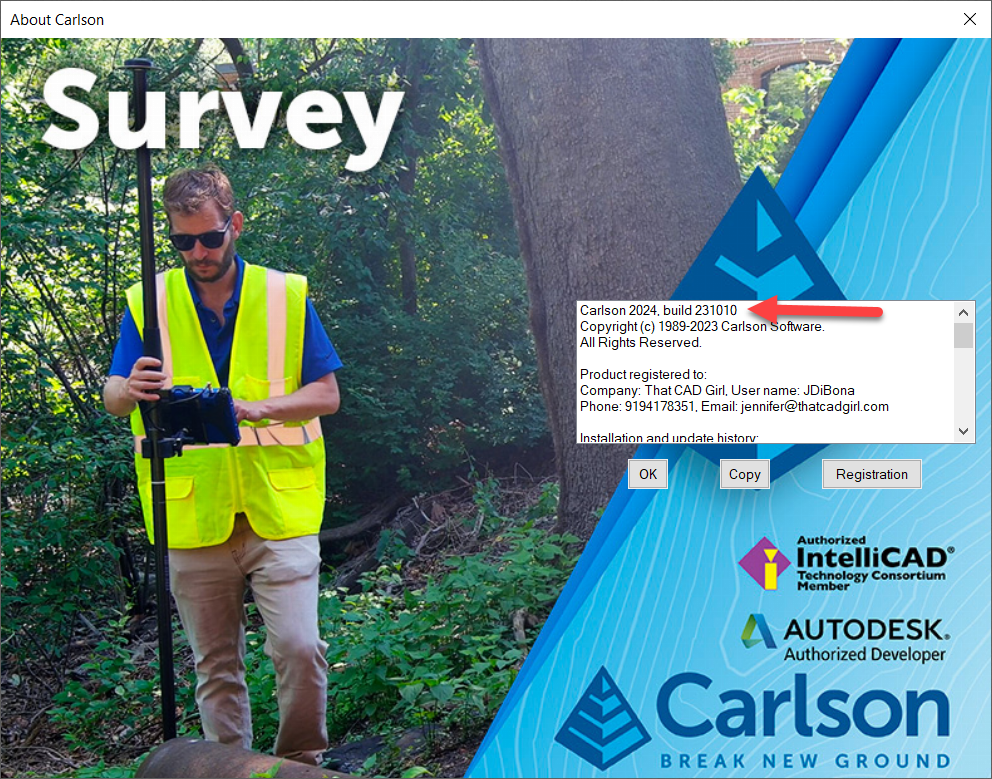
Some content on this website was prepared with AI assistance. Please verify important information with the manufacturer or original source before making purchasing or financial decisions.
If you find the material on this website helpful, please consider supporting That CAD Girl by purchasing our products or services.
If you are interested in purchasing products or services we do not offer, we would love to refer you to one of our Trusted Partners. Please click here to send us a message with your request.
I think I found a bug in my Carlson Software – how can I get it resolved?
+If you encounter a bug in the program, you’ll first want to check for updates to see if you’re running the latest build of your program. If not, the latest build might resolve the issue.
There is a link to Check for Updates in your Windows Carlson Software program folder as shown below:
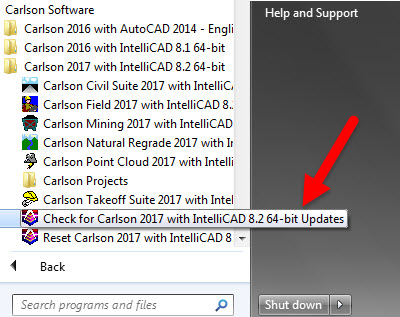
Rather than use the Check for Updates link, you can follow these FAQs to see if the build you currently have installed is the same as the one posted on Carlson’s Software Downloads page.
Once you’ve confirmed you’re running the latest build, you have several ways to submit a request for tech support.
After they have verified it’s a repeatable error/bug, Carlson may handle it a couple of ways. If it’s a stop-work situation for you in the latest version, Carlson will work to correct it and send you updated program files with instruction on how and where to copy them. Anyone else who stumbles upon the same issue will get the same files sent to them.
Your bug fix will be incorporated into the next build of the program when it’s posted to Carlson’s website.
Some content on this website was prepared with AI assistance. Please verify important information with the manufacturer or original source before making purchasing or financial decisions.
If you find the material on this website helpful, please consider supporting That CAD Girl by purchasing our products or services.
If you are interested in purchasing products or services we do not offer, we would love to refer you to one of our Trusted Partners. Please click here to send us a message with your request.
Does Carlson retire their products?
+
Some content on this website was prepared with AI assistance. Please verify important information with the manufacturer or original source before making purchasing or financial decisions.
If you find the material on this website helpful, please consider supporting That CAD Girl by purchasing our products or services.
If you are interested in purchasing products or services we do not offer, we would love to refer you to one of our Trusted Partners. Please click here to send us a message with your request.
Does Carlson Software Still Offer Perpetual Licenses?
+The change from a perpetual license model (you purchase once and continue to use it forever) to a subscription license model (you pay by the month or by the year for access) in our little CAD corner of the world has sparked a lot of questions, debate and heartburn.
In 2015 Autodesk announced they would be shifting toward a subscription model of delivery for their AutoCAD-based products. Although some Autodesk accounts and products were grandfathered in, any new purchases of AutoCAD are now available by subscription only. And, the kicker, you stop paying, you can’t access the software or your data.
Carlson Software remains committed to the perpetual license model where you, the user, never have to worry about losing access to your software or data. Carlson’s desktop software includes a license of IntelliCAD so, if you ever stop paying for your AutoCAD, Carlson with IntelliCAD can give you another option to open your DWG files. If you want to ensure you have “perpetual” access to all your other data such as points, surfaces, road designs and more – make sure you archive your project data to Land XML files so that it can be retrieved with other land development, survey, civil and construction software programs.
See also: How can I access and use my old Civil 3d, Land Desktop, Eagle Point or Terra Model data?
See also: Get a Perpetual License with Carlson or download PDF
See also: Robert Green’s CAD Manager’s Newsletter #350 Autodesk Goes Subscription-Only in 2016 or download PDF
See also: Autodesk Courtesy Notice: End of Perpetual Licenses Sales, including individual products and suites
Some content on this website was prepared with AI assistance. Please verify important information with the manufacturer or original source before making purchasing or financial decisions.
If you find the material on this website helpful, please consider supporting That CAD Girl by purchasing our products or services.
If you are interested in purchasing products or services we do not offer, we would love to refer you to one of our Trusted Partners. Please click here to send us a message with your request.
I’ve Installed My Carlson Software – Now What Do I Do?
+
Installing and Registering
FAQ: How do I register my Carlson Software? And what are change keys?
FAQ: Can I install my Carlson desktop software on two computers?
FAQ: What happens if I get a new computer and need to reinstall Carlson?
FAQ: What happens if I get a new computer and need to reinstall Carlson?
Tracking my Licenses and Keeping Up to Date
FAQ: That CAD Girl Customer Portal
FAQ: My Maintenance is Current… Where’s My Upgrade?
FAQ: When I upgrade, do I immediately lose access to the older version of my software?
FAQ: I can’t seem to keep up with my Carlson maintenance – Can you help?
FAQ: Do I qualify for an automatic upgrade to the new version of Carlson?
Technical Support
FAQ: Where do I get support for Carlson Software and how much will it cost me?
FAQ: How can I be sure I’m running the latest build of my Carlson Software?
FAQ: How can I find out when new versions or builds of Carlson are released?
FAQ: Where do I find the build date or build number of my Carlson Software?
FAQ: I think I found a bug in my Carlson Software – how can I get it resolved?
FAQ: What is the latest and greatest version/build of my Carlson Software? (a running thread)
FAQ: What is “The Little CAD Engine That Could” Website?
Training
FAQ: What options do I have for training on CAD or Carlson Software?
FAQ: Am I eligible to attend your Carlson Software webinars for free?
FAQ: Before I buy, can I attend a webinar for free?
FAQ: Does That CAD Girl training qualify for PDH/CEU/continuing education credit?
Some content on this website was prepared with AI assistance. Please verify important information with the manufacturer or original source before making purchasing or financial decisions.
If you find the material on this website helpful, please consider supporting That CAD Girl by purchasing our products or services.
If you are interested in purchasing products or services we do not offer, we would love to refer you to one of our Trusted Partners. Please click here to send us a message with your request.
My Maintenance is Current… Where’s My Upgrade?
+With the building out of your That CAD Girl Customer Portal, we are doing our best to have all the information you need about your serial numbers easily accessible and available to you.
As soon as possible after a new release, we will post your new, upgraded serial number(s) to your Customer Portal and will upload a new maintenance report showing your new serial number(s). However, if you get to this before we do… you can use the Carlson Software Serial Number Upgrade Lookup site to get your new serial number as soon as it’s released.
You will need the items listed below. Your serial number and Carlson Customer ID can be found on your That CAD Girl Customer Portal:
- Your current serial number
- Your Carlson Customer ID
- Phone Number
- Email Address
Some content on this website was prepared with AI assistance. Please verify important information with the manufacturer or original source before making purchasing or financial decisions.
If you find the material on this website helpful, please consider supporting That CAD Girl by purchasing our products or services.
If you are interested in purchasing products or services we do not offer, we would love to refer you to one of our Trusted Partners. Please click here to send us a message with your request.
Does BricsCAD Offer a 30 day Trial?
+
Can I run BricsCAD without a license?
Yes. If you do not own a license, you can run BricsCAD in trial mode.
How long does the BricsCAD trial last?
The BricsCAD trial lasts 30 days from the time it is activated.
Is the BricsCAD trial fully functional?
Yes. During the trial period, BricsCAD runs as a fully functional version with no feature limitations.
What happens when I open BricsCAD in trial mode?
When BricsCAD is opened in trial mode, the BricsCAD Launcher opens automatically and displays how many days remain in your trial.
What options do I have when the BricsCAD Launcher opens?
You have two options:
- Continue to launch BricsCAD in trial mode
- Enter License to activate a Single user Volume or Network license
What license level does BricsCAD use during the trial?
By default, BricsCAD runs in Ultimate mode during the trial, giving you access to all available features.
Can I test different BricsCAD license levels during the trial?
Yes. You can switch between license levels while in trial mode to evaluate which edition best fits your needs.
How do I change the license level during a BricsCAD trial?
Use the SETLICENSELEVEL command within BricsCAD to change the active license level.
What license levels are available in BricsCAD?
BricsCAD offers five license levels:
- BricsCAD Lite
- BricsCAD Pro
- BricsCAD BIM
- BricsCAD Mechanical
- BricsCAD Ultimate
Can I apply a purchased license to a trial installation?
Yes. If you purchase a license during or after the trial, you can activate it without reinstalling BricsCAD.
Some content on this website was prepared with AI assistance. Please verify important information with the manufacturer or original source before making purchasing or financial decisions.
If you find the material on this website helpful, please consider supporting That CAD Girl by purchasing our products or services.
If you are interested in purchasing products or services we do not offer, we would love to refer you to one of our Trusted Partners. Please click here to send us a message with your request.
What Licensing Options Does BricsCAD Offer?
+
What is a BricsCAD perpetual license?
A perpetual license is a one time purchase that gives you ownership of the software.
What is BricsCAD Maintenance?
BricsCAD Maintenance is an optional annual plan for perpetual licenses. It provides:
- Priority Support
- Access to product updates
- Access to future major release versions
What is a BricsCAD subscription license?
A subscription license allows you to use the latest version of BricsCAD for one year. While active it includes Priority Support and access to all new versions released during the subscription term.
What is a BricsCAD single user license?
A single user license is assigned to one person. It is intended for individual use and is not a floating license.
A single user license may be installed on two computers, such as a desktop workstation and a laptop. However, the software may only be used on one computer at a time. Concurrent use is not permitted.
Single user licensing is available for both perpetual and subscription licenses.
Can I use my BricsCAD license on two machines?
Yes. If you own a single user BricsCAD license, you may install it on two machines for the same user. Typical examples include an office computer and a home or field laptop.
This dual install allowance does not apply to network or volume licenses unless expressly permitted by Bricsys.
What is a BricsCAD network license?
A network license is a floating license that allows multiple users to access BricsCAD within a local area network. Licenses are checked out from a central license server when BricsCAD is launched.
The number of network licenses purchased determines how many users can run BricsCAD at the same time.
Network licenses are available as perpetual or subscription licenses and include one year of BricsCAD Maintenance.
What is a BricsCAD volume license?
A volume license allows BricsCAD to be used within a defined group of users using the same license key.
Volume licenses are available as perpetual or subscription licenses and include one year of BricsCAD Maintenance.
Volume licenses do not include the dual install rights provided with single user licenses unless explicitly authorized by Bricsys.
What is a BricsCAD academic license?
BricsCAD academic licenses are free for 12 months and available to students instructors faculty and educational institutions.
Students may renew annually with a valid student ID.
What license types are available for academic use?
Academic licensing is available in single user network or volume formats.
Some content on this website was prepared with AI assistance. Please verify important information with the manufacturer or original source before making purchasing or financial decisions.
If you find the material on this website helpful, please consider supporting That CAD Girl by purchasing our products or services.
If you are interested in purchasing products or services we do not offer, we would love to refer you to one of our Trusted Partners. Please click here to send us a message with your request.